Are you sure this camera/Integration use the stream component ?, in which integration do you have the Sonoff Camera ?
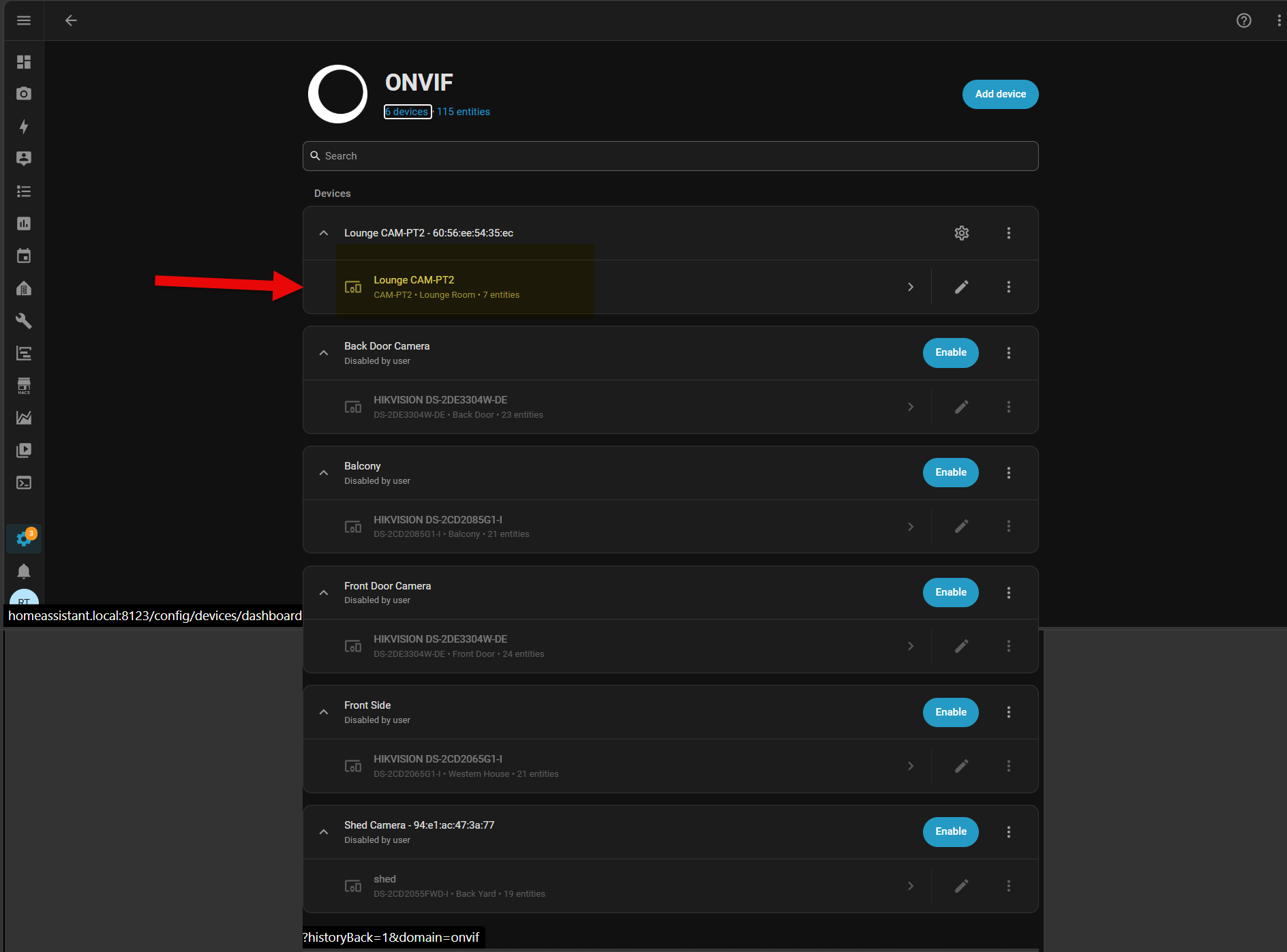

ok, i just wondered if it used the same integration, as your HIKVisions 
Yes, I cannot see why but I am no expert that’s for sure. The only difference is the PT2 does not have a WEB interface, only RTSP so you have to use ONVIF.
I have all my HIKVision cameras running under surveillance station on my Synology NAS so I do have surveillance for the exterior of the house.
2026-08-23 @ 11:07 I installed the 2026.8.3 update. No Repairs that were not there before update and that repair is just an unknown entity which I know about.
I will let it run for a little before I try too much.
AT 13:28 I enabled the 6 HIKVision cameras and cleared log.
Lets see what happens
I’m looking at the reported errors in the Hikvision integration and see that there is ongoing work being done to fix some.
Not sure how much that contributes to your overall system stability which is contributing to your database corruption errors. The longer uptime would seem to support this. Should I cross my toes as well as fingers? 
The go2rtc fix affected a multi-camera setup such as yours where one camera fault had a cascading effect on all the others, and you may find your error log quite a lot smaller now that you have applied the updates. This seems to apply to other cameras as well, not just the Hikvision.
Other errors still open or being worked on here:
I note in your picture there are a lot of entities/sensors exposed for each camera. Do you use all of the functionality exposed? Can some be switched off or disabled, like ‘unattended baggage’ if you do not need that at all locations? Go back and check the configuration of each camera and the NVR and make sure no unnecessary data is being stored in the HomeAssistant database that may be contributing to size, stability and system load, and your NVR storage of snapshots and videos is not being unnecessarily duplicated in the HomeAssistant database. You may have to check in the camera manuals as well as the NVR manual, as well as the Hikvision HomeAssistant documentation to cover all aspects. Best not generate unnecessary data up front than have to process it, store it, and then purge it later. Be brutal - tweak those default settings to an inch of their life!
Notice how you’ve become quite familiar with different aspects of HomeAssistant? You learn the most when fixing broken things, how it works behind the scenes.
Curious if Spook has stopped grumbling about anything, discreetly hovering away in the background?
Spook has been quiet. No Repairs.
Database size
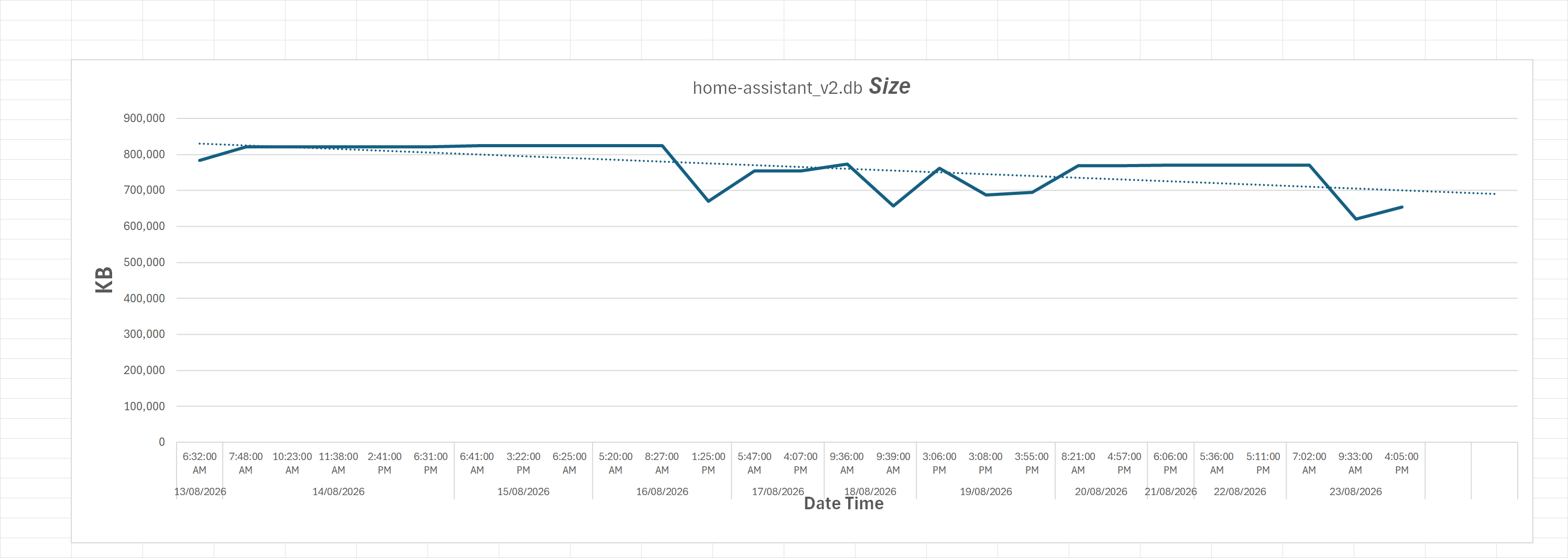
Seeing as how I started with around 2.7GB this is good.
This is current Cor Log
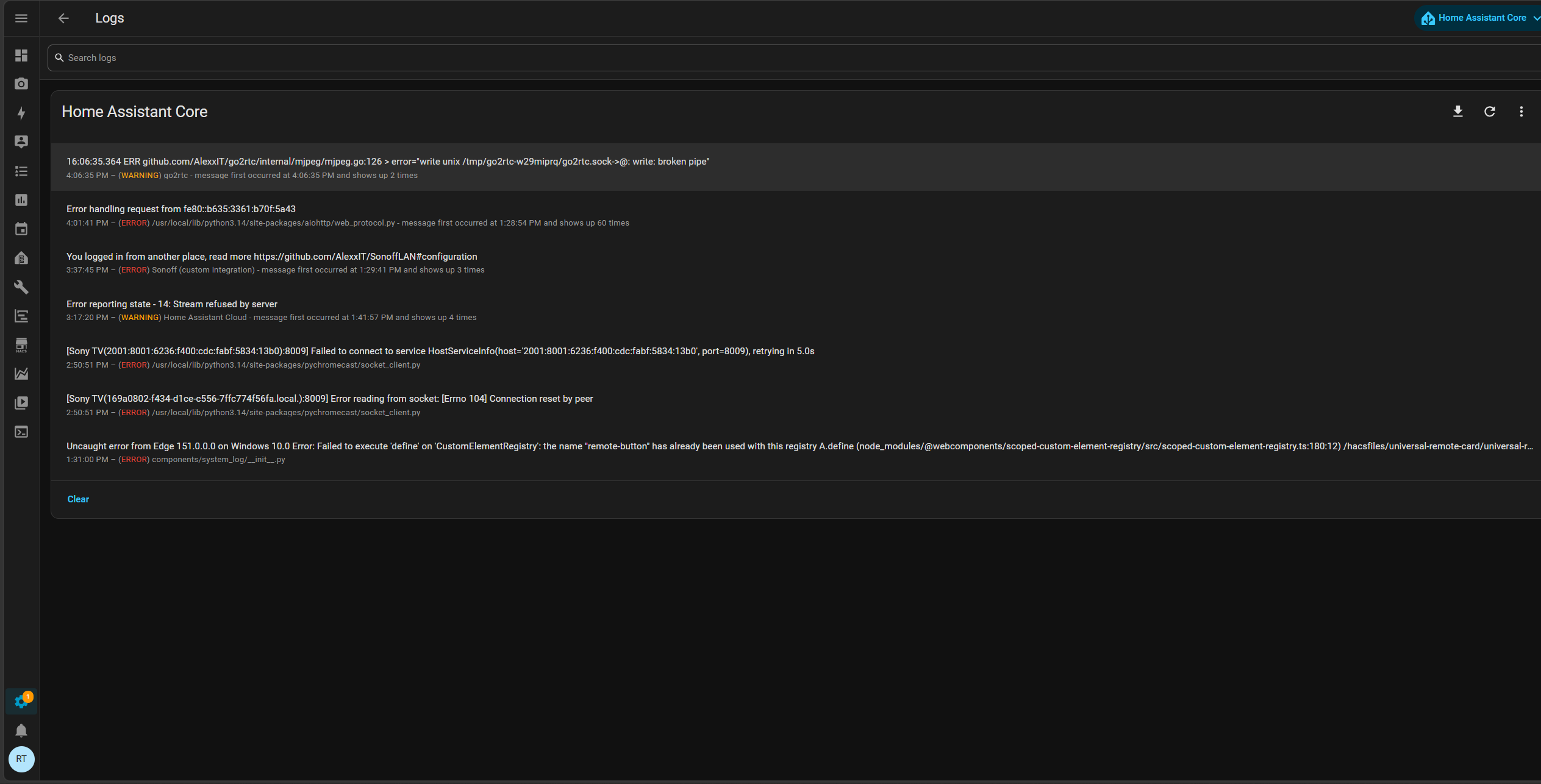
I do use some of the sensors but most of this can be done in the NAS. I am not sure how I can turn them off
I can look into that.
I am not using the HIKVision integration only the ONVIF
I am not going to do any changes for the rest of the day and night and see how it gois. So far so ggood.
Cross everything! Fingers, toes, arms, legs 
I found this on how to disable unwanted sensors
Yes, you can disable unwanted sensors and entities created by the ONVIF integration directly through the Home Assistant user interface.
Steps to Disable Entities
* Go to Settings and select Devices & Services.
* Click on the ONVIF integration or search for your specific camera device card.Click on the number of entities listed under the device to see everything it creates.
* Select the specific sensor or binary sensor you want to turn off.
* Click the gear icon (settings) in the upper right corner of the entity pop-up window.
* Toggle the Enabled switch to off, or disable the Visible / entity status depending on your core version.
* Click Update or Save to confirm the changes.
Currently Up 20 Hrs without a restart and all cameras back in dashboard.
Looks like the update in 2026.8.3 for go2rtc was very helpful.
I will continue to let it be and not make any changes just for the next 24 hrs
2026-08-24 @18:00 hrs and no restarts. That’s 31 hrs uptime.
Fingers crossed.
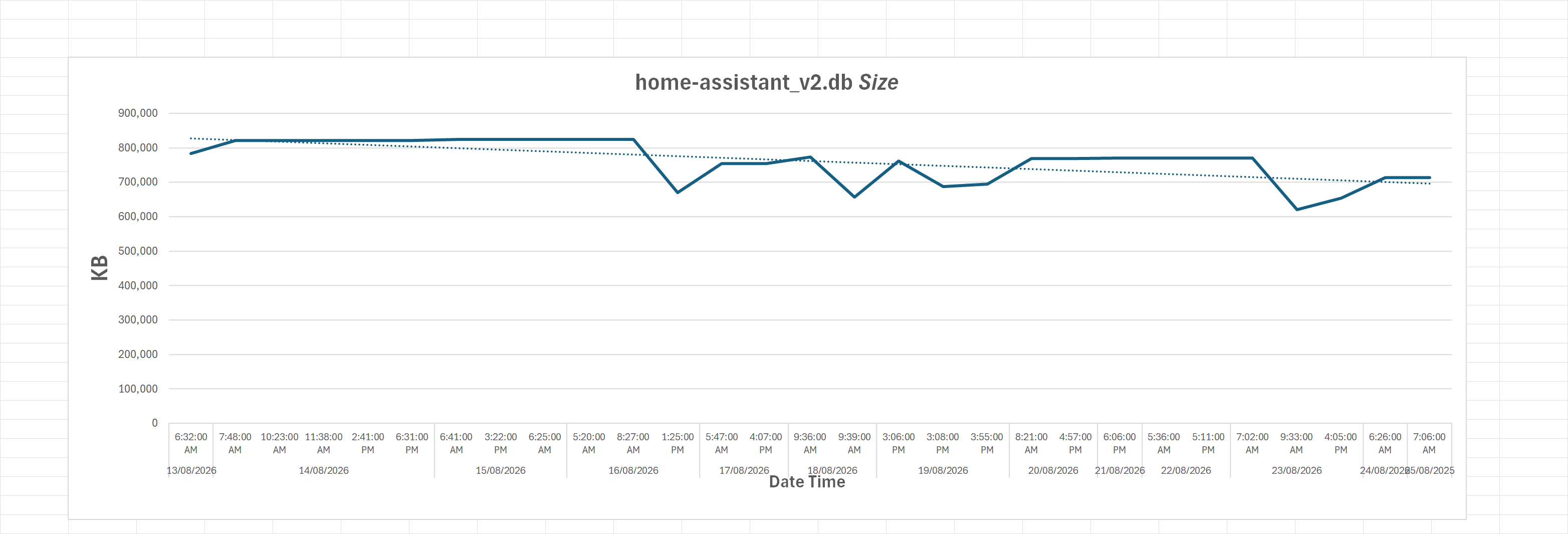
2026-08-25 @07:06 44hrs no restarts
DB Size
I looked into the sensors that were on each camera and how often they were activated.
In the two days since the Go2ttc patch, only two cameras showed any activity. The rest showed no activity. The two that did show activity were two that I would expect and want and those are my Balcony camera and front door camera. The balcony camera looks down on my driveways, and the front door looks at traffic in/out of front door.
You’re starting to sound confident now, getting familiar with how it all works. Good!
Ok, you’ve probably tamed the camera issue, combined with the fix in the last update to slow the flow of incoming sensor data and error messages to be buffered and stored in the database. Be sure you haven’t turned off any desired detection actions by mistake while you were troubleshooting, and turn off debugging if you have turned it on.
Leave some food for the magpies and possums on the balcony later this evening to test that camera is properly detecting activity.
Step 10 shows the biggest entries being stored. It has now probably changed with the pruning activities.
The orphans in step 14 have probably gone too. Worth checking again.
Take another look and post what you find now for both. We might change our focus to other entities and integrations as well.
Thanks for persisting and your patience.
Thank you for your encouragement and expertise. I was really struggling.
I feel I can probably keep on top of it now, that is, until someone makes some change that breaks it.
Everything these days is rushed and that new reach for AI is frightening.
Spook keeps me informed of lost entities and I can attend to them with its help.
I still have these orphaned entities and cannot figure out how to purge them apart from typing them all in and that is dangerous with my typing skills
count: 21
entities:
  - binary_sensor.pool_pool_camera_disk_full
  - binary_sensor.sonoff_1000dc5d6e
  - binary_sensor.mymotiondetectorrule_cell_motion_detection_5
  - automation.sliding_front_door_west_opening_notification
  - switch.hikvision_ds_2cd2065g1_i_wiper_2
  - sensor.sonoff_1000dc5d6e_battery_voltage
  - binary_sensor.pool_pool_camera_video_mismatch
  - automation.sliding_front_door_east_opening_notification
  - switch.hikvision_ds_2cd2085g1_i_wiper
  - binary_sensor.pool_pool_camera_pool_line_crossing
  - binary_sensor.pool_pool_camera_tamper
  - binary_sensor.pool_pool_camera_field_detection
  - binary_sensor.pool_pool_camera_motion
  - binary_sensor.pool_pool_camera_illegal_access
  - binary_sensor.pool_pool_camera_unattended_baggage
  - binary_sensor.sonoff_1000dc5d57
  - sensor.sonoff_1000dc5d57_battery_voltage
  - binary_sensor.pool_pool_camera_disk_error
  - binary_sensor.pool_pool_camera_attended_baggage
  - binary_sensor.pool_pool_camera_scene_change_detection
  - binary_sensor.videosource_1_global_scene_change_3
Thats where copy & paste come in handy  , and No , i don’t use an i.e phone or tablet for admin tasks ! , and don’t recommend it either
There is also a few integrations/apps which can help, latest and quite useful is
GUI Recorder – manage recorder & clean up your DB, no YAML .

Not sure you can paste a “chunk” , i never tried that in the ui, but rather choose/paste 1 by 1 ( +add in purge-entities in HA-Tools )
But have a look at above urls, it’s a very hand tool
If you click +add ( In ha-tools ) you only need to type very few “distinct” letters/word and u get a “selection” compare it with your “list” … but use your latest “version” of eye-sight-enhancement gadget
Couple of issues
1.If I install the HACS app I have to restart the DB and tying to avoid that at the moment
2. the BOSS “she who must be obeyed” is calling for my attention so maybe tomorrow…
Thanks
OK Back to it after a small outage for medical reasons.
I have to have a rethink on my camera integrations.
ONVIF does not provide anywhere near enough monitoring of the more complex sensors like logical line crossings. Research told me there were ways to get round it but overly complicated the configuration. I had automations that would be triggered from the crossing of the logical lines in a particular direction to turn on lights. For example when I opened my front gate and drove up the driveway at night it would turn on some lighting. This could not work under ONVIF.
Anyway I have put all my HIKVision Cameras back to the HIKVision Integration and only left the SONOFF camera on ONVIF as this is it’s only interface.
This also got rid of a few SPOOK issues as well.
I think my system is more responsive as well but time will tell.
Now I have this error back with the HIKVision integration
Logger: homeassistant.components.stream.stream.camera.hikvision_ds_2cd2055fwd_i_substream
Source: components/stream/__init__.py:492
Integration: Stream (documentation, issues)
First occurred: 12:33:00 PM (8 occurrences)
Last logged: 1:31:21 PM

Error from stream worker: Forbidden error opening stream (Server returned 403 Forbidden (access denied), rtsp://****:****@192.168.0.174:554/Streaming/Channels/102?transportmode=unicast&profile=Profile_2)

I have troubleshot it and it boils down to the issue where I have a special character in my user password. For example if i have a user:qwert@555 the @ is treated as a separator by HIKvision.
I have proved this by rinning this in VLC
rtsp://username:[email protected]:554/Streaming/Channels/102
It asked me for a password and when I entered it with the “@” it streamed the camera no worries.
This was suggested by AI in chrome.
The suggestion was to remove the special characters from the password but the Firmware wants ithe special character. Catch 22!!!