@starkillerOG agreed, and thank you, that’s really helpful information.
WORKAROUND! 1st solution below killls the battery, seconnd solution (7/23 update - WITH SOURCE CODE BELOW!) works perfectly woithout affecting the battery (only detect motion, not what type):
When I discovered this issue, I built a standalone Python service using reolink_aio that maintains the cmd31 subscription and publishes the local AI events (person, vehicle, animal, package, motion) to Home Assistant over MQTT. It works well functionally and gives very low-latency local events. During testing, though, I did notice battery dropping faster than I would have liked which did go away when I replaced my ancient transformer with a 16V 30VA one.

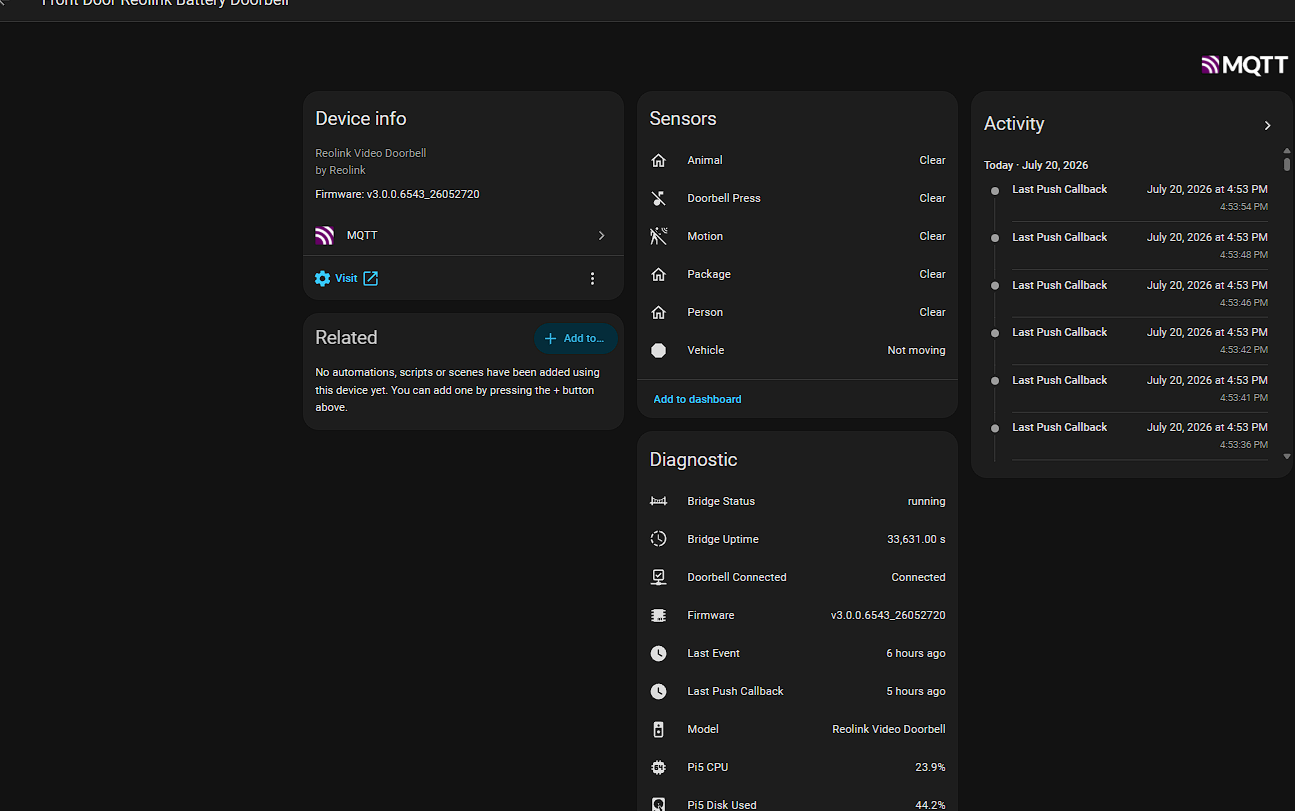
So although I am actually good to go now with all the functionality I need, as a developer I agree 1,000% with your your explanation that a continuous cmd31 subscription keeping the battery camera awake makes a lot of sense and matches what I was seeing. Assuming the new firmware provides the same local events through the webhook mechanism while allowing the camera to sleep normally (and I hope they are as fast or nearely as fast!), I’d much rather use that than maintain a continuous cmd31 connection and will switch over as soon as I can to hopefully retire my custom code. I am already using code like this to rely upon for automations that just need to be triggered as quickly as possible when there is ANY motion detected) so I can just throw the switch to cut over (those with _battery_ in the ID are the custom engineered MQTT fed versions)
template:
  - binary_sensor:
      - name: Front Door Motion
        unique_id: front_door_motion
        state: >
          {{
            is_state('binary_sensor.front_door_reolink_doorbell_pet', 'on')
            or
            is_state('binary_sensor.front_door_reolink_battery_doorbell_animal', 'on')
            or
            is_state('binary_sensor.front_door_reolink_doorbell_motion', 'on')
            or
            is_state('binary_sensor.front_door_reolink_battery_doorbell_motion', 'on')
            or
            is_state('binary_sensor.front_door_reolink_doorbell_package', 'on')
            or
            is_state('binary_sensor.front_door_reolink_battery_doorbell_package', 'on')
            or
            is_state('binary_sensor.front_door_reolink_doorbell_person', 'on')
            or
            is_state('binary_sensor.front_door_reolink_battery_doorbell_person', 'on')
            or
            is_state('binary_sensor.front_door_reolink_doorbell_vehicle', 'on')
            or
            is_state('binary_sensor.front_door_reolink_battery_doorbell_vehicle', 'on')
          }}
        device_class: motion
So as you can imagine there are alot of us chomping at the bit for this! You did say “2-3 months”… yikes. You cetainly have done all of your due diligence quickly. Is there any way we (you?) can get a more definitive timeline from them (do they have an SLA or estimation they can give you for firmware releases or a QA/UAT schedule they have in mind)?
Update 7/23/26: I wanted to provide an update after spending the past week experimenting with my white Reolink Battery Doorbell (D340B).
Since the battery doorbell still doesn’t expose the same local push events as the powered models, I started investigating whether there was another reliable way to detect events locally.
What I found is that the doorbell briefly opens a TLS connection to pushx.reolink.com whenever it is online for the non-video traffic. By passively monitoring outbound network traffic (using tcpdump on a Raspberry Pi as shown below), it is possible to correlate bursts of traffic on that connection with the doorbell events. And it really works well! Unfortunately it is not as immediate as the above which keeps the doorbell awake so the latency of the doorbell waking up is stil unavoidable but it works perfectly. I ended up writing a passive observer that:
- The above chews the battery up snd spits it out, not really maintainable (as everybody would probably say!)
- The below uses ZERO BATTERY on the battery doorbell - does not even connect to it!
- Does not connect to or poll the doorbell
- Does not intercept or modify any traffic
- Simply watches for activity on the existing encrypted connection
- Publishes a Home Assistant MQTT binary sensor that turns ON when an event is detected and OFF after a configurable timeout
- After several days of testing it has been very reliable at detecting that an event occurred (motion, AI detection, button press, etc.). As the traffic is encrypted (which cannot be decoded unless you build a pass-through proxy that stands between the doorbell and it’s network connection) - it cannot tell the difference between vehicle, person, animal etc. but DOES capture movement and it good enough for my use case anyway (to turn on the lights near the doorbell at night). It DOES knows whenever the doorbell generates an event. For my use case, that has been enough to trigger Home Assistant automations with very low latency while remaining completely passive.
This obviously isn’t a replacement for native battery-device support, but it has turned out to be a surprisingly effective interim solution.
To set this up to observe the traffic from the doorbell, I have mirrored an upstream switch port that it ultimately connects to, meaning:
I have:
Doorbell → Access Point (there are many other devices connected to this acces point, but the doorbell is locked to connectting to this access point for this purpose) → Switch (port 9)
RPI5 running Rasbpian with a QEMU/KVM VM that is running HAOS → Same switch (port 3)
I have set my network up to then also mirror all the traffic on port 9 to port 3 (Omada - it is able to mirror one port to another without turning off the destination port’s other traffic - some network equipment forces you to use the destination port only for the mirrored traffic. If your network does that, you can just get an ethernet to UBS adaper and plug the additional network cable into your RPI that way.)
On the RPI5 (not the HAOS appdaemon in the VM - I tried that already - as that container does not have the right context) - I have a daemon that is running this python on the RPI5 host outside the HAOS VM - which publishes the MQTT to HAOS on the VM as mentioned above. Here is the source code - one file, very lightweight (and screen shote below that)!
#!/usr/bin/env python3

from __future__ import annotations

import json
import logging
import os
import select
import signal
import subprocess
import sys
import threading
import time
from datetime import datetime
from pathlib import Path
from typing import Any

import paho.mqtt.client as mqtt


CONFIG_PATH = Path("/home/pi/reolink_passive_observer/config.json")

LOGGER = logging.getLogger("reolink_passive_observer")


class ReolinkPassiveObserver:
    def __init__(self, config: dict[str, Any]) -> None:
        self.config = config

        self.interface = str(config["capture_interface"])
        self.doorbell_ip = str(config["doorbell_ip"])
        self.trigger_hostname = str(
            config["trigger_hostname"]
        ).encode("ascii").lower()

        self.mqtt_host = str(config["mqtt_host"])
        self.mqtt_port = int(config.get("mqtt_port", 1883))
        self.mqtt_username = str(config.get("mqtt_username", ""))
        self.mqtt_password = str(config.get("mqtt_password", ""))

        self.event_topic = str(config["mqtt_topic"])
        self.availability_topic = str(config["availability_topic"])
        self.discovery_prefix = str(
            config.get(
                "home_assistant_discovery_prefix",
                "homeassistant",
            )
        )

        self.device_name = str(config["device_name"])
        self.device_identifier = str(config["device_identifier"])

        self.event_hold_seconds = float(
            config.get("event_hold_seconds", 10)
        )
        self.debounce_seconds = float(
            config.get("debounce_seconds", 5)
        )

        self.running = True
        self.mqtt_connected = threading.Event()

        self.capture_process: subprocess.Popen[bytes] | None = None
        self.last_trigger_monotonic = 0.0
        self.off_timer: threading.Timer | None = None
        self.event_active = False
        self.event_generation = 0

        self.mqtt_client = mqtt.Client(
            client_id="reolink-passive-observer",
            clean_session=True,
        )

        if self.mqtt_username:
            self.mqtt_client.username_pw_set(
                self.mqtt_username,
                self.mqtt_password,
            )

        self.mqtt_client.will_set(
            self.availability_topic,
            payload="offline",
            qos=1,
            retain=True,
        )

        self.mqtt_client.on_connect = self._on_mqtt_connect
        self.mqtt_client.on_disconnect = self._on_mqtt_disconnect

    def _on_mqtt_connect(
        self,
        client: mqtt.Client,
        userdata: Any,
        flags: dict[str, Any],
        result_code: int,
    ) -> None:
        if result_code != 0:
            LOGGER.error(
                "MQTT connection failed with result code %s",
                result_code,
            )
            self.mqtt_connected.clear()
            return

        LOGGER.info(
            "Connected to MQTT broker %s:%s",
            self.mqtt_host,
            self.mqtt_port,
        )

        self.mqtt_connected.set()
        self._publish_discovery()

        client.publish(
            self.availability_topic,
            payload="online",
            qos=1,
            retain=True,
        )

        client.publish(
            self.event_topic,
            payload="ON" if self.event_active else "OFF",
            qos=1,
            retain=True,
        )

    def _on_mqtt_disconnect(
        self,
        client: mqtt.Client,
        userdata: Any,
        result_code: int,
    ) -> None:
        self.mqtt_connected.clear()

        if self.running:
            LOGGER.warning(
                "Disconnected from MQTT broker; result code %s",
                result_code,
            )

    def _publish_discovery(self) -> None:
        discovery_topic = (
            f"{self.discovery_prefix}/binary_sensor/"
            f"{self.device_identifier}/activity/config"
        )

        payload = {
            "name": "Activity",
            "unique_id": f"{self.device_identifier}_activity",
            "state_topic": self.event_topic,
            "availability_topic": self.availability_topic,
            "payload_on": "ON",
            "payload_off": "OFF",
            "device_class": "motion",
            "force_update": True,
            "device": {
                "identifiers": [self.device_identifier],
                "name": self.device_name,
                "manufacturer": "Ridgewood Estate",
                "model": "Passive TLS observer",
            },
        }

        self.mqtt_client.publish(
            discovery_topic,
            payload=json.dumps(payload),
            qos=1,
            retain=True,
        )

    def connect_mqtt(self) -> None:
        LOGGER.info(
            "Connecting to MQTT broker %s:%s",
            self.mqtt_host,
            self.mqtt_port,
        )

        self.mqtt_client.connect(
            self.mqtt_host,
            self.mqtt_port,
            keepalive=60,
        )
        self.mqtt_client.loop_start()

        if not self.mqtt_connected.wait(timeout=10):
            raise RuntimeError(
                "MQTT did not connect successfully within 10 seconds"
            )

    def start_capture(self) -> None:
        capture_filter = (
            f"src host {self.doorbell_ip} and tcp dst port 443"
        )

        command = [
            "/usr/bin/tcpdump",
            "-i",
            self.interface,
            "-nn",
            "-s",
            "0",
            "-l",
            "-A",
            capture_filter,
        ]

        LOGGER.info(
            "Starting passive capture on %s for source %s",
            self.interface,
            self.doorbell_ip,
        )
        LOGGER.info(
            "Watching for TLS hostname %s",
            self.trigger_hostname.decode("ascii"),
        )

        self.capture_process = subprocess.Popen(
            command,
            stdout=subprocess.PIPE,
            stderr=subprocess.PIPE,
            bufsize=0,
        )

        if self.capture_process.stdout is None:
            raise RuntimeError("tcpdump stdout pipe was not created")

        stdout_fd = self.capture_process.stdout.fileno()
        rolling_buffer = b""
        maximum_buffer = 16384

        while self.running:
            ready, _, _ = select.select(
                [stdout_fd],
                [],
                [],
                0.5,
            )

            if not ready:
                return_code = self.capture_process.poll()

                if return_code is not None and self.running:
                    stderr_text = self._read_tcpdump_stderr()

                    raise RuntimeError(
                        f"tcpdump stopped with return code "
                        f"{return_code}: {stderr_text}"
                    )

                continue

            chunk = os.read(stdout_fd, 4096)

            if not chunk:
                return_code = self.capture_process.poll()

                if return_code is not None and self.running:
                    stderr_text = self._read_tcpdump_stderr()

                    raise RuntimeError(
                        f"tcpdump stopped with return code "
                        f"{return_code}: {stderr_text}"
                    )

                continue

            rolling_buffer = (
                rolling_buffer + chunk.lower()
            )[-maximum_buffer:]

            if self.trigger_hostname in rolling_buffer:
                self.handle_activity()
                rolling_buffer = b""

    def _read_tcpdump_stderr(self) -> str:
        if (
            self.capture_process is None
            or self.capture_process.stderr is None
        ):
            return ""

        return (
            self.capture_process.stderr.read()
            .decode("utf-8", errors="replace")
            .strip()
        )

    def handle_activity(self) -> None:
        if not self.running:
            return

        now_monotonic = time.monotonic()
        timestamp = datetime.now().astimezone().isoformat(
            timespec="seconds"
        )

        if self.event_active:
            LOGGER.debug(
                "Extending active event after repeated activity"
            )
        elif (
            now_monotonic - self.last_trigger_monotonic
            < self.debounce_seconds
        ):
            LOGGER.debug(
                "Ignoring duplicate activity inside debounce window"
            )
            return
        else:
            self.last_trigger_monotonic = now_monotonic

            LOGGER.info(
                "REOLINK ACTIVITY DETECTED at %s",
                timestamp,
            )

            if not self.mqtt_connected.is_set():
                LOGGER.error(
                    "Activity detected, but MQTT is not connected"
                )
                return

            result = self.mqtt_client.publish(
                self.event_topic,
                payload="ON",
                qos=1,
                retain=True,
            )

            if result.rc != mqtt.MQTT_ERR_SUCCESS:
                LOGGER.error(
                    "Failed to publish ON event; MQTT result %s",
                    result.rc,
                )
                return

            self.event_active = True

            LOGGER.info(
                "Published ON to MQTT topic %s",
                self.event_topic,
            )

        self.event_generation += 1
        generation = self.event_generation

        if self.off_timer is not None:
            self.off_timer.cancel()

        self.off_timer = threading.Timer(
            self.event_hold_seconds,
            self.publish_off,
            args=(generation,),
        )
        self.off_timer.daemon = True
        self.off_timer.start()

    def publish_off(self, generation: int) -> None:
        if generation != self.event_generation:
            return

        if not self.running:
            return

        self.off_timer = None
        self.event_active = False

        if not self.mqtt_connected.is_set():
            LOGGER.warning(
                "Cannot clear activity because MQTT is disconnected"
            )
            return

        LOGGER.info("Clearing Reolink activity state")

        result = self.mqtt_client.publish(
            self.event_topic,
            payload="OFF",
            qos=1,
            retain=True,
        )

        if result.rc != mqtt.MQTT_ERR_SUCCESS:
            LOGGER.error(
                "Failed to publish OFF event; MQTT result %s",
                result.rc,
            )

    def stop_capture(self) -> None:
        if self.capture_process is None:
            return

        if self.capture_process.poll() is None:
            self.capture_process.terminate()

            try:
                self.capture_process.wait(timeout=3)
            except subprocess.TimeoutExpired:
                self.capture_process.kill()
                self.capture_process.wait(timeout=3)

        self.capture_process = None

    def stop(self) -> None:
        if not self.running:
            return

        LOGGER.info("Stopping passive observer")
        self.running = False

        if self.off_timer is not None:
            self.off_timer.cancel()
            self.off_timer = None

        # Stop packet capture before disconnecting MQTT. This prevents
        # buffered capture data from becoming a false event during shutdown.
        self.stop_capture()

        if self.mqtt_connected.is_set():
            self.mqtt_client.publish(
                self.event_topic,
                payload="OFF",
                qos=1,
                retain=True,
            )

            self.mqtt_client.publish(
                self.availability_topic,
                payload="offline",
                qos=1,
                retain=True,
            )

            time.sleep(0.2)

        self.mqtt_client.disconnect()
        self.mqtt_client.loop_stop()

    def run(self) -> None:
        self.connect_mqtt()

        while self.running:
            try:
                self.start_capture()
            except Exception:
                if not self.running:
                    break

                LOGGER.exception("Capture process failed")
                self.stop_capture()

                LOGGER.info(
                    "Restarting capture in five seconds"
                )
                time.sleep(5)


def load_config() -> dict[str, Any]:
    try:
        with CONFIG_PATH.open(
            "r",
            encoding="utf-8",
        ) as config_file:
            return json.load(config_file)

    except FileNotFoundError:
        LOGGER.error(
            "Configuration file not found: %s",
            CONFIG_PATH,
        )
        raise

    except json.JSONDecodeError:
        LOGGER.exception(
            "Invalid JSON in %s",
            CONFIG_PATH,
        )
        raise


def configure_logging() -> None:
    logging.basicConfig(
        level=logging.INFO,
        format=(
            "%(asctime)s %(levelname)s "
            "%(name)s: %(message)s"
        ),
    )


def main() -> int:
    configure_logging()

    observer = ReolinkPassiveObserver(
        load_config()
    )

    def stop_handler(
        signum: int,
        frame: Any,
    ) -> None:
        LOGGER.info(
            "Received signal %s",
            signum,
        )
        observer.stop()

    signal.signal(
        signal.SIGTERM,
        stop_handler,
    )
    signal.signal(
        signal.SIGINT,
        stop_handler,
    )

    try:
        observer.run()
    finally:
        observer.stop()

    return 0


if __name__ == "__main__":
    sys.exit(main())
The above expects a confg.json of course (I had the following settings which was working for both active broidge solution above as well as the passive observer which was my final solution):
{
  "capture_interface": "eth0",
  "doorbell_ip": "<static IP addres of the doorbell>",
  "trigger_hostname": "pushx.reolink.com",

  "mqtt_host": "<IP adrress of the HAOS>",
  "mqtt_port": 1883,
  "mqtt_username": "mqtt-reolink-battery-doorbell-observer",
  "mqtt_password": "<put your doorbell password here - only needed for the active connection, not passive>",

  "mqtt_topic": "ridgewood/reolink_battery_doorbell/activity",
  "availability_topic": "ridgewood/reolink_battery_doorbell/availability",

  "home_assistant_discovery_prefix": "homeassistant",
  "device_name": "Reolink Battery Doorbell Passive Observer",
  "device_identifier": "reolink_battery_doorbell_passive_observer",

  "event_hold_seconds": 10,
  "debounce_seconds": 5
}
The above resulting in:
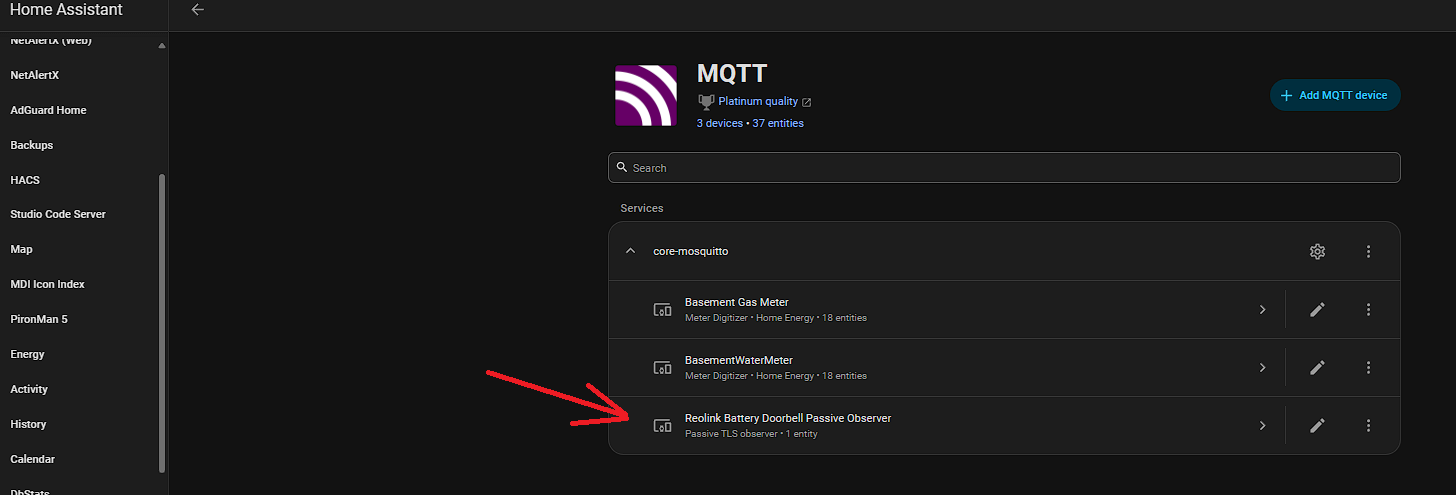
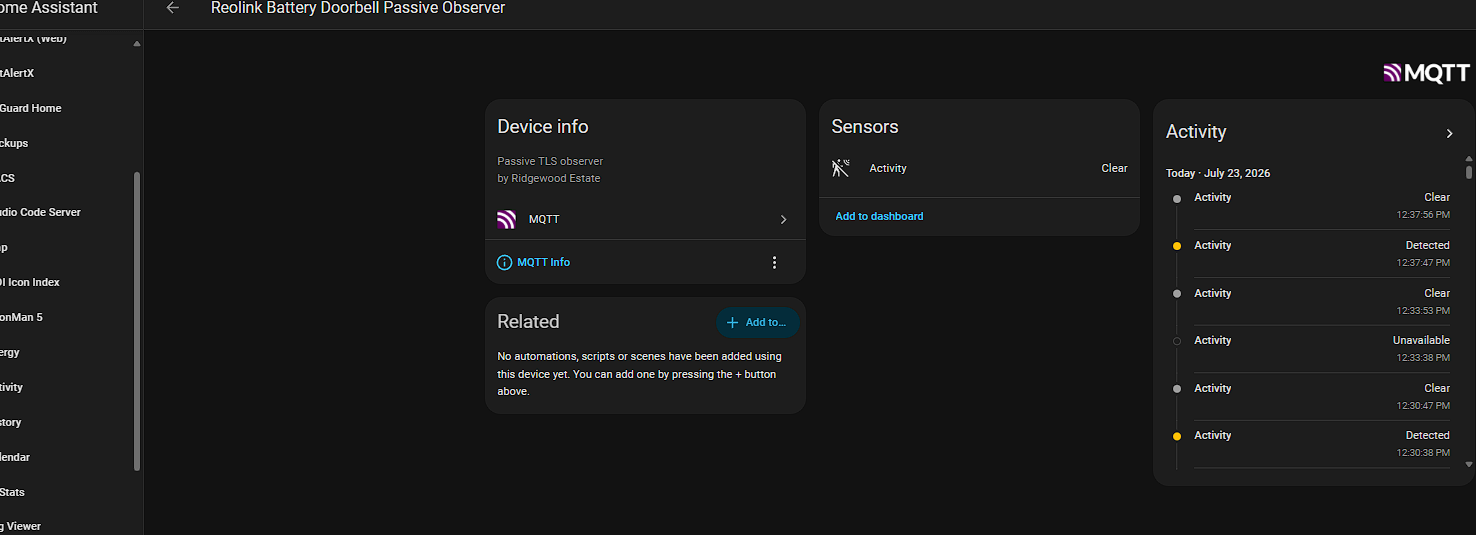
Hope that helps!
 .
.
