The END of Wemo Cloud and App

I have a Wemo Dimner wall switch that I use through both the Wemo app and also integrated into HA via the HomeKit integration. I have a bunch of Wemo smart plugs which I got rid of because of connectivity issues. I never bothered seeing if they worked through HomeKit as well, as I prefer the Shelly Plug US which also measures power usage. Long story short, I just got an email from them - text of the email pasted below:


After careful consideration, we have made the difficult decision to end technical support for older Wemo products, effective January 31, 2026.

What this means for you:

  • App Access: The Wemo app used to control these devices will no longer be supported after January 31, 2026.
  • Remote Features: Any features that rely on cloud connectivity, including remote access and voice assistant integrations, will no longer work.
  • Customer Support: Technical support, firmware and software updates, and troubleshooting assistance for affected products will no longer be available after January 31, 2026.

This decision was not made lightly. Over the last decade, since Belkin first launched Wemo in 2011, we’ve been committed to providing consumers with innovative, simple-to-use accessories for a seamless smart home experience. However, as technology evolves, we must focus our resources on different parts of the Belkin business.

We acknowledge and deeply appreciate the support and enthusiasm for Wemo over the last several years. We are proud of what we’ve accomplished in the smart home space and are grateful to our customers for welcoming Wemo into their homes.

We understand this change may disrupt your routines, and we sincerely apologize for the inconvenience.

If your Wemo product is still under warranty on or after January 31, 2026, you may be eligible for a partial refund. Refund requests will not be processed before that date. For full details on eligibility, the refund process, affected products, and FAQs, please visit: https://www.belkin.com/Wemo

Note: Wemo products configured for use with Apple HomeKit will continue to function via HomeKit in the absence of Wemo cloud services and the Wemo app. For instructions on configuring and using Wemo devices via Apple HomeKit, please consult our online FAQs.

This decision does not affect Wemo’s Thread-based products (SKUs WLS0503, WDC010, WSC010, WSP100), which will continue to function as they do today through HomeKit.

List of affected products can be found below.

With gratitude,
Belkin Customer Service
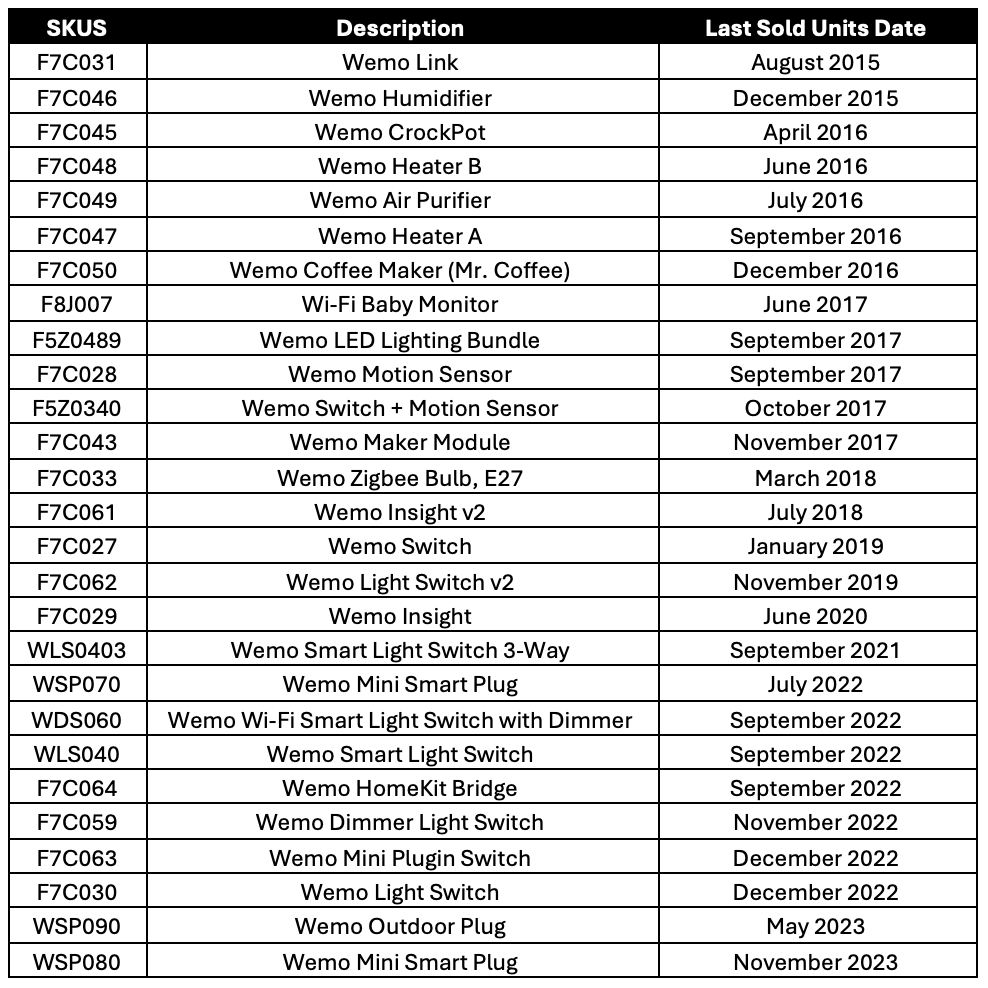
4 Likes

Thanks for letting us know

Just saw this. My entire home is wired with Wemo switches. Does anyone have a good alternative, and is it something that’s standalone or requires/works with Apple or Google home apps?

1 Like

be interesting to see how this pans out…the HA integration is classed as Local Push (see Classifying the Internet of Things - Home Assistant) so seems doesn’t use/rely on the Belkin Cloud which prob means continues to work in HA…firmware update, support, etc obv is gone but maybe not the end of the road for the devices :thinking:

Correct. I used firewall rules to block my wemo devices from accessing the Internet and they continued to work with HA.

1 Like

The biggest problem I can see with this is I have some Wemo light switches that flashed angry red lights when I tried blocking their Internet connection at my firewall in the past.

They did continue to work with Home Assistant, but having bright red flashing lights on my walls will cause me to replace them regardless.

Unless someone is aware of a way to turn that off?

Particularly, it is some of my in-wall Wemo dimmer switches that I have seen exhibit this behavior.

I put tape over the flashing lights. Then I replaced them when they failed, which was often, with tp-link switches.

1 Like

I did try that but it was not ideal. Honestly, the Wemo dimmers are some of my more problematic components and they often lock up and I have to throw the breaker to reset them. I’ll probably just look at replacing them with something else, like the Kasa ones.

Can they be reconfigured outside the app?
If you have to factory reset one because it’s having a mare, you’re a bit screwed unless you can get it back onto the network.
The app is used locally to configure though, so guess replacing the app with a HA integration or maybe in appdaemon would be a nice project for someone bonkers enough to take it on…

One reason I like the Wemo plugs is they retain any rules you set in the app… which has been a god send as a backup when the wifi drops- like running the extractor fan in my workshop which is on the limit of wifi range or when I want my PHEV charged in the small hours - just when the wifi AP decides to update or reboot itself and I’m not awake for HA to alert me to go and switch it manually…

I found it easier to switch to a different device.

An esp device maybe an option but I would try fixing my wifi issues first.

I have not had a Wemo on my network in a while. My guess is that you could save the app binary before it is removed from App / Play stores, and continue to use it later on.

However, the Wemo app might still require cloud server access in order to register the new device. This would need to be tested.

Unfortunately, this is a problem for installing my Kasa devices, as well as Wiz light bulbs. I have already tried blocking the Kasa from cloud, and it’s not possible to add a device. They work fine locally, but only after they have been setup.

I believe the problem is the same with my Wiz light bulbs and its app.

The other problem is that in the long-term, the app binary may stop functioning on newer versions of Android/iOS. If that’s the case, you might still be able to run it in an emulator, though.

The proper fix would be to have devices that work end-to-end without requiring the use of any app, using standard protocols like HTTPS web interfaces, built-in SSIDs in AP mode for Wifi devices, BLE for discovery. A Matter device solves that issue, as you can set them up directly in HA, without any app.

Some newer Kasa devices have Matter support. Unfortunately, my 50 KP125 are too old, and missing it.

Most of my 222 Wiz lightbulbs don’t have Matter support. I don’t know exactly how many do or do not. I tried the Matter integration for a few of them. The feature set is slightly inferior with the Matter integration, in terms of doing things like changing the color effects. When grouping them in HA, it becomes a problem if you want set an effect on the entire group. Also, the Matter Wiz bulbs show up in both the Wiz and Matter integrations, and there is no simple way to de-duplicate with the bulb count that I have. You would have to manually look at the MAC address for each device in each integration, and then delete or disable the duplicate one from the Wiz integration. It was much simpler and practical for me to just delete the Matter integration. I don’t know how long my Wiz bulbs will last - I bought them used for very cheap. For sure, if any of them fails, I would replace them with Matter. It’s very unlikely that all 222 will die in my lifetime, though.

Be aware that most Kasa devices still require the app for setup, and the Kasa app requires cloud. This is actually no better than Wemo.

The only exception would be if you buy the newest Matter enabled Kasa devices.

Regarding Wifi, my Kasa KP125 have bad temperaments with my Unifi APs. Sometimes they don’t come back online after AP firmware upgrades or config changes. Usually, rebooting all the APs will solve it. Sometimes it takes multiple AP reboots. In a the worst situations, I have had to physically unplug and plug the KP125 back in for them to work. I have one KP125 ub a remote location, in an outlet behind a wall, and the only access is a trap door, in a closet that’s open floor to ceiling. The more practical fix in this case is to flip the corresponding breaker - if you know which one it is. With 4 subpanels and 80 breakers, it is not obvious to me. But at least I now know which subpanel it’s on.

I still love the KP125 because they are rated for the full 15 amps, and the energy monitoring feature lets me turn all my plug-in appliances into smart ones with HA and the “appliance has finished” blueprint.

The KP125 were also very cheap, I believe I paid only $15 each. But eventually, unless TP-Link fixes their app to not depend on their cloud server, they will suffer the same fate as Wemo - same as with the vast majority of IOT devices that require an app to setup.

Matter cannot be retrofitted to the KP125 as they lack BLE hardware. And of course, you would need a firmware update even if they had it. TP-Link could fix their app to make the cloud registration optional. I asked about that in their public support forum. There was no response.

IMO, when manufacturers EOL their devices, they should be legally required to open up the firmware source, so that developers could make necessary updates, and stop them from becoming e-waste. It is unlikely that any legislative body would take that up.

Barring that, there should be better technical information to help consumers choose devices that don’t require proprietary apps or cloud. The “Matter” label is nice for that, as it’s really a single bit. But you could also remove the app and cloud dependency on most IoT devices, if firmware changes were possible.

Unfortunately, the “Local push” or “Local polling” labels on HA integration do not inform users about the app & cloud dependency for initial device setup.
And there are many models that have this dependency, and others that don’t, that work with the same integration.
Therefore, it would n
eed to be some sort of independent 3rd party database, listing the app/cloud requirements model-by-model. I have nearly 600 physical devices, and could probably get started on that … But not that many different models.

3 Likes

Like matter? Listed as local push but requires cloud and maybe even an vendor app (possible with mandatory cloud account). :cloud_with_lightning:

Some how matter turned out being even worse than zigbee, supporting vendor lock in’s an walled gardens/ecosystems by don’t enforcing manufactures to actually expose all device features via matter to get certified. :put_litter_in_its_place:

The solution is here long time and if you like/want full local control and ownership you might just go with esphome and call it a day… :walking_man:

1 Like

My only experience with Matter is with Wiz bulb models I have that support Matter. The only app that I used was the Home Assistant app on my smartphone.

It was able to setup a new Wiz/Matter bulb out of the box that way, finding it via BLE, and adding it to my Wifi SSID, without the use of the manufacturer’s app, and certainly without any cloud account.

It might have worked from a laptop too - I did not try. Probably not from my desktop, since it has neither Bluetooth or Wifi.

ESPHome is great, but there are tons of device categories that are not available as ESPHome devices. I have Wiz bulbs in a variety of sizes, colors, socket types. Philips has them all with Wiz.

But without cloud? I guess not. Matter needs the cloud (DCL) for initial commissioning :cloud: :warning:

But one good thing about matter is definetly that it comes with (free™) popcorn :popcorn:

Thanks. I wasn’t aware of that. I’ll have to try to decommission one bulb and see if I can add it with the internet blocked.

Unfortunately, the popcorn problem is not specific to Matter. In my home, it happens with the native Wiz bulbs too, even when they support multi-cast. This is because they all compete for airtime on 3 measly 2.4 GHz channels. With 222 of them, it’s just impossible to get the sync to work right. If you have just a few of them, it’s fine. I have light groups of dozens of them, though. For example, over 20 bulbs in my theater alone. They rarely turn on and off all at once. I’m lucky if the Z-wave switch works the first time. Never know which one is the culprit - Z-Wave or Wifi. Sigh. I really hate wireless devices.

I just tried the Yolink local hub. confirmed that it’s not possible to add a device to the Yolink local hub without Internet. Even if the app is already open before internet is blocked, it claims the QR code on the back of the device is not valid when Internet is off. Poor error reporting in the app - I’m not surprised. When exiting the Yolink app and re-opening it, it complains about no Internet. I re-enabled internet and was able to add the device just fine with the same QR code.

Turns out none of my Yolink automations work anymore with this new local hub, whether Internet is blocked or not, even though all the devices show up in both the app and the HA Yolink integration (which I did restart after the hub swap). Sigh.

Zwave has the same Popcorn problem AFAIK. For espHome based WiFi devices I have no problems toggling ~20 lights together (biggest light group I use) in snyc. :bulb:

That (in)famous one which was released just couple of years after announced with a fraction of the previous advertised features? :put_litter_in_its_place:

I wonder why so many people still buy products which are documented pain? Don’t do people do the mandatory due diligence? :person_shrugging:

If I had a grand total of 20 bulbs, it would work absolutely fine. But when I went from 100 Wifi devices (no smart bulbs) to over 300, things started behaving noticeably differently. 2.4 GHz is highly problematic in a dense environment.

I have four ESPHome devices - AtHom AR-01 IR receivers/blasters. They usually work fine, but sometimes they roam to very distant AP, unfortunately, and that adds latency.

Not sure what you mean about Z-wave and popcorn. Multi-cast is not commonly use with Z-wave, though it is available, and I have used it. Multi-cast doesn’t work with Z-Wave LR, though.

I wonder why you feel the need to pass judgment. Your suggestions to use ESPHome are not actual solutions. Many devices of various form factors just don’t have ESPHome equivalents. I invested in Yolink devices because I couldn’t find anything from any other vendor with any technology that offered the same range as Yolink did. Literally nothing else works inside my mailbox. Of course I wish it worked fully locally. I just blocked the new hub’s IP address in pfSense. The devices just don’t work correctly, either in HA or in Yolink’s own app. Motion sensors report detection initially, but their state never clears subsequently, so they are not usable. Seems like a bug somewhere. Guess I have to continue this with their tech support.

I would make sure to block them from internet as soon as possible. Just to make sure they don’t get a new firmware that bricks them when they can’t phone home.

2 Likes

Wow. Another one bites the dust.

Honestly, I can’t see why anyone who used HA would buy anything which required cloud access to use - or configure.

We have Zigbee, Z-Wave and ESPHome. I’ve never been unable to find a solution using one of those local options. Matter seemed like it was going to be the future of local control. It’s sounding more and more like the vendors are pushing it the other way.