UI eXtension - Add CSS styles to (almost) any part of the Home Assistant UI
UI eXtension (UIX) comes from the heritage of card-mod by @thomasloven. With an ever growing number of features that go beyond cards and dashboards, UIX was created to keep pushing the boundaries of custom CSS across your Home Assistant UI.
Quick Start
Go to Quick Start for installation instructions and a short guide on making your first UIX.
Correct. UIX provides for ease of management for Frontend resources, which now means all users of UIX get full Frontend styling options without any update issue of duplicate resources.
Replacing card_mod with uix only maintains the ha-card margin-bottom style and the other styles stop working. I really struggle with the various levels and shadow root stuff and am now lost as to how I can update.
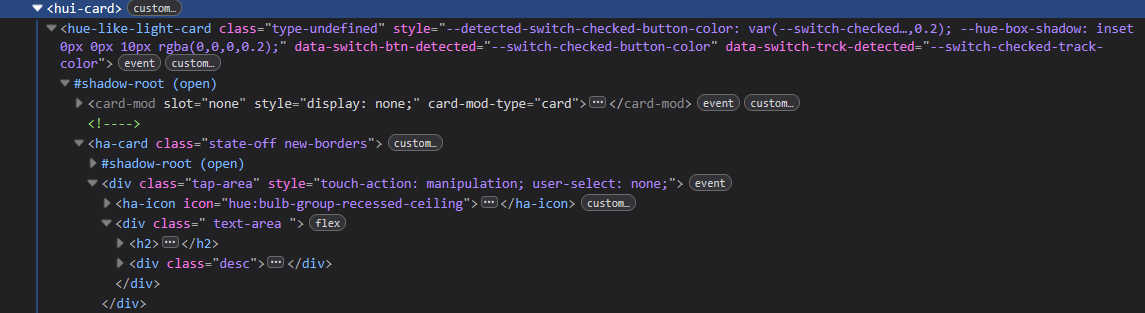
The screenshot above only shows the H2 text area but presumably once that is solved, the slider height would employ the same method.
I tried replacing ha-icon with uix-icon and --uix-icon but to no avail.
OK. The issue here is that hui-like-light-card recreates its config and only copies across card_mod key and not any other keys. So this card will conitinue to work with card_mod key which is fine to use with UIX. I will actually investigate using the config stored in hui-card which is always available and never touched by custom card.
Congrats Darryn, release of Uix is a huge step for us modders.
Been running the beta for a bit now with this drop in replacement and haven’t seen anything but success.
I did replace all occurrences of card_mod (and card-mod in the properties) to uix with the text editor ( took less than 2 minutes for yaml and raw Ui editor .
It feels great to have our UI’s in a thoroughly maintained component again.
We can’t thank you enough !
O and yes, 2 cards misbehave: apexcharts-card and hue-like-light-card because they ‘require’ the card_mod key.
But we have an easy fix for those : keep using the card_mod key (Uix is also still applying with that) until those cards have fixed their issue.
Looks Promising , But to be honest, After first “reading” , I have Alot Card_mods, on every Card and even in Theme( Maybe Irrelevant/easy-fix )
But Is it as simple as Marious example ?
Then i guess i can Just , Get started, and “solve” what might Have been “over-modded” / "Working but not Clean / Optimal … Some are, Kind of trail and error “solutions” i have
I Do have this ( extra_module_url ) in config.yaml , however i haven’t noticed any issues with “duplicates”
Using Card-Mod
This issue was the bigest issue thread I have managed in a while. So while not everyone had issues, many did, and knowing why means managing a plugin like that for everyone was going to keep being very tedious and sapping time away for wiritng new features Anyhow, the 2 pages worth of confusing readme instructions is now nothing in UIX.
Yeah i “Noticed” , and been following your efforts with Card_Mod
Yes, it sounded like , well “nothing” even thou it’s ages ago i read the read-me in Card-Mods Repos , And i guess this was what first “tipped me off”, i.e ( Do i have to learn all over again ), But i believe it now will be easier, So Not So many trails&errors
Hmmmm which one to choose to “Download” ? ( Even 5.0.0 wont work on 2026.1.3 )
Im “back” on 2026.1.3, doo To Insane Forced Populated Dashboards And Tibber-CORE-Integration
Keep Failing at restart and have to Reload, then it work max for a very short while, And Spewing the logfile every 5min , After 2026.2.0 ( Might there be a coincident ? ) 3 times i rolled back and forth since 2026.2.0
 UI eXtension - Add CSS styles to (almost) any part of the Home Assistant UI
 Quick Start
 Migrating from card-mod
 Something not touchable by UI eXtension
 :
:
 , But to be honest, After first “reading” , I have Alot Card_mods, on every Card and even in Theme( Maybe Irrelevant/easy-fix )

