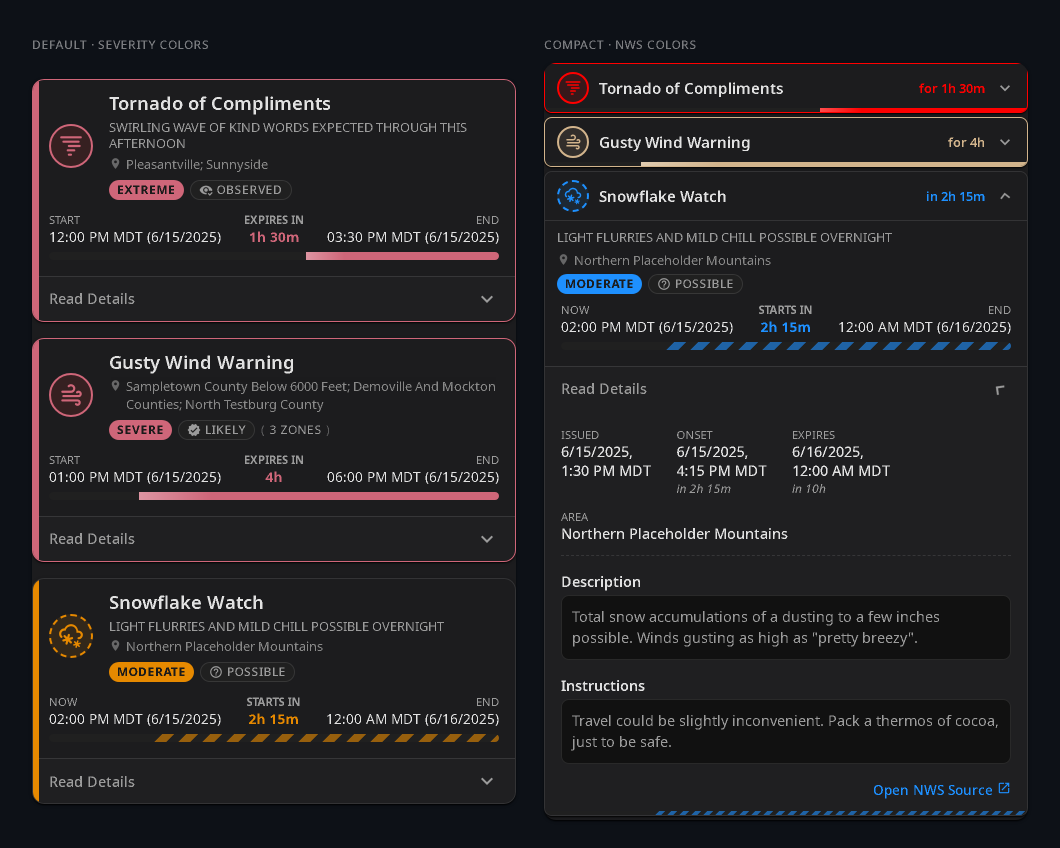
Weather Alerts Card
A custom Lovelace card for severe-weather alerts: severity badges, time progress bars, expandable details. Works with NWS (US), Bureau of Meteorology (Australia), MeteoAlarm (Europe), DWD (Germany), ECCC (Canada), PirateWeather, and the CAP Alerts integration — auto-detected from your entity's attributes, configurable through the visual editor (no YAML required).
Note: This thread replaces the earlier NWS Alerts Card thread — the card has grown beyond NWS, so the project was renamed. The underlying
finity69x2/nws_alertsintegration is still the recommended NWS source and the development reference integration.
Color themes
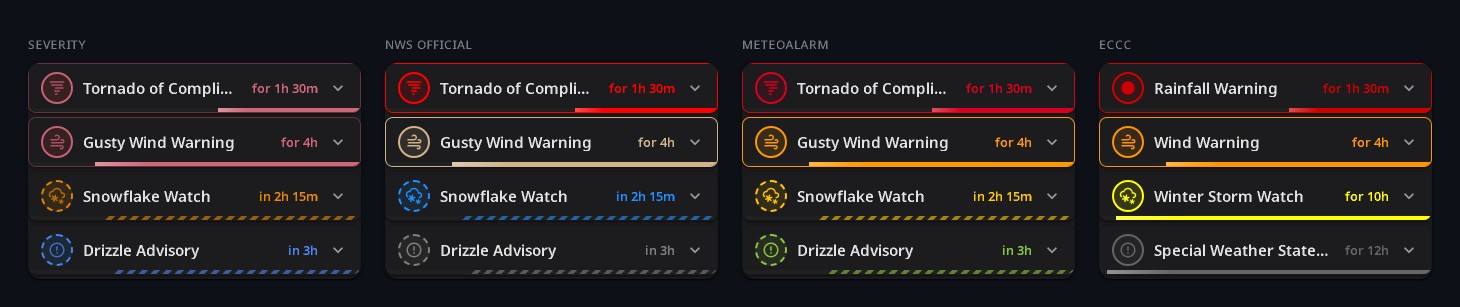
Four built-in themes. Left to right: severity-based (default), NWS official event colors, MeteoAlarm awareness colors, ECCC public-alert palette.
Installation
HACS (recommended) — search Weather Alerts Card in HACS → Frontend, or click the badge:

Manual — download weather-alerts-card.js from the latest release, copy it to config/www/, and register /local/weather-alerts-card.js as a JavaScript Module under Settings → Dashboards → Resources.
Setting up
The card ships with a visual editor — most people never need to touch YAML.
- Install a weather-alert integration for your region (see the table below).
- Add Card → Weather Alerts Card on your dashboard.
- Pick your alert entity. For CAP Alerts, pick the device instead — the card auto-discovers each per-alert sensor and re-discovers as alerts come and go.
- Tweak color theme, layout, sort order, and severity threshold in the editor.
Supported providers
| Provider | Region | Integration |
|---|---|---|
| NWS | US | finity69x2/nws_alerts (HACS) |
| BoM | Australia | bremor/bureau_of_meteorology or the safepay fork (HACS) |
| MeteoAlarm | Europe | Built-in meteoalarm |
| DWD | Germany | Built-in dwd_weather_warnings |
| ECCC | Canada | michaeldavie/environment_canada_hacs (HACS) — not the core integration (yet) |
| PirateWeather | Global | Pirate-Weather/pirate-weather-ha (HACS) |
| CAP Alerts | NWS, ECCC, MeteoAlarm, WMO | seevee/cap_alerts — experimental integration that generates one entity per active alert; pair with device: for auto-discovery |
Provider is auto-detected from entity attributes; set provider: manually if you ever need to override it.
A few representative configs
Full options table and the rest of the examples live in the README. A taste:
Most users (NWS, defaults):
type: custom:weather-alerts-card
entity: sensor.nws_alerts_alerts
Compact rows, sorted by severity, NWS official event colors:
type: custom:weather-alerts-card
entity: sensor.nws_alerts_alerts
colorTheme: nws
layout: compact
sortOrder: severity
ECCC with the official public-alert palette:
type: custom:weather-alerts-card
entity: sensor.marathon_alerts
colorTheme: eccc
CAP Alerts — auto-discover every active alert under a device:
type: custom:weather-alerts-card
device: 1a2b3c4d5e6f7a8b9c0d1e2f3a4b5c6d
(Use the editor's device picker so you don't have to type the device ID.)
Common questions
The card shows "No active alerts" but I expect some.
Check the underlying entity first — open it in Developer Tools → States and confirm attributes contains the alert list. The card is read-only on top of that data.
Some badges are italic with a tilde, like ~Moderate.
That marks values inferred by the card from other fields (e.g. BoM doesn't ship a CAP severity, so the adapter derives one from the alert type and group). Plain non-italic badges came straight from the provider.
Auto-detect picked the wrong provider.
Set provider: explicitly — nws, bom, meteoalarm, dwd, eccc, pirateweather, or cap.
ECCC core integration isn't working.
The bundled environment_canada integration doesn't currently expose alert details. Use the HACS environment_canada_hacs component until PR #164481 lands upstream.
Wall-mounted display / kiosk:
expandDetails: true shows details without a tap, hideNoAlerts: true removes the empty-state banner, and showSourceLink: false drops the link out of kiosk mode. fontSize: large (or x-large) is also worth trying at viewing distance.
NWS alert text has awkward mid-sentence line breaks.
That's the legacy 69-character teletype wrap from the NWS source feed. reformatText: true (the default) strips it while preserving paragraph breaks — leave it on unless you specifically want the raw text.
Help & bug reports
- Questions, dashboard tips, screenshots, theme requests: reply on this thread.
- Bugs and feature requests: open an issue on GitHub — they get lost in forum scroll.
Support
If the card's useful, consider tipping at Ko-fi  or — better — donating to The Y'all Squad, a rapid-response program providing direct aid, chainsaws, and supplies to families hit by severe weather.


 instead of the current condition when a weather alert is active.