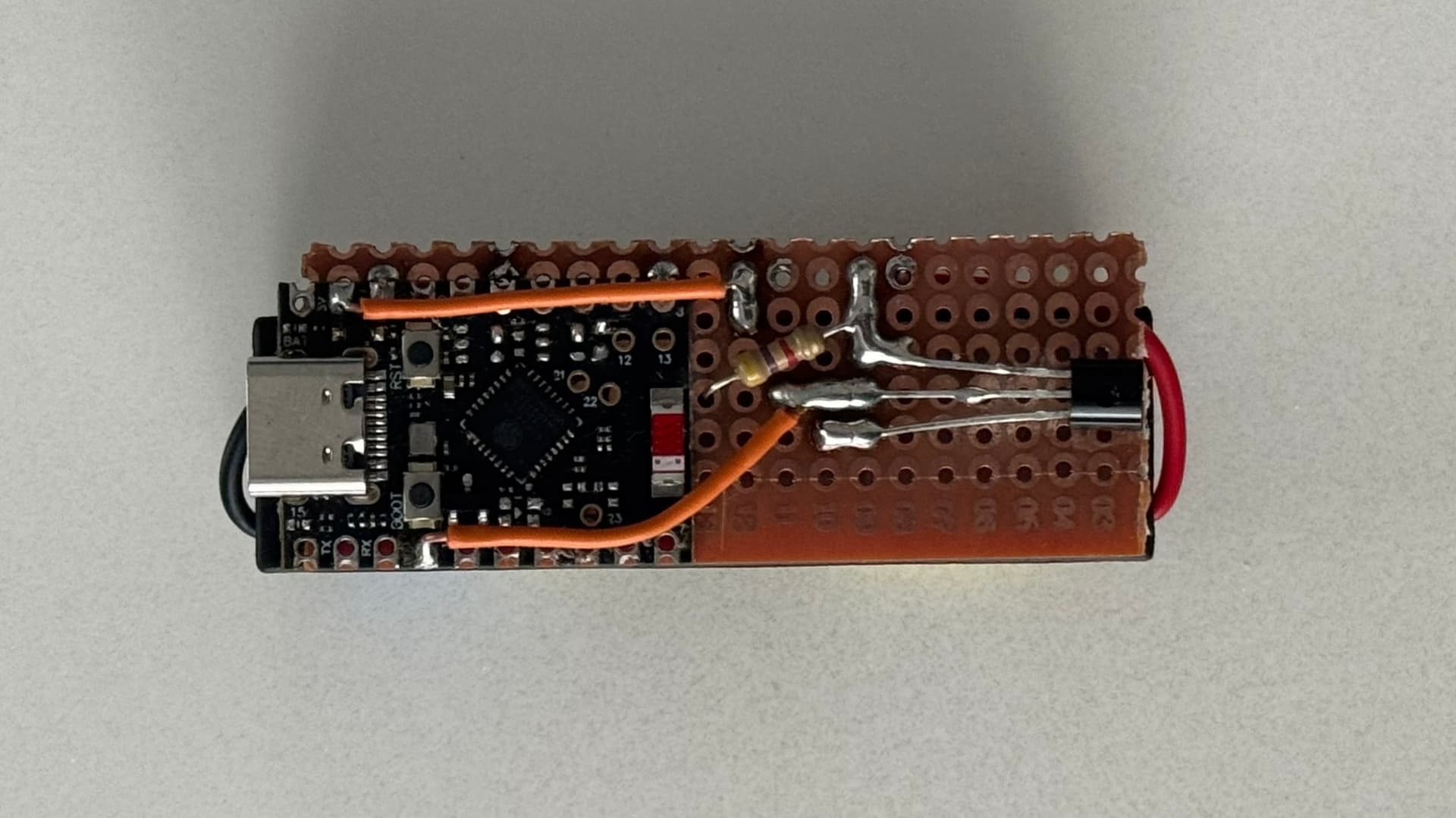
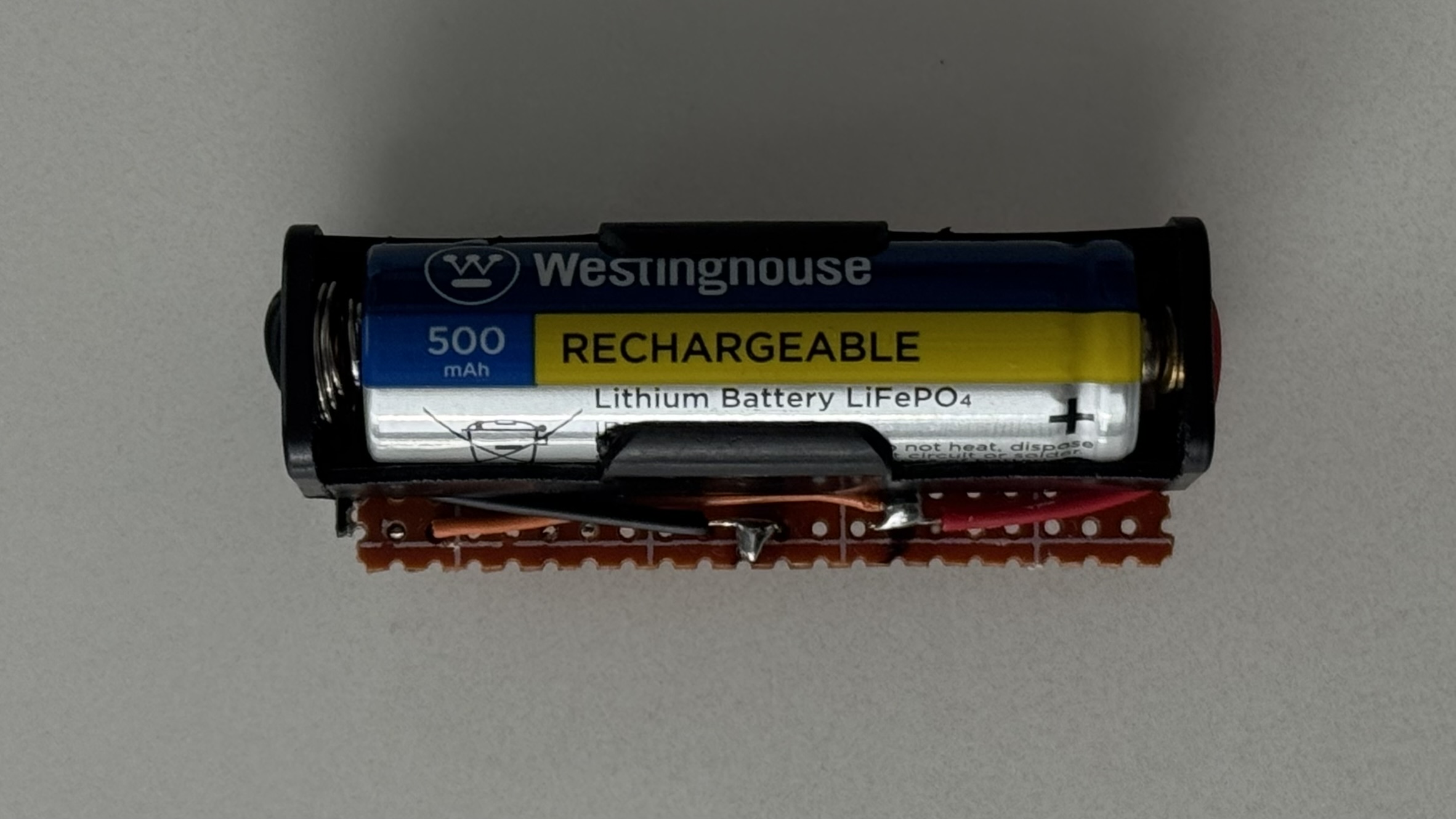
Hi! I am playing with thread and wanted to see if I could use battery powered sensors where it’s inconvenient to have cables. This project demonstrates how to do it using deep sleep. I literally just tried if I am able to read some values, send them to HA via thread, let it go to deep sleep, repeat, and do that on battery. I am launching the test today, who knows when the battery get drained, will try to report here. My hopes are that it could last for months with sensible readings of temperature every e.g. 5 minutes.
I have the following setup:
- LiOn Battery (3.7V) Original 18650 Battery NCR18650B 3.7v 3400mAh Lithium Rechargeable with a 18650 Battery Holder Box 1 Slot 3.7V
- ESP32-H2 Supermini (Thread only device)
- ESPHome 2025.7.5
- BME280 for temp measurement (not shown in the diagram below)
Overall about $15. “Cheapest” zigbee Aqara temp sensor is about $13, for comparison (they lasted about 3 years and then simply died).
There are already some threads about esp32-h2 like here, my ESP32 border router is described here.
Wiring
The best is soldering the battery holder connectors to the B+/B- from the bottom of the pad. It has integrated voltage regulator etc., so will be the most efficient and you save yourself an extra component.
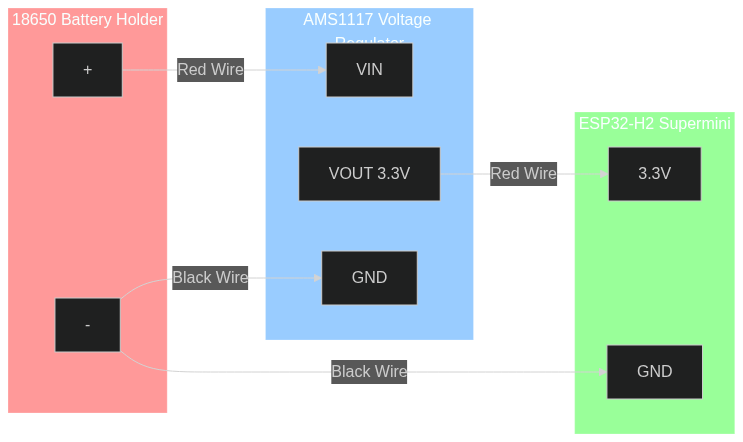
If you don’t want to solder, you can use what I used originally: Voltage regulator from 3.7V (battery) → 3.3V (ESP32 3v pin), AMS1117 like this:
ESPHome Config
It’s clearly not minimal, and some things IMHO do not work at all. But it’s a start, and my hope is that people can try and build on top of it etc. I haven’t found many concrete examples, hence writing this.
This config is not production ready, you almost surely want to tweak the deep sleep time interval, add your own sensors (right now this shows cpu temp, heap, uptime, to demonstrate some readings, what I want to add here is just BME280), and so on.
esphome:
  name: h2beta
  friendly_name: Thread H2 Beta
  # Boot actions to increment wake counter
  on_boot:
    priority: 600  # Run early
    then:
      - globals.set:
          id: wake_count
          value: !lambda 'return id(wake_count) + 1;'
      - component.update: sleep_cycle_count
      - component.update: wakeup_cause
      # Blink blue LED on wake to show activity
      - light.turn_on: blue_led_light
      - delay: 500ms
      - light.turn_off: blue_led_light
      - delay: 200ms
      - light.turn_on: blue_led_light
      - delay: 500ms
      - light.turn_off: blue_led_light

esp32:
  board: esp32-h2-devkitm-1
  variant: ESP32H2
  framework:
    type: esp-idf

# Enable logging - note that I couldn't get logs on h2 serial via USB, I only could see some via mqtt
logger:
  level: DEBUG

# not necessary, was somewhat useful for testing
mqtt:
  broker: 192.168.0.202
  username: z2m
  password: <pwd>
  topic_prefix: null
  log_topic: h2test

api:

ota:
  - platform: esphome

network:
  enable_ipv6: true

# Deep Sleep Configuration
deep_sleep:
  run_duration: 30s
  sleep_duration: 60s
  id: deep_sleep_control

# Global variables for persistent wake counter
globals:
  - id: wake_count
    type: int
    restore_value: yes  # This persists across deep sleep
    initial_value: '0'

# Blue LED output (GPIO13)
output:
  - platform: gpio
    pin: 13
    id: blue_led

# Blue LED light control
light:
  - platform: binary
    name: "Blue LED"
    id: blue_led_light
    output: blue_led
    restore_mode: RESTORE_DEFAULT_OFF

# interval:
#   - interval: 2s
#     then:
#       - logger.log: "Heartbeat - ESP32-h2-beta is alive!"

openthread:
  tlv: <...fill in...>
  force_dataset: true

text_sensor:
  - platform: openthread_info
    ip_address:
      name: "Off-mesh routable IP Address"
    channel:
      name: "Channel"
    role:
      name: "Device Role"
    rloc16:
      name: "RLOC16"
    ext_addr:
      name: "Extended Address"
    eui64:
      name: "EUI64 Interface ID"
    network_name:
      name: "Network Name"
    network_key:
      name: "Network Key"
    pan_id:
      name: "PAN ID"
    ext_pan_id:
      name: "Extended PAN ID"

  # Deep sleep wakeup cause sensor
  - platform: template
    name: "Wakeup Cause"
    id: wakeup_cause
    update_interval: never  # Only update once on boot
    lambda: |-
      auto cause = esp_sleep_get_wakeup_cause();
      switch (cause) {
        case ESP_SLEEP_WAKEUP_UNDEFINED: return std::string("Reset/Power On");
        case ESP_SLEEP_WAKEUP_TIMER: return std::string("Timer");
        case ESP_SLEEP_WAKEUP_EXT0: return std::string("External 0");
        case ESP_SLEEP_WAKEUP_EXT1: return std::string("External 1");
        case ESP_SLEEP_WAKEUP_TOUCHPAD: return std::string("Touchpad");
        case ESP_SLEEP_WAKEUP_ULP: return std::string("ULP");
        case ESP_SLEEP_WAKEUP_GPIO: return std::string("GPIO");
        case ESP_SLEEP_WAKEUP_UART: return std::string("UART");
        default: return std::string("Unknown (" + to_string(cause) + ")");
      }

sensor:
  # Internal temperature sensor (simulates external temperature sensor)
  - platform: internal_temperature
    name: "CPU Temperature"
    id: cpu_temp
    update_interval: 5s

  # Free heap memory sensor
  - platform: template
    name: "Free Heap"
    id: free_heap
    lambda: |-
      return heap_caps_get_free_size(MALLOC_CAP_INTERNAL);
    unit_of_measurement: "bytes"
    accuracy_decimals: 0
    update_interval: 5s

  # Uptime sensor (will reset each wake cycle)
  - platform: uptime
    name: "Uptime Since Wake"
    id: uptime_sensor
    update_interval: 5s

  # Deep sleep cycle counter (stored in global variable that persists)
  - platform: template
    name: "Sleep Cycle Count"
    id: sleep_cycle_count
    accuracy_decimals: 0
    update_interval: never  # Only update once on boot
    lambda: |-
      return (float)id(wake_count);

switch:
  # Switch to prevent deep sleep (useful for debugging/OTA updates)
  - platform: template
    name: "Prevent Deep Sleep"
    id: prevent_sleep_switch
    optimistic: true
    restore_mode: RESTORE_DEFAULT_OFF
    turn_on_action:
      - deep_sleep.prevent: deep_sleep_control
      - logger.log: "Deep sleep prevented"
    turn_off_action:
      - deep_sleep.allow: deep_sleep_control
      - logger.log: "Deep sleep allowed"

# Optional: Manual deep sleep trigger
button:
  - platform: template
    name: "Enter Deep Sleep Now"
    on_press:
      - logger.log: "Manually entering deep sleep..."
      - delay: 1s
      - deep_sleep.enter: deep_sleep_control

# Log sensor readings before going to sleep
# I don't think this work
interval:
  - interval: 20s  # Trigger X seconds before sleep
    then:
      - logger.log:
          format: "Sensor readings - CPU: %.1f°C, Heap: %.0f bytes, Uptime: %.1fs"
          args: ['id(cpu_temp).state', 'id(free_heap).state', 'id(uptime_sensor).state']
      - logger.log: "Preparing for deep sleep in 10 seconds..."
      # Dim the blue LED as a visual indicator before sleep
      - light.turn_on:
          id: blue_led_light
          brightness: 50%
      - delay: 3s
      - light.turn_off: blue_led_light
Flashing this config to the device results in reporting the metrics inside home assistant (to which I added this device before, described here)
Various findings
- I am flashing manually via CLI from my Mac as e.g.
uv run esphome run h2-sleep.yaml - OTA also seemed to work fine, but is of course a bit finicky unless you manage to switch of the deep sleep entry - you can’t flash when it’s sleeping.
- find the ipv6 address in homeassistant under
Off-mesh routable IP Address, and doping6 <address>. You can see when the device is up and connected. It takes only 2-5 seconds for me for the ping to start receiving reply (pretty cool that this is possible with thread, and that the device is so fast). You should see e.g.:
$ ping6 fd84:c977:29b2:1:7cbe:7175:21b8:be55
PING6(56=40+8+8 bytes) fd49:e5fc:83af:0:c41:5092:6308:5a0f --> fd84:c977:29b2:1:7cbe:7175:21b8:be55
16 bytes from fd84:c977:29b2:1:7cbe:7175:21b8:be55, icmp_seq=143 hlim=254 time=616.515 ms
16 bytes from fd84:c977:29b2:1:7cbe:7175:21b8:be55, icmp_seq=144 hlim=254 time=40.652 ms
- with mqtt, I see this:
$ mosquitto_sub -h 192.168.0.202 -u z2m -P <mypwd> -t "h2test" --pretty -F "%t>%p"
h2test>[D][esp32.preferences:142]: Writing 1 items: 0 cached, 1 written, 0 failed
h2test>[W][component:307]: mqtt cleared Warning flag
h2test>[I][mqtt:310]: Connected
h2test>[W][component:407]: mqtt took a long time for an operation (113 ms)
h2test>[W][component:408]: Components should block for at most 30 ms
h2test>[D][sensor:104]: 'Uptime Since Wake': Sending state 21.55600 s with 0 decimals of accuracy
h2test>[D][sensor:104]: 'CPU Temperature': Sending state 22.00000 °C with 1 decimals of accuracy
h2test>[D][sensor:104]: 'Free Heap': Sending state 136424.00000 bytes with 0 decimals of accuracy
h2test>[D][esp32.preferences:142]: Writing 3 items: 2 cached, 1 written, 0 failed
h2test>[D][sensor:104]: 'Uptime Since Wake': Sending state 26.55800 s with 0 decimals of accuracy
h2test>[D][sensor:104]: 'CPU Temperature': Sending state 22.00000 °C with 1 decimals of accuracy
h2test>[I][deep_sleep:062]: Beginning sleep


h2test>[W][component:307]: mqtt cleared Warning flag
h2test>[I][mqtt:310]: Connected
h2test>[W][component:407]: mqtt took a long time for an operation (121 ms)
h2test>[W][component:408]: Components should block for at most 30 ms
h2test>[D][sensor:104]: 'CPU Temperature': Sending state 21.00000 °C with 1 decimals of accuracy
h2test>[D][sensor:104]: 'Uptime Since Wake': Sending state 20.97000 s with 0 decimals of accuracy
h2test>[D][light:052]: 'Blue LED' Setting:
h2test>[D][light:065]:   State: OFF
h2test>[D][sensor:104]: 'Free Heap': Sending state 136428.00000 bytes with 0 decimals of accuracy
h2test>[D][sensor:104]: 'CPU Temperature': Sending state 21.00000 °C with 1 decimals of accuracy
h2test>[D][sensor:104]: 'Uptime Since Wake': Sending state 25.97400 s with 0 decimals of accuracy
h2test>[I][deep_sleep:062]: Beginning sleep
h2test>[I][deep_sleep:062]: Beginning sleep
as you can see, it takes quite some time before it actually connects and starts logging to mqtt. I don’t know why but I see it 26 seconds after the wakeup, which is quite late.
- It does take up maybe a dozen of seconds before the data show up in homeassistant.
Overall, this is pretty fun and already somewhat easier to work with than with zigbee devices that I use. With those, I have virtually no “visibility” than “coordinator knows about these”. But on thread, I can just ping the devices, or let them directly talk to mqtt or HA, which is neat. And I am a big fan of ESPHome, which is just a crazy beast. LLMs can write the spec flawlessly (as long as you just copy paste the relevant - usually well written - docs)
Good luck!
 //Björn
 )
) … Man, I would love to have a cheap, thread powered battery device that is ESPHome configurable. Too many wishes.
 , I might look into it more. When I checked ESPHome