IKEA Bilresa Dual Button Remote

Blueprint for Ikea Bilresa Dual Button Remote

What’s this all about?

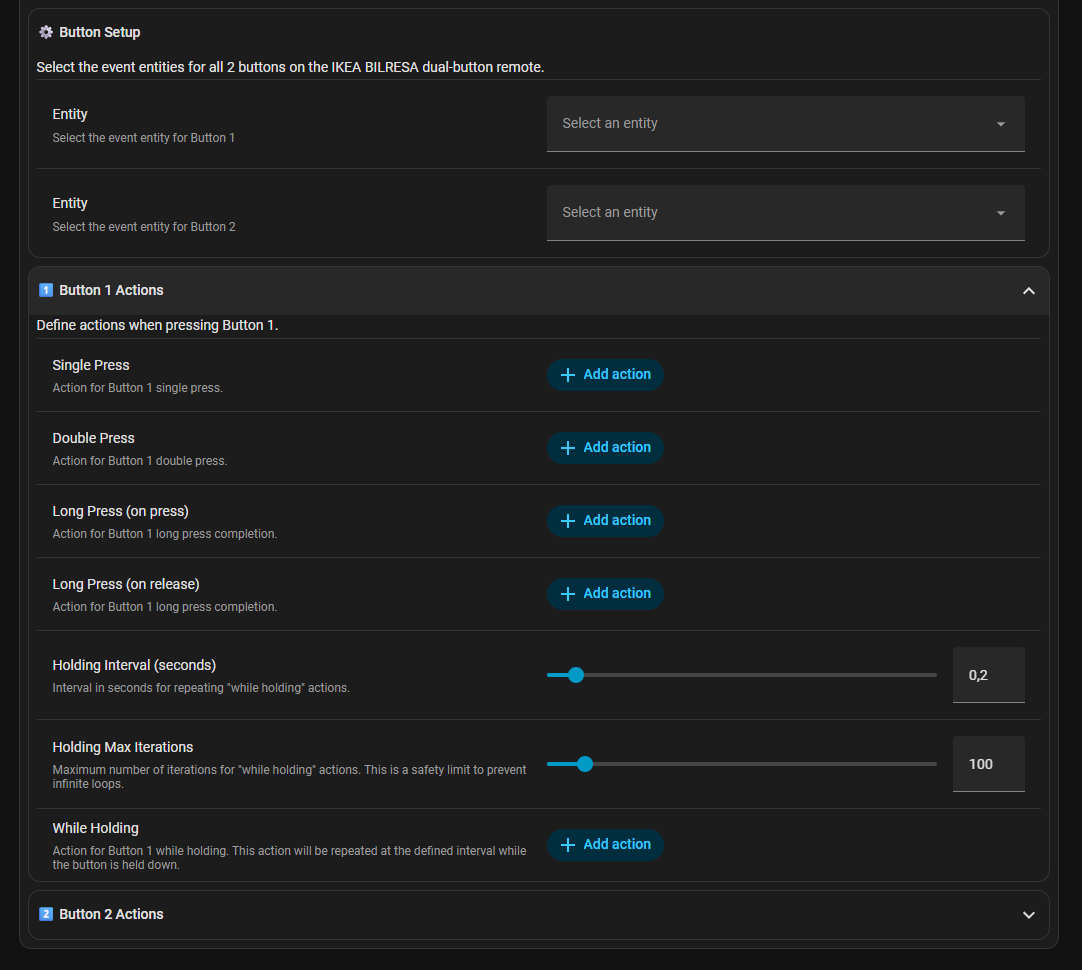
I wanted the IKEA Bilresa dual button remote to be as useful as possible without wiring every interaction by hand. This blueprint gives each button five different behaviors so you can do everything from dimming lights to shuffling playlists without touching a phone.

What you get (per button)

  • Single press
  • Double press
  • Long press (on press) → fire as soon as you hold it
  • Long press (on release) → run something when you let go
  • While holding → repeat an action on a timer (great for volume, blinds, dimming)

Every “while holding” loop has its own interval and a “max iterations” cap so it doesn’t go wild if the remote forgets to send a release event.

Installation

Use My Home Assistant (one-click import):

image

Or drop the URL in manually:

https://raw.githubusercontent.com/Skaronator/home-assistant-blueprints/refs/heads/main/automation/ikea-bilresa-dual-button.yaml

Pick your Matter event entities for button1 and button2, plug in actions, and you’re done.

Configuration

Ideas

  • Lights: single = on/off, double = scene, hold to dim.
  • Media: single = play/pause, double = next track, hold to adjust volume smoothly.
  • Covers/shades: hold to open/close, release to stop.

Source + Support

GitHub link (blueprint file): https://github.com/Skaronator/home-assistant-blueprints/blob/main/automation/ikea-bilresa-dual-button.yaml

If this helps, throw a star on GitHub or share what you built. Always happy to hear feedback or ideas for vNext!

8 Likes

This version is really nice! Could you also make one for the IKEA BILRESA scroll wheel? That one is really nice as well 😊

Ha, many Home Assistant enthusiast tinkering with Ikea stuff :grinning: :+1:

You may also want to have a look at my blueprint for the scroll-wheel version then:

I would really like to use yours, but I don’t want to use it for lights — I’d like to use it for a media player instead.

I’m planning to do one for the scroll wheel as well. I already have it on my desk. I just haven’t had enough time to finish it yet.

The Matter implementation for scroll wheels is a bit wonky. On top of that, Home Assistant’s handling of multiple events with the same type is also somewhat odd within the Matter integration.

Good idea to use it for media players as well, I added volume control for now, please have a look.

Thanks a lot for this Blueprint. I have a question. I just learned how to simplify the amount of automations I have with Trigger ID’s. How can I create those in this Blueprint so I can adjust the actions of the button clicks based on time of day? Thanks in advance. Friso

I used this but the automation randomly triggers if the device goes from “unavailable” to back on network. Anyway to fix that?

I posted this BILRESA blueprint a few days before Xmas when I found some BILRESA at IKEA. With a bug report it catches your edge case @nownaga . @Skaronator feel free to reach out if you want to merge or collab on the other IKEA products :blush:

Triggers from unavailable or unknown state should not happen. As the blueprint has this as condition. (See here).

Can you check the automation traces and post them if it happens again?

(You can download the trace when clicking the 3 dots in the top right)

Dear @censay and @Skaronator: should I suggest both of your blueprints not restraining to “matter” integration?
I have personally just paired my brand new BILRESA remote with Zigbee2MQTT and so your blueprints doesn’t filter properly my remote (which cannot be found in this use case)
Thank your very much by the way!

Thanks for a great blueprint! Do you have any suggestions for the parameters to dim/brighten lights? I’ve tried a few values but none that feel completely intuitive as of now, for:

  • percentage change while holding, e.g.,
    data:
      brightness_step_pct: -10
    
  • Holding Interval (seconds)
  • Holding Max Iterations (I’m guessing just doing the math to not go over 100%)

This is really nice!! Thank you for your blueprint… I’m trying to wrap my head around the “while holding”… wouldn’t it be the same as “long press”? For example on a cover entity… long press button2 to close… long release button2 to stop.

First, thank you for the blueprint, it is very easy to use.

I have a problem with the “on hold” action.
When I hold a button, it only triggers about once per second, even though the holding interval is set to 0.05 seconds. Because of that, the light does not dim smoothly.

I’m not sure whether the problem is caused by the blueprint or by my lamp.
Is anyone else experiencing this issue?

Thank you for this Blueprint, it works very well! I use short press to turn lights on and off; long press to dim and brighten. The double press opens and closes the blinds.
However, with this setup, I cannot stop the blinds when they reach the desired position, I can only have fully open or closed. Would it be possible to add a feature to have a second double press of the same button, within a specified interval, issue a separate command such as cover_stop in my case?

Thanks!

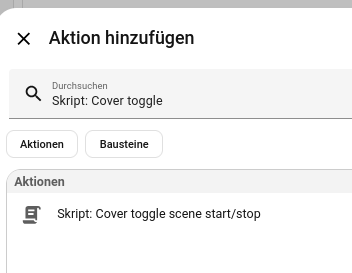
To control different actions with one button I am using some helper scripts which are independent of specific button/blueprint.

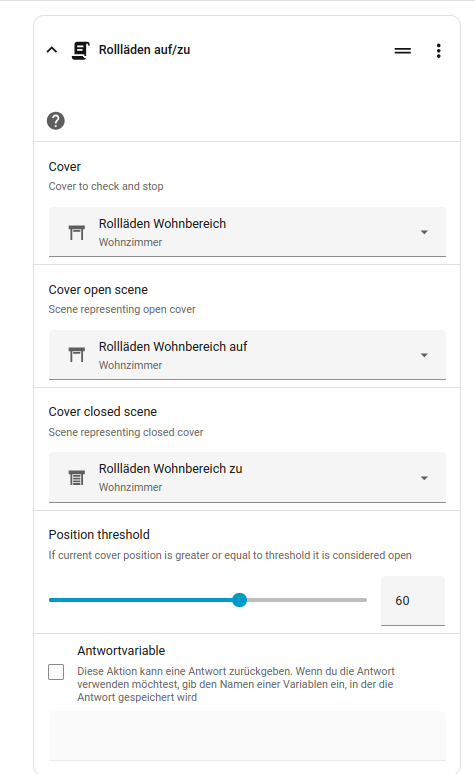
For the cover I have Cover toggle scene start/stop which can be used as action for a single button. It toggles between Cover open scene, Stop, Cover closed scene:

YAML code
sequence:
  - if:
      - condition: template
        value_template: "{{ is_state(cover, 'opening') or is_state(cover, 'closing') }}"
    then:
      - action: cover.stop_cover
        metadata: {}
        data: {}
        target:
          entity_id: "{{ cover }}"
    else:
      - if:
          - condition: template
            value_template: "{{ state_attr(cover, 'current_position') >= position_threshold }}"
        then:
          - action: scene.turn_on
            metadata: {}
            target:
              entity_id: "{{ cover_closed_scene }}"
        else:
          - action: scene.turn_on
            metadata: {}
            target:
              entity_id: "{{ cover_open_scene }}"
alias: Cover toggle scene start/stop
fields:
  cover:
    name: Cover
    description: Cover to check and stop
    selector:
      entity:
        filter:
          domain: cover
    required: true
  cover_open_scene:
    name: Cover open scene
    description: Scene representing open cover
    selector:
      entity:
        filter:
          domain: scene
    required: true
  cover_closed_scene:
    name: Cover closed scene
    description: Scene representing closed cover
    selector:
      entity:
        filter:
          domain: scene
    required: true
  position_threshold:
    selector:
      number:
        min: 0
        max: 100
    name: Position threshold
    description: >-
      If current cover position is greater or equal to threshold it is
      considered open
    default: 50
    required: true
description: ""

store as new scene and as action for the button choose

1 Like

Thank you, I will give this a try.

I’ve added the BILRESA dual button through Zigbee2MQTT. Would this blueprint also work when the device is not paired via Matter?

Just passing along…

1 Like

OMG! It works like a charm. Thank you so much. You really made my day!

1 Like