What router are you using and what firmware do you have?
Are you able to access the router settings page via myfritz.net? (Try both from outside and inside your network).
I used to experience something similar and would fix it by clearing the browser cache, but it hasn’t happened in a while.
However, I’ve noticed issues with the latest beta firmware for the 7590.
I am using the FRITZ!Box 6840 LTE with the newest firmware, which is still supported for this old router, version 06.88. I can easily connect to the FRITZ!Box with no problem even when the Pi is not responding.
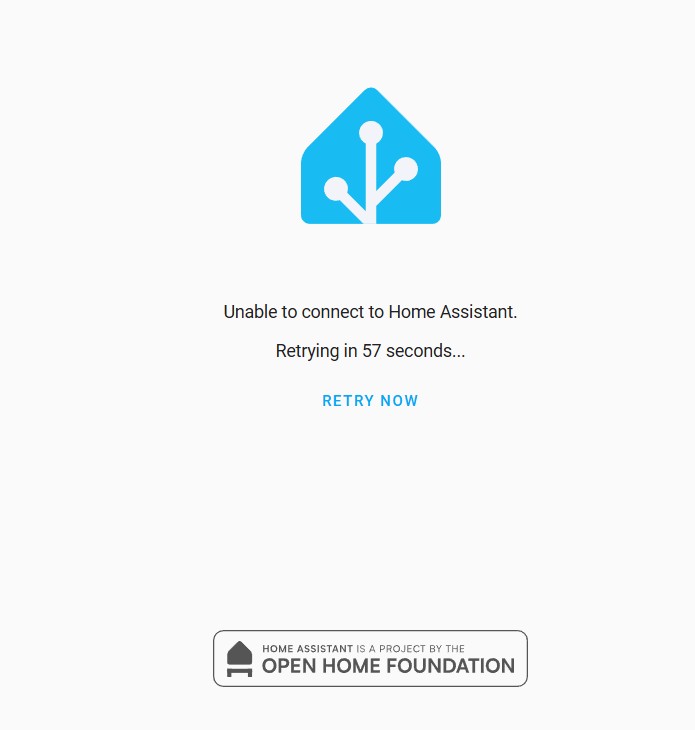
Another odd behavior is that while the Pi is unreachable, my Zigbee devices also seem to stop communicating with it—at least that’s my assumption. When I reboot the Pi, I can see that the Zigbee devices update their states normally, but they stopped responding at the exact same time HA became inaccessible. After that, they flatline completely.
This makes me think the issue might be deeper than just network routing because Zigbee should continue working locally even if the router is disconnected, right? It almost seems like the Pi is freezing or crashing entirely, rather than just losing network connectivity.
Hey,
I have DS-Lite and I won’t be able to change that :(. Will there soon be a way to do it with IPv6? Has anybody from the FritzBox or the HomeAssistant devs thought about working together to make the remote access through myFritz DDNS easily possible? I mean why is it not as easy as to just klick a button in some FritzBox setting and done? Wouldn’t that be in the interest of both the FritzBox manufacturer and HA Community?
I mean why is it not as easy as to just klick a button in some FritzBox setting and done?
I don’t think that this is going to happen. But I believe that iPv6 should work and it is “just” a matter of configuring every involved component correctly, i.e. fritzbox, home assistant, nginx and myFritz. If I find some time I might look into this again and see if I can make it work.
Speaking of @starob’s suggestion of “configuring everything involved”, I found multiple issue with this whole process - up to the point where I deemed it ordeal & started fiddling around.
Here are my findings:
No NGinX seems to be needed. At all.
All I had to set up was 1 port forwarding for port 443 (I prefer “port-free” URLs, looks “cleaner” to me), both ex- & internally & externally, and 1 for port 80 (externally, mapped to 8000 internally) within the FritzBox interface & of course, instruct the Let’s Encrypt add-on to run on that port (bottom of its configuration tab).
Almost 2 years ago, @WxrthlessLiquid’s logs already claimed cert files are written to /data/letsencrypt/live/[your sub-domain].myfritz.net/[fullchain|privkey].pem, this is still misleading - any (custom) configured filename is used, but the files will still be stored at /ssl/[your filenames].pem!
Correct. It’s helpful because you only need to restart nginx when the certs got updated. See my comment above. But when using ipV6 it might be easier to just not use it and restart HA instead.
but the files will still be stored at /ssl/[your filenames].pem
I also mentioned that in II.6 above.
So for the benefit of interested users can you explain in more detail the steps you took to configure your router, MyFritz and HA to use IPV6. And how do you make sure that the certs are renewed after 90 days? Are you using the blueprint mentioned above?
It’s helpful because you only need to restart nginx when the certs got updated.
But AFAIK, there’s already a “sensor” for reloading/restarting HA anyway, i.e., there’s no sense in using the NGinX proxy anway?!
I also mentioned that in II.6 above.
Yes, but you mentioned nowhere that specifying /my/example/path/foo.bar.pem as the cert storage location will be mostly ignored as it would just store them under /ssl/foo.bar.pem - which is especially ridiculous as the wizard for requesting the path even suggests to provide a full path & the logs of @WxrthlessLiquid from 2 years ago even suggest that complete custom paths are possible while in reality they’re not…
So for the benefit of interested users can you explain in more detail the steps you took to configure your router, MyFritz and HA to use IPV6. And how do you make sure that the certs are renewed after 90 days? Are you using the blueprint mentioned above?
I never said I’m using IPv6, hence can’t provide any details for that.
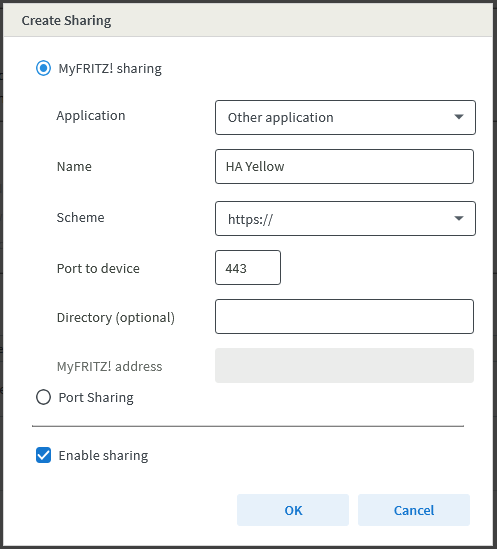
Renewal isn’t automated, yet (much stuff happening all around, can’t get my hands at completing the HA cert workflow in the next couple of days/weeks), but for the initial cert issue, I made sure I chose MyFritz sharing instead of Port sharing:
This way, you get the nice “bonus” of using, e.g., https://yellow.[random].myfritz.net instead of https://[random].myfritz.net.
Lastly, since I own a top-level domain, I made a CNAME record so that https://yellow.example.net points to the MyFritz one (which the FritzBox auto-updates every 24 hours) & I can use a more memorizable domain…
@starob Hi. I am very interested in your solution! I have a fritz!box 5530 fiber and I setup my fritz.net bit I haven’t been able to remote access my router other than going through MyFritz! app. I know my ISP includes free static IPV6 but it looks a daunting route for me considering I am not very knowledgeable in networking. I can also get a public dynamic IPV4 address paying €10 only once but before paying them I wanted to make sure with you that I be able to setup everything as you shared in this post.
Many thanks in advance for anyone who will support!
I managed to set everything up following your steps. Many thanks!
For renewing the certificate though I opted for an autometion. Here’s what I did:
Add “Certificate Expiry” integration to monitor when the SSL certificate for my fritz.net expires (this itegration provides a sensor that holds a timestamp).
Enabled “Let’s Encrypt” running binary sensor (to wait until the renewal finishes).
So I have this autometion, triggered at 3 am every day that check is the certificate has expired (checking the timestamp of sensor created by the “Certificate Expiry” integration); if it has expired, the automation enables port forwarding on the fritz!box, trigger the renewal process, wait that “Let’s Encrypt” stops running (or wait for a 60 seconds timeout, in case something goes wrong), disable port forwarding - job done.
I have been using this to remote access my HA ever since https: became mandatory. But a few month ago it stopped working. I have spent a lot of time trying to fix to no avail.
I believe it boils down to not being able to renew the certificate. The log shows:
Renewing an existing certificate for xxxx.myfritz.net
Certbot failed to authenticate some domains (authenticator: standalone). The Certificate Authority reported these problems:
Domain: xxxx.myfritz.net
Type: dns
Detail: no valid A records found for xxxx.myfritz.net; no valid AAAA records found for xxxx.myfritz.net
Hint: The Certificate Authority failed to download the challenge files from the temporary standalone webserver started by Certbot on port 80. Ensure that the listed domains point to this machine and that it can accept inbound connections from the internet.
Some challenges have failed.
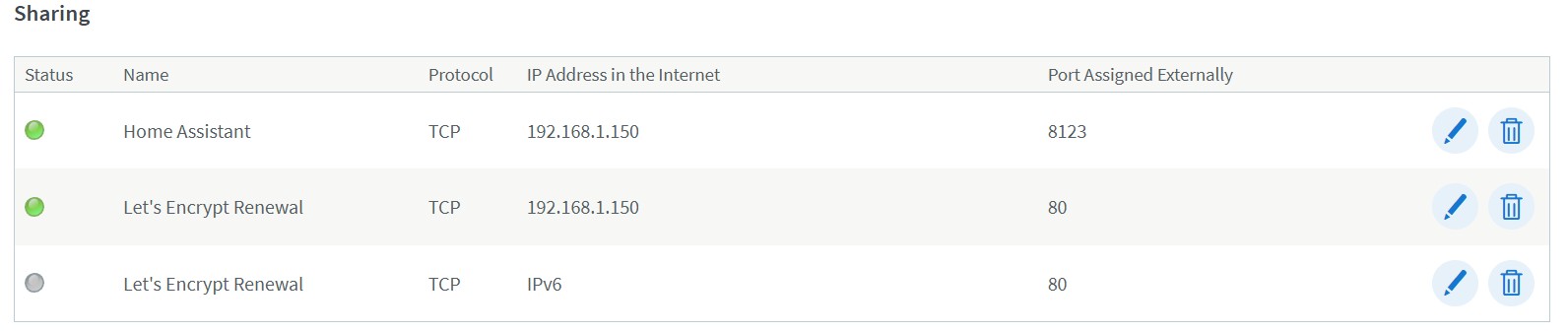
Please verify if port 80 on your fritzbox is forwarded to port 80 (or other port # if you changed it) of your Let’s Encrypt add-on. Otherwise the add-on cannot communicate with Let’s Encrypt to update the certificate.
It the certs are expired you cannot connect to HA remotely.
This problem has been going on for months. Somewhere in that timeframe I changed to a new (temporary) provider. Using Odido (Netherlands) on the 4G network, and connect the FRITZ!Box to the internet through the Odidi WiFi.
Poor setup (although it works fine for everything else including streaming), but I have to live with that until I move again. Does the setup somehow block getting the certificate?
I noticed that the FRITZ!Box is also unable to get a Let’s Encrypt certificate (it hangs after requesting one), so I use the self issued and registered that for now.
That might cause issues because some protocols might be blocked.
Also I noticed that your external fritzbox IP is 192.168.1.150. This is strange since 192.168.1.x is reserved for internal networks. And this might also be an issue here.