All well and good, but the primary issue is that the lights didn't turn off when they were supposed to. The bypass was off, and the lights are still on for 30 minutes.
The recommended approach for a garage is to create a template binary sensor with an auto-OFF delay for your garage door. When the garage door opens, the template binary sensor turns ON and remains ON for the configured delay (for example, 5 minutes). Once that delay expires, the template binary sensor turns OFF.
Next, create a group containing the template binary sensor, your motion sensor, and your mmWave sensor, then use this group as the trigger in the blueprint.
With this setup, opening the garage door will immediately turn the lights ON. If the door remains open but no motion is detected, the template binary sensor will turn OFF after its auto-OFF delay. The blueprint's own time delay then begins. If motion is detected at any time, the lights remain ON until no motion is detected and the blueprint's time delay has expired.
For example, if the template binary sensor has a 5-minute auto-OFF delay and the blueprint's time delay is also set to 5 minutes, the lights will turn OFF approximately 10 minutes after the garage door is opened, provided no motion is detected during that time.
Blacky 
1 Like
I use this automation in a few places in the house (as previous posts).
Prompted by the garage door post above.
I use it with an outdoor detector to turn on my room lights when I'm coming towards the (back) door when it's dark. It all works fine.
I have it set for my basic use case, which is that I'd like the lights to turn off after five minutes.
Is there a way to add a condition so that if the lights are already on to leave them on? The detection automation means that if the lights are already on, and someone comes home, the lights go off after five minutes.
It feels as if bypass is the answer but even reading it a few times I still don't understand it.
If you are turning the light ON manually then yes you can do this but you will need my  Manual Control Status Tracker blueprint. What you do is create a toggle helper and then in the manual control status tracker blueprint use it as your Tracker Helper. Then your light goes into Target Entities To Track and select manual ON and OFF option. Then use that toggle helper in this blueprints bypass option 1.
Now when you turn the light ON manually it will turn ON the bypass disabling the automation. Then you must manually turn the light OFF to turn OFF the bypass (toggle helper) enabling the automation again. You can choose to use the Bypass Auto OFF Option so if you forget to turn OFF the light manually it will automatically turn OFF the bypass (toggle helper) and enable the automation again.
Blacky
Hi! Thanks for the awesome blueprint. I am using it for a few months now.
Today i tried dynamic lighting with lux-controlled brightness. Currently, when the automation triggers, the light only turns on after the "Dynamic Lighting - Heartbeat" interval has passed. Is this expected behavior?
I want the light to turn on instantly when triggered, but I still want to keep a decent heartbeat interval (e.g., 1 minute) to adjust the brightness later. Is there a way to force an immediate update on the first trigger?
I should turn ON depending on your settings. If you could you please provide us your YAML of the automation? This YAML code are the settings you have selected in the automation so I can help. To do this go into your automation, top right 3 dots, Edit in YAML, copy all the code, come back to the forum and in your reply at the top tool bar click on “</>” and paste code in there.
Blacky
Thanks for the fast response. I tried a few variants. This would be the preferred one:
alias: Licht Gästezimmer EG - Sensor Light
description: ""
use_blueprint:
  path: Blackshome/sensor-light.yaml
  input:
    motion_trigger:
      - binary_sensor.motion_gaestezimmer_eg_presence
    light_switch:
      entity_id: light.light_gaestezimmer_eg
    time_delay: 0
    include_bypass:
      - bypass_enabled_stop
    motion_bypass_lights_stop:
      - input_boolean.licht_gaestezimmer_eg_bypass
    include_dim_before_off: dim_before_off_enabled
    dim_before_off_pct: 50
    include_light_control:
      - use_brightness
    dim_before_off_time_delay: 5
    bypass_auto_off_delay: 15
    include_state_control: state_control_enabled
    state_control_entity: binary_sensor.sleep_mode_house
    include_night_lights: night_lights_disabled
    night_lights_conditions:
      - sun_enabled
    night_lights:
      entity_id: light.light_gaestezimmer_eg
    include_night_light_control:
      - use_brightness
    night_time_delay: 0
    include_dynamic_lighting: enable_lux_controled_brightness_inv
    dynamic_lighting_lux_sensor: sensor.motion_gaestezimmer_eg_illuminance
    dynamic_lighting_min_brightness: 20
    dynamic_lighting_boolean: input_boolean.light_gaestezimmer_eg_dynamic_lighting
    dynamic_lighting_max_lux: 400
    dynamic_lighting_heartbeat: 1
    light_transition_on: 0
    light_transition_off: 0
    night_light_include_dim_before_off: dim_before_off_enabled
    night_light_dim_before_off_time_delay: 10
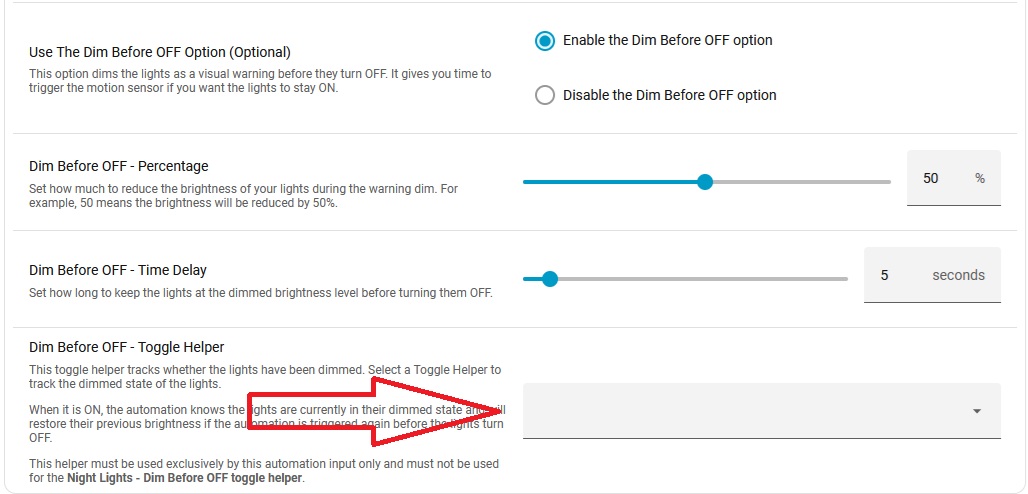
Thanks for your YAML. Your missing the dim before OFF toggle helper in light control. Add one in or disable this option and you bee good to go.
Blacky
1 Like
I'm really new to automations, and I very much appreciate your work creating this one, and even more so in supporting it.
My lights aren't dimming off. I have configured the automation with a sensor group (two Ikea Myggspray motion sensors, one at the top and one at the bottom of the stairs) as the Trigger, and a light group (three Ikea Kajplatt bulbs in the stair pendant light) as the Lights. I would like the lights to fade off over 10 seconds, so I configured the Light Control to Use Transition with a 0 second Transition - ON and a 10 second Transition - OFF.
The lights switch on with any motion, as expected. They stay on while the Myggspray sensors clear, as expected. Then they fade quickly, over less than a second.
The trace shows they take a path through the transition, but that's not how my lights behave. Looking at the source code, I see it expects a scene.
I've never worked with scenes before. Is this just a named scene so that the automation can save the previous state of my lights? Or do I need to make a scene specifically to store the off state? Or perhaps I've done something else incorrectly, and I don't actually need a scene at all.
How do I get my lights to fade off?
Hey... Since the latest HA update to 7.1, my automations are no longer working. What could be the reason for this?
Thanks for your kind words.
You don’t need to use a scene. Some lights don’t support transition and or the internal light has it own setting that may override the blueprint. If you like me to look at your settings then could you please provide us your YAML of the automation? This YAML code are the settings you have selected in the automation so I can help. To do this go into your automation, top right 3 dots, Edit in YAML, copy all the code, come back to the forum and in your reply at the top tool bar click on “</>” and paste code in there.
Blacky
I’d appreciate that. Here’s my yaml:
alias: Stair presence lights
description: ""
use_blueprint:
  path: Blackshome/sensor-light.yaml
  input:
    motion_trigger:
      - binary_sensor.stair_presence
    light_switch:
      entity_id: light.stair_lights
    time_delay: 0
    include_light_control:
      - use_transition
    light_transition_on: 0
    light_transition_off: 10
Thanks for your YAML. All your settings look good, and the blueprint will send the transition value to your light. There are a couple of things to keep in mind.
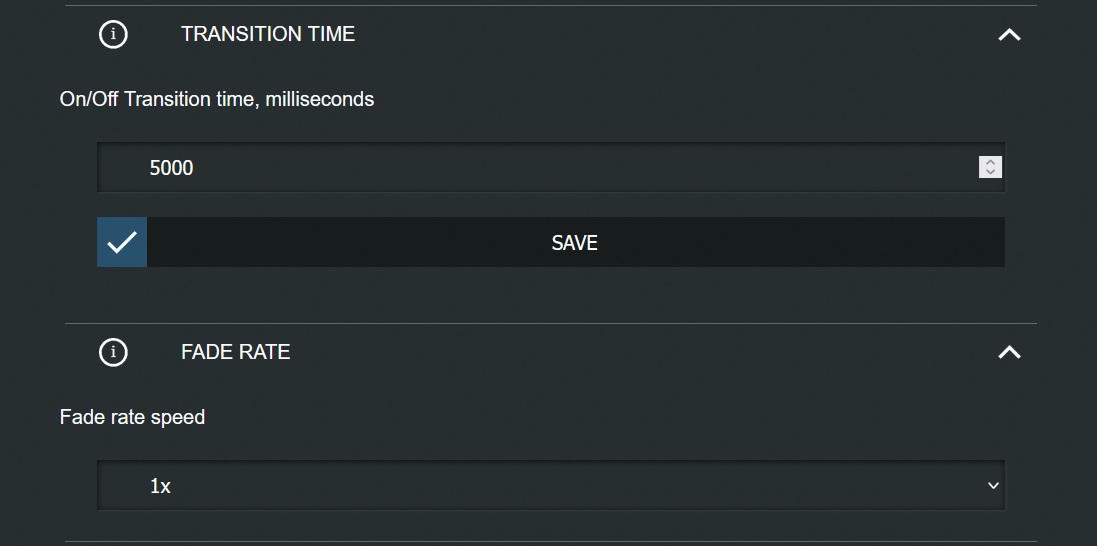
Not all lights support transitions in the same way. Some lights ignore the transition value sent by Home Assistant or use their own built-in settings instead. For example, I use Shelly dimmers, and the transition is controlled by the Shelly’s own settings. They only allow a maximum transition of 5 seconds (5000 milliseconds), so even if I set a 10 second transition in the blueprint, the light will only fade for up to 5 seconds.
In my case, I simply work within that limit. For example, I can set a 1 second transition for turning the light on and a 5 second transition for turning it off, and the Shelly will perform those transitions correctly. I just know that any transition longer than 5 seconds will be limited to 5 seconds by the dimmer.
This is Shelly settings
On the other hand, I also use WLED lights, which do support the transition value sent by Home Assistant. If I set a 10 second transition in the blueprint, the lights will fade over 10 seconds.
Have a look in your light settings and see what is possible for what you have.
Blacky
Thanks, Blacky. These are Ikea white+color Kajplats bulbs; I know they support dimming, but I don’t know what transitions they support. Documentation is… sparse. I found some Kajplats Zigbee documentation on Github, which implies that transition works, but grabs control of the bulb while transitioning. I’m running it in Matter-over-Thread mode, and I don’t know if that changes anything.
Is there a way I can send commands to the light directly and see how it behaves?
This blueprint will do that for you.
Could you provide us a screen shot of your light device. This will be in settings > device & services > look for you light device and take a screen shot of all the settings.
Then
In developer tools under the states tab could you search for your light entity and then also take a screen shot of all your attributes.
Thanks
Blacky
@Blacky Will your blueprints be updated to support the new automation features like areas/labels? I’d love to setup trigger devices by area/labels, and the same thing for devices being controlled.
Right at the start, this blueprint used to do all of that, but it applied to everything and I was getting a lot of questions about how it behaved. That’s why I changed the focus to Light, Switch, Scene, and Script entities. Internally, the blueprint splits these up from a single input and applies each entity to the appropriate action. Even though this is a new feature in Home Assistant, the blueprint has always been able to achieve the same result. Groups have also always been available, allowing you to maintain a set of lights (or other entities) in a group and simply add that group to the automation.
If we make it turn everything ON/OFF in an Area, what exactly does “everything” mean? For example, should it turn ON every light, switch, scene, or script associated with the kitchen?
Personally, I’m not a big fan of Areas at the moment. Maybe I just need more time to think about it. I think it could work well in a small home or apartment, but in a larger home I’m not sure it would suit most people. Turning ON every light, switch, scene, or script in the kitchen may not always be what someone expects.
If, instead, we said “turn ON a Label containing the kitchen lights,” then I think that could work. However, someone would need to maintain that Label. Or do we simply maintain the automation instead? A Device selector could also work, but I can see potential issues there as well.
I can definitely add support for Areas, Labels, or Devices without any problem. My concern is making sure it is well planned before adding the extra complexity. It would mean more code to write, more code to maintain, and potentially more bugs.
Or do we keep it simple and say, “Turn ON these entities,” where we know exactly what is going to happen? Yes, if a new kitchen light is added, you may need to update the automation, but that’s a quick and obvious change.
I’m happy to listen to ideas though.
Blacky
I’m also seeing an error since very recently. Was using it successfully since a while and just yesterday migrated all lights to Sensor Light 8.6 and now non of them seem to work unless I use entities as targets. Is this intended?
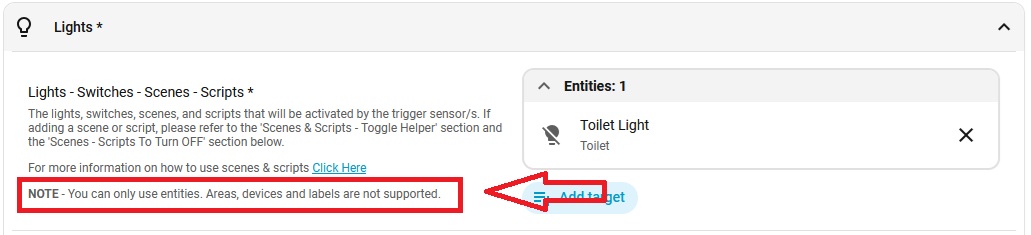
Edit: just read the response above, was not clear to me this is not supported. Is there a cleaner way to make it visible in the UI?
Error in logs:
Logger: homeassistant.components.automation.licht_auto_esstisch
Source: components/automation/__init__.py:715
Integration: Automation (documentation, issues)
First occurred: July 14, 2026 at 19:05:16 (80 occurrences)
Last logged: 23:38:31

Error rendering variables: UndefinedError: 'dict object' has no attribute 'entity_id'
Then I have the first FAQ for this click here
I am glad you worked it out and your up an running.
Blacky