Floor3DX Card: the 3D floor plan card plus two optional companions: a 2D snapshot card and a learning-enabled scheduler

If you previously built a 3D floor plan for Home Assistant with floor3d-card, this is a card that picks up where it stopped. If you never did, because the model files were huge, the lights looked flat, or the whole thing seemed like too much effort, this post is also for you: the hard parts have got easier, and an existing Sweet Home 3D house (or a Blender/SketchUp export) is all it takes.

Floor3DX Card is a fork of floor3dpro-card and, through it, of Andrea Di Zanni’s original floor3d-card. It shows a live 3D model of your home and binds the model’s objects to your entities: lamps lit in the bulb’s colour and brightness, doors and shades moving with their covers, fans spinning at their speed, camera feeds and video on screens, the time of day falling through the windows.
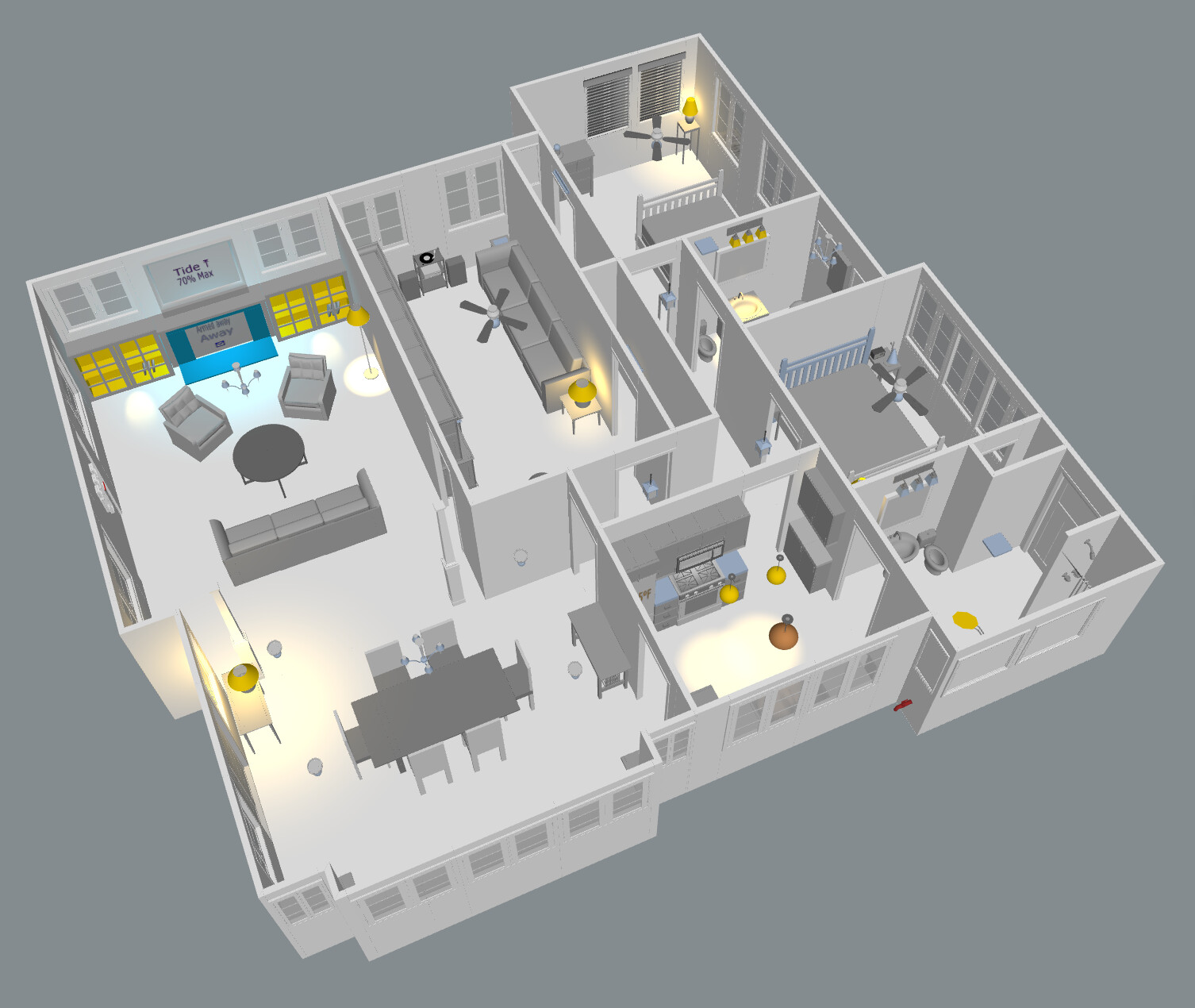
Repository and documentation: GitHub - FortranFour/floor3dx-card: Home Assistant 3D floor plan card. Fork of floor3dpro-card – Game Engine Backbone Edition (which, itself, was forked from Andrea Di Zanni's floor3d-card) with Draco/Meshopt/KTX2 models, full-resolution rendering and a door-cache fix, along with many new features · GitHub (MIT). Current release: 2.3.0.

If you already use floor3d-card or floor3dpro-card

Your configuration works as it is. Change one line:

type: custom:floor3dx-card

The card registers its own element names, so it installs next to the cards you have and can go on the same dashboard. The way to try it is to duplicate an existing card, change the type, and compare. Every new behaviour is off unless you configure it; a config written for the parent cards renders exactly as it did. Model files, object names, object_groups, entities, type3d rows, zoom_areas: nothing changes.

What the fork adds

Compressed models. Draco, Meshopt, KTX2 and WebP glTF files load with the decoders kept next to the card (HACS downloads them with it), so a house that was 30 MB is 4 MB, loads in a couple of seconds on a phone, and works with no internet. Compression scripts are in the repo. This alone made the card usable for me on iOS.
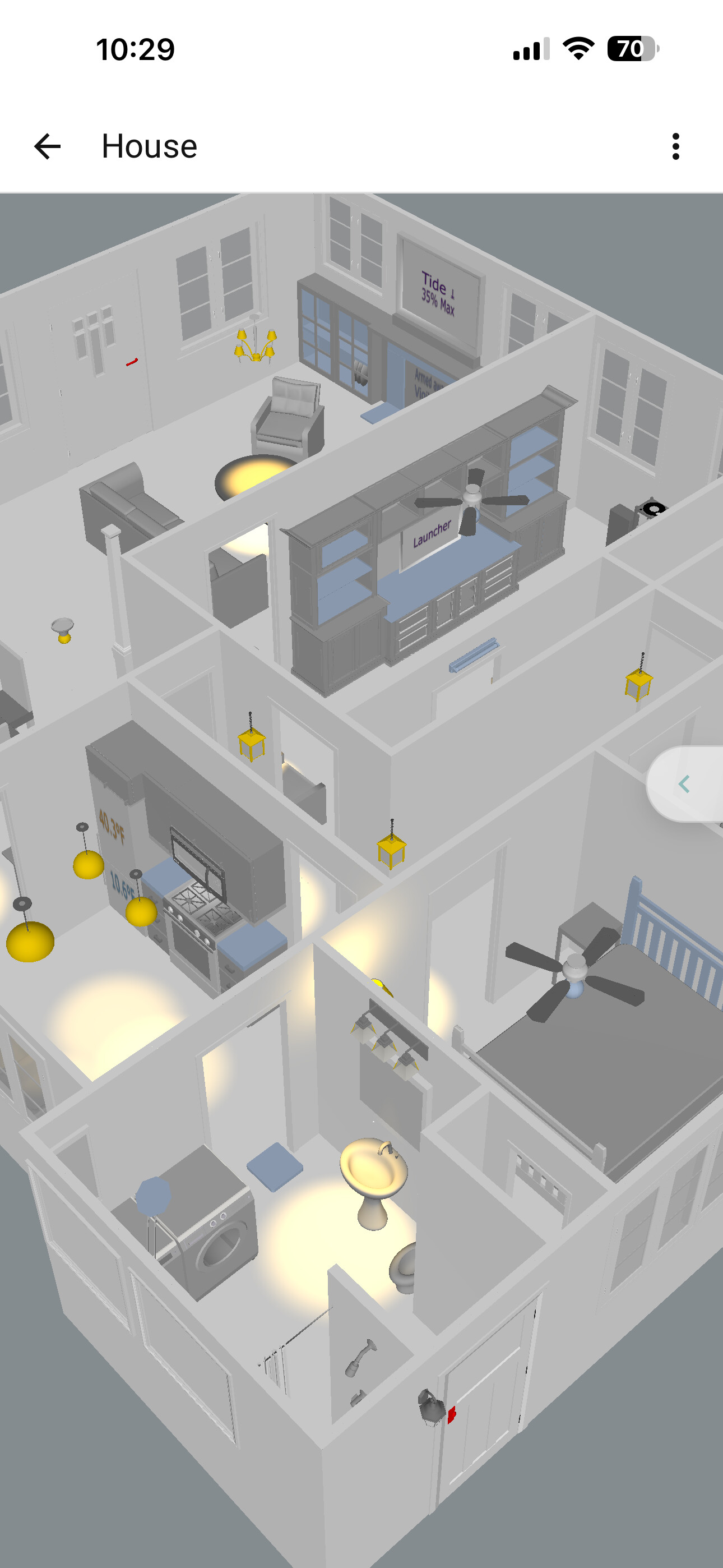
Lights that behave like the real ones. Brightness and colour from the entity (follow_entity), a wall switch for the state and the bulb behind it for the colour (color_entity), one light for a multi-part fixture, a light placed in front of its object so a slatted headboard throws its pattern on the wall. A color: entity condition tints the lamp shade in the light’s colour.
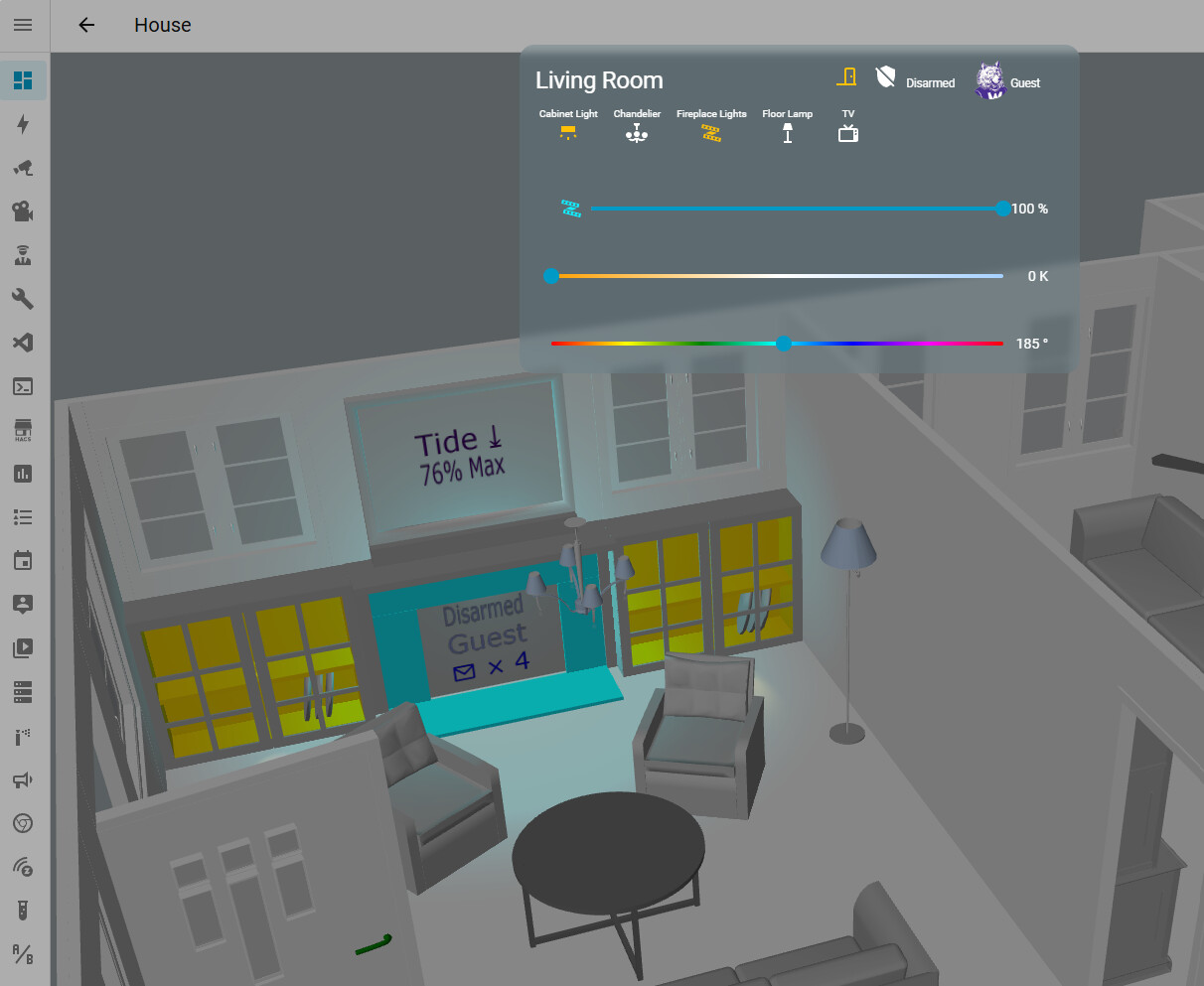
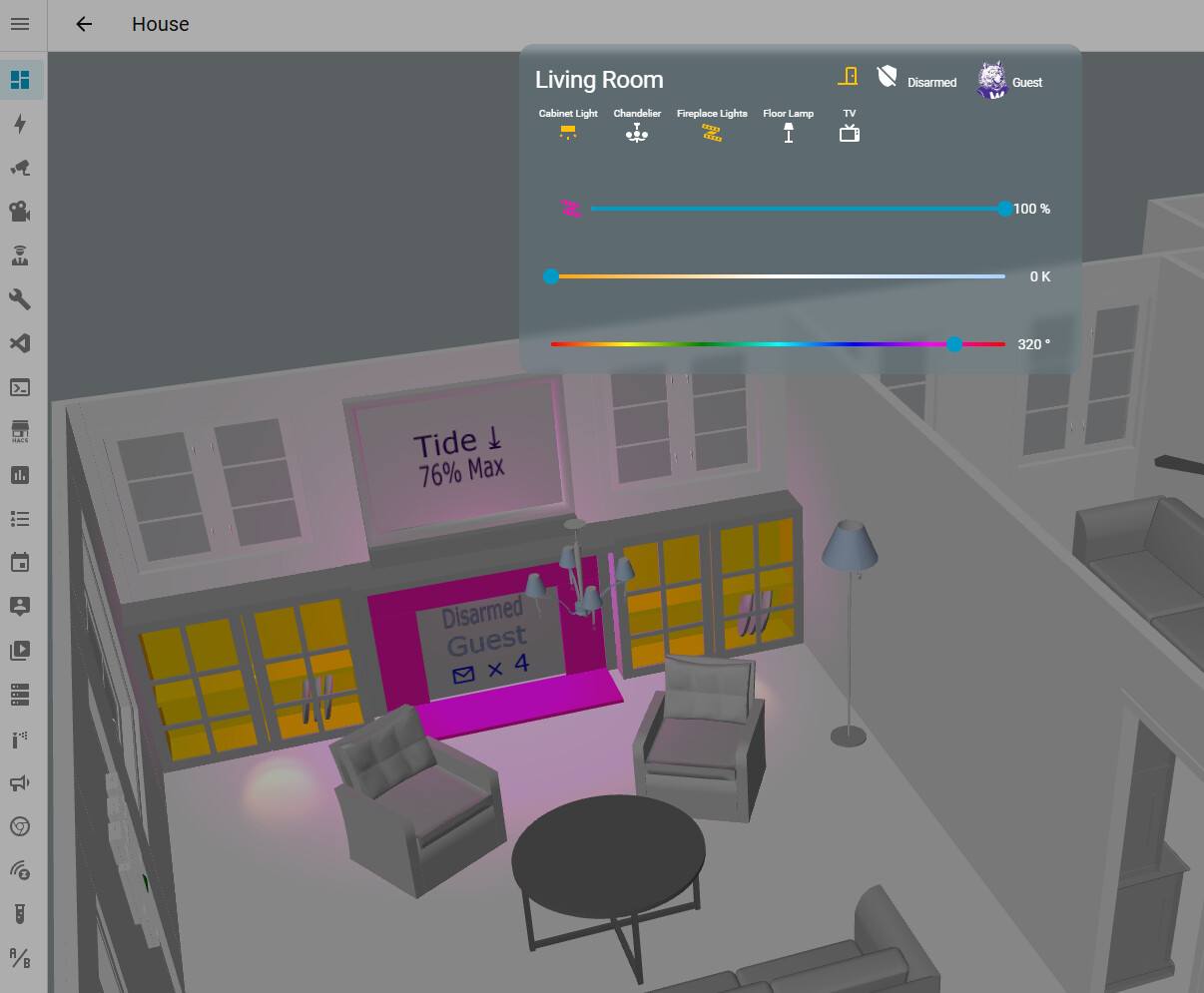
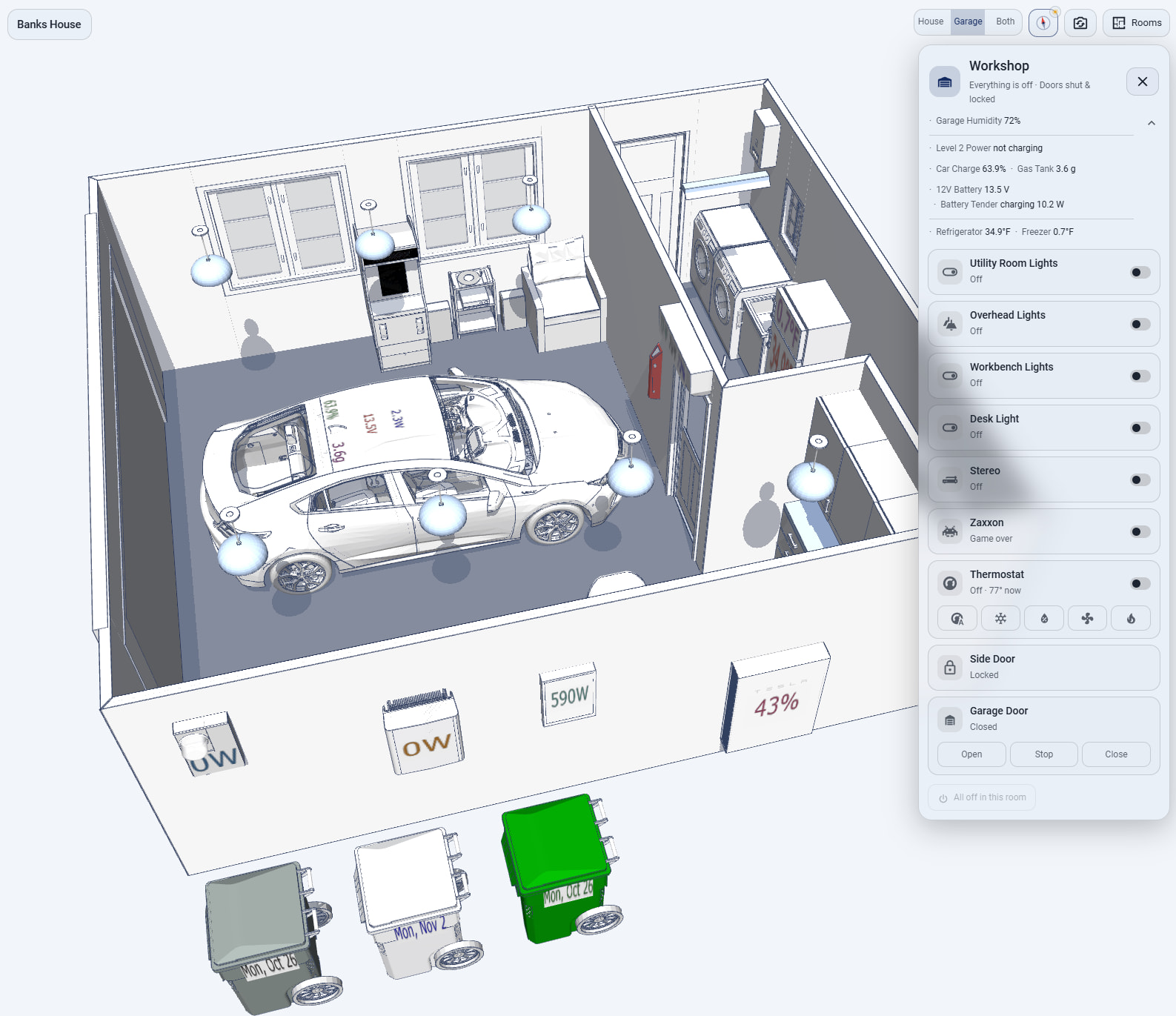
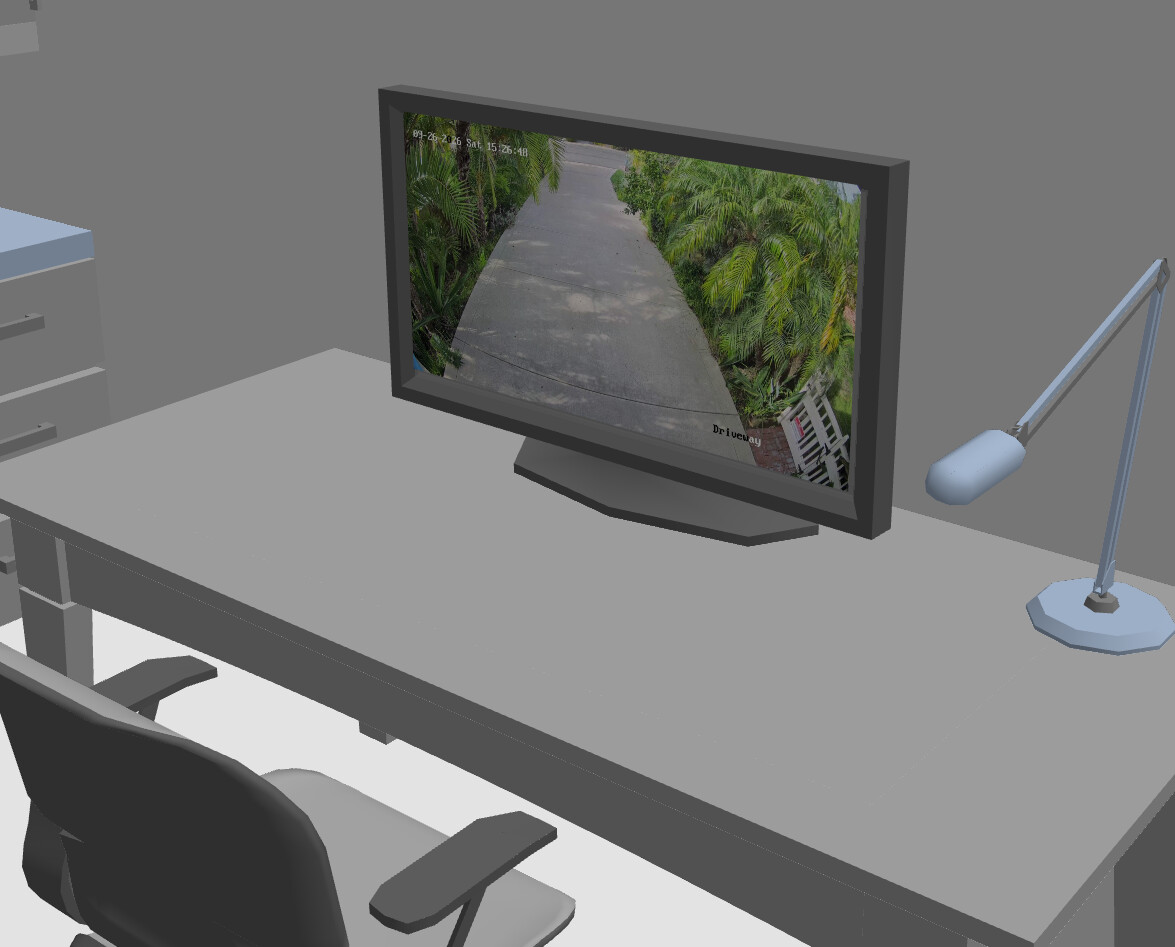
Pictures and video on any surface (type3d: image). A camera’s entity_picture on the wall display, album art on the stereo, an animated GIF decoded in the card, a looping video while a switch is on and a dark still while it is off. It works on surfaces the model exported without texture coordinates (Sweet Home 3D panels, plain boxes), which is most of them. In my garage the security camera video feed shows on the desktop monitor and the arcade game Zaxxon cabinet’s marquee and screen animates while the machine is on:
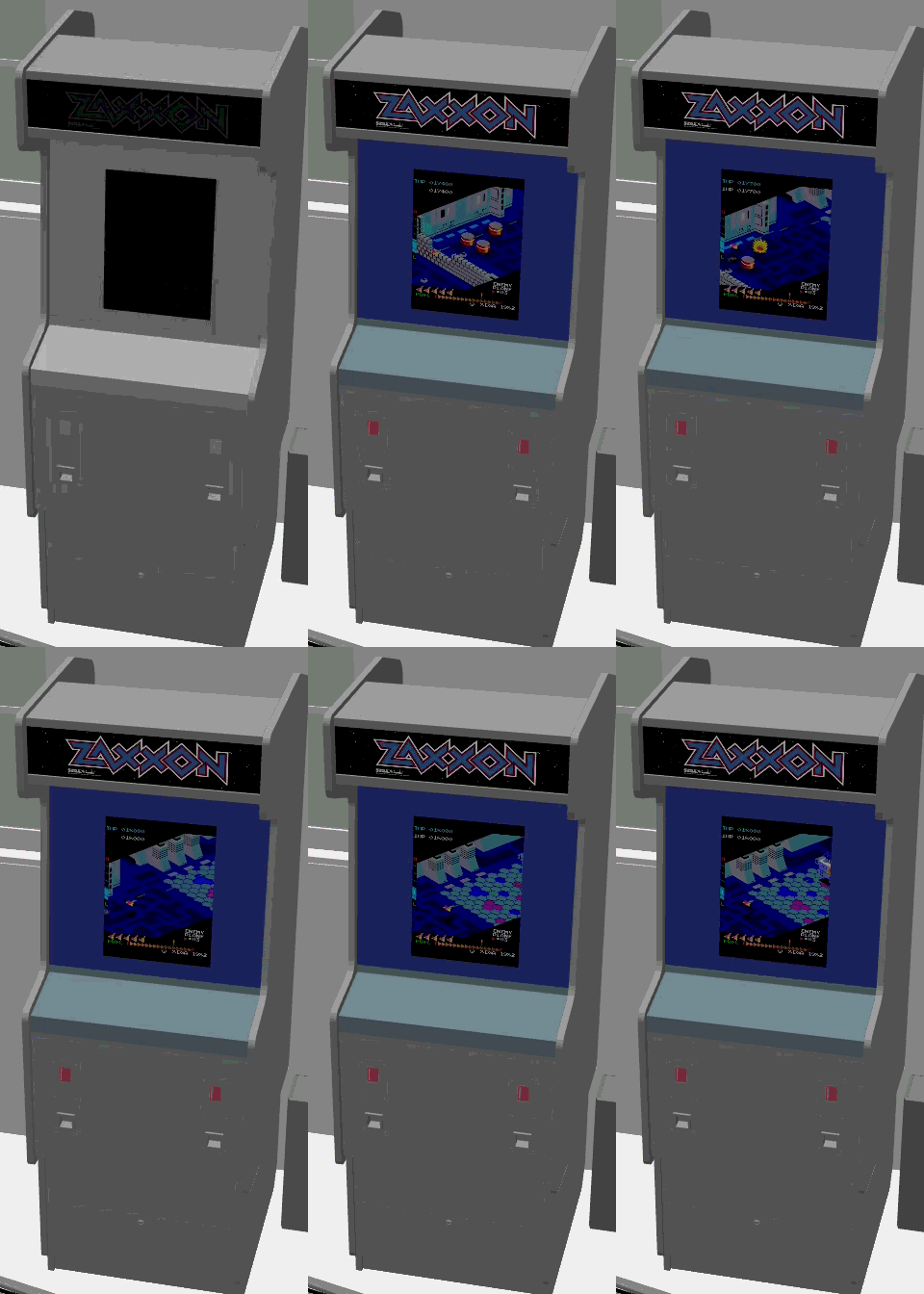
Recording: the marquee animating on a model object

Time of day without a roof (daylight). Ambient light and colour from the sun’s elevation and a weather entity, beams through the windows that follow the real sun round the house, glass that glows after dark, and a slider to scrub through the day.
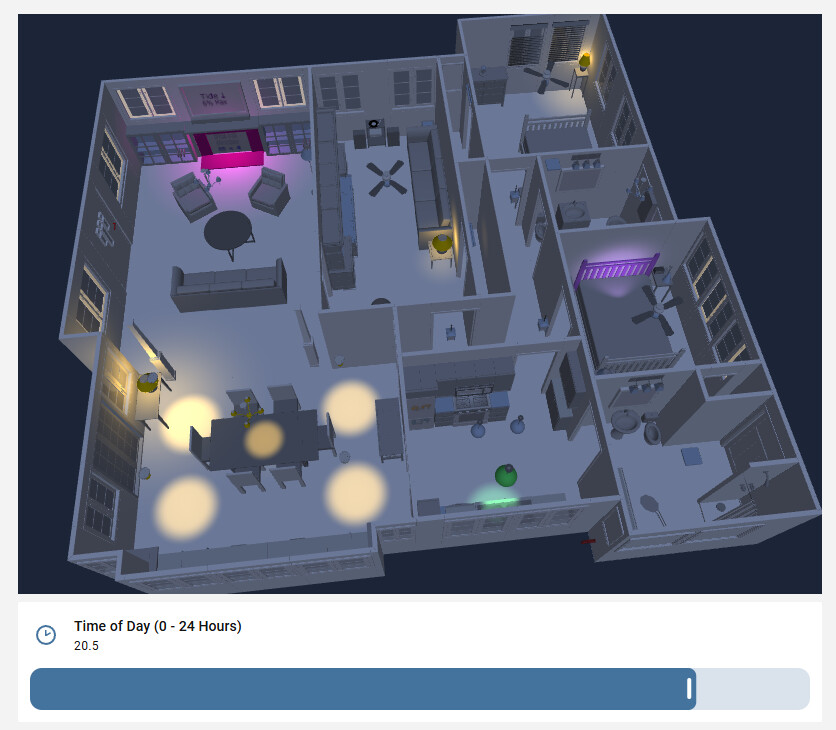
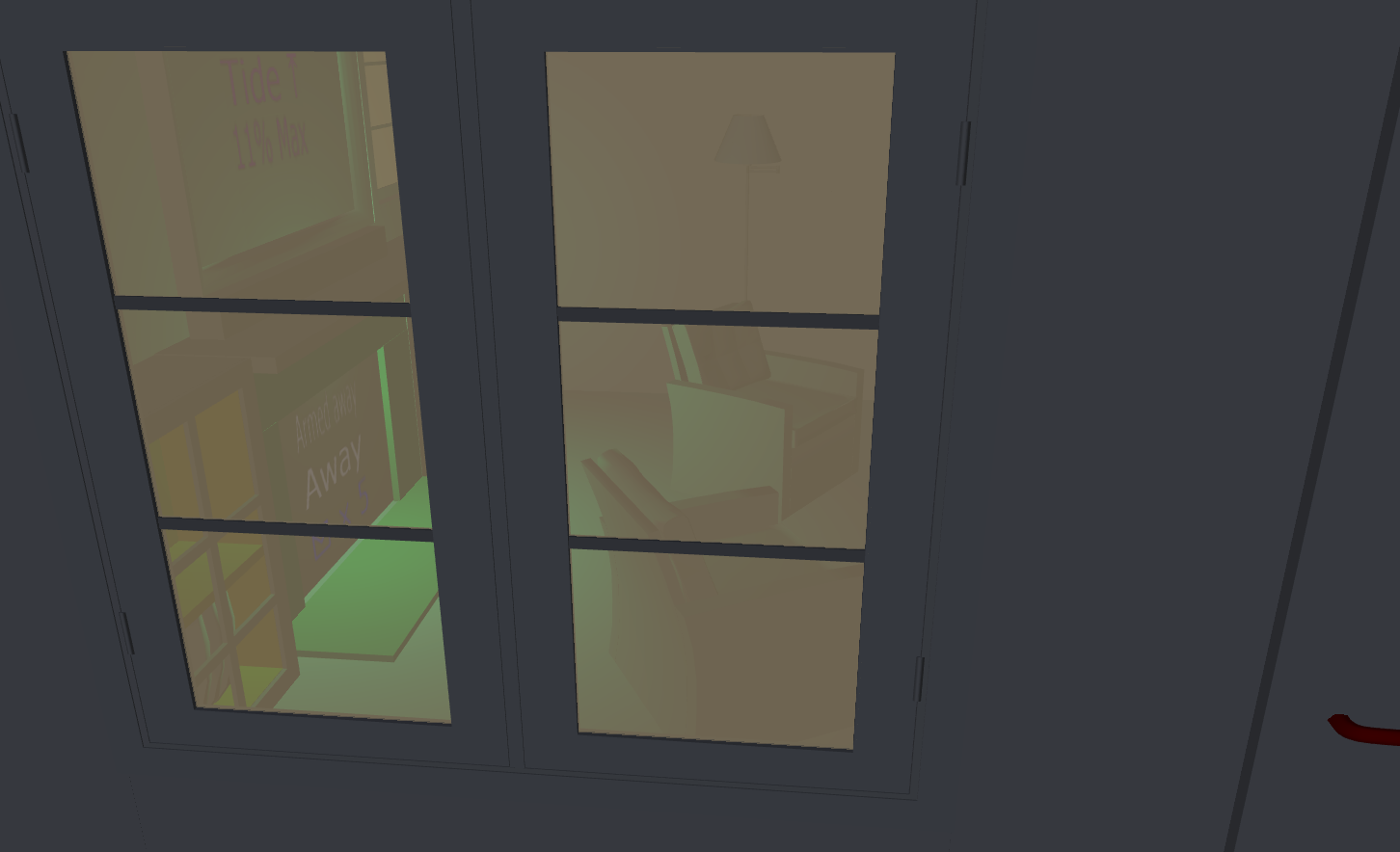
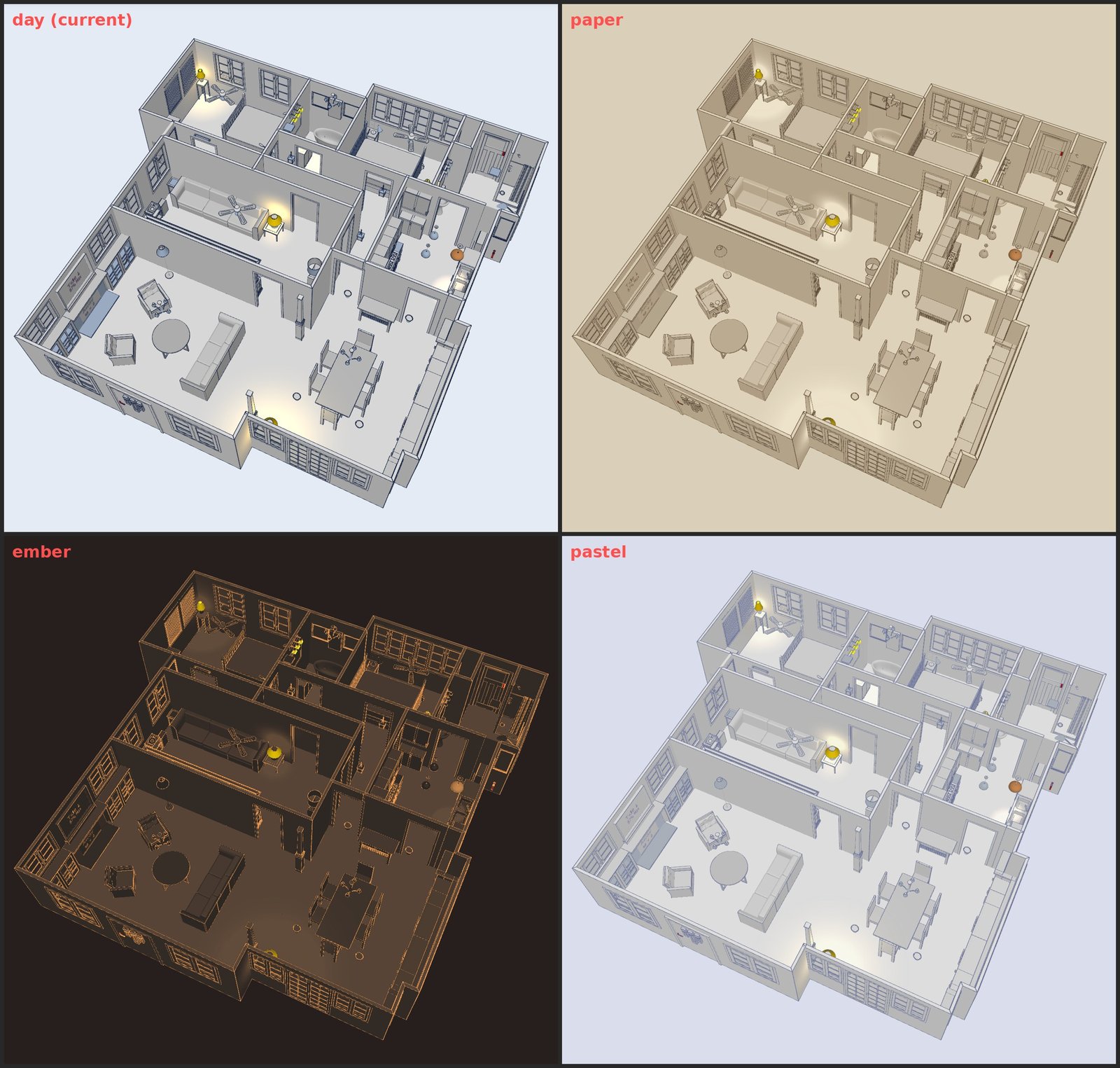
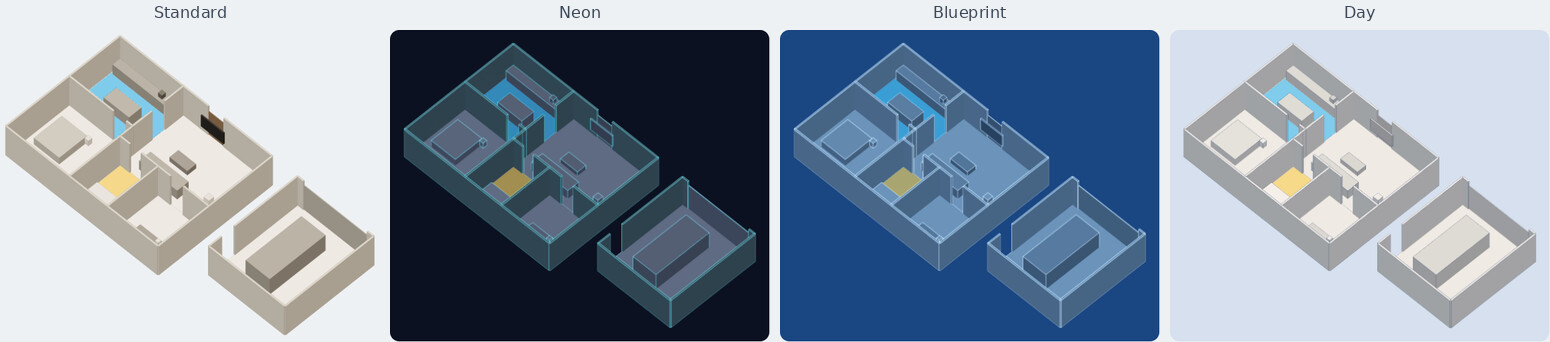
Themes (look). The neon, blueprint and day looks of NeonPlan 3D and NextFloor (see table below), on your own model: glowing edge lines, lit lamps that shine, outlines that know to skip wall seams and room borders. Three more of this card’s own (paper, ember, pastel) and a custom theme with your colours as colour pickers in the editor.
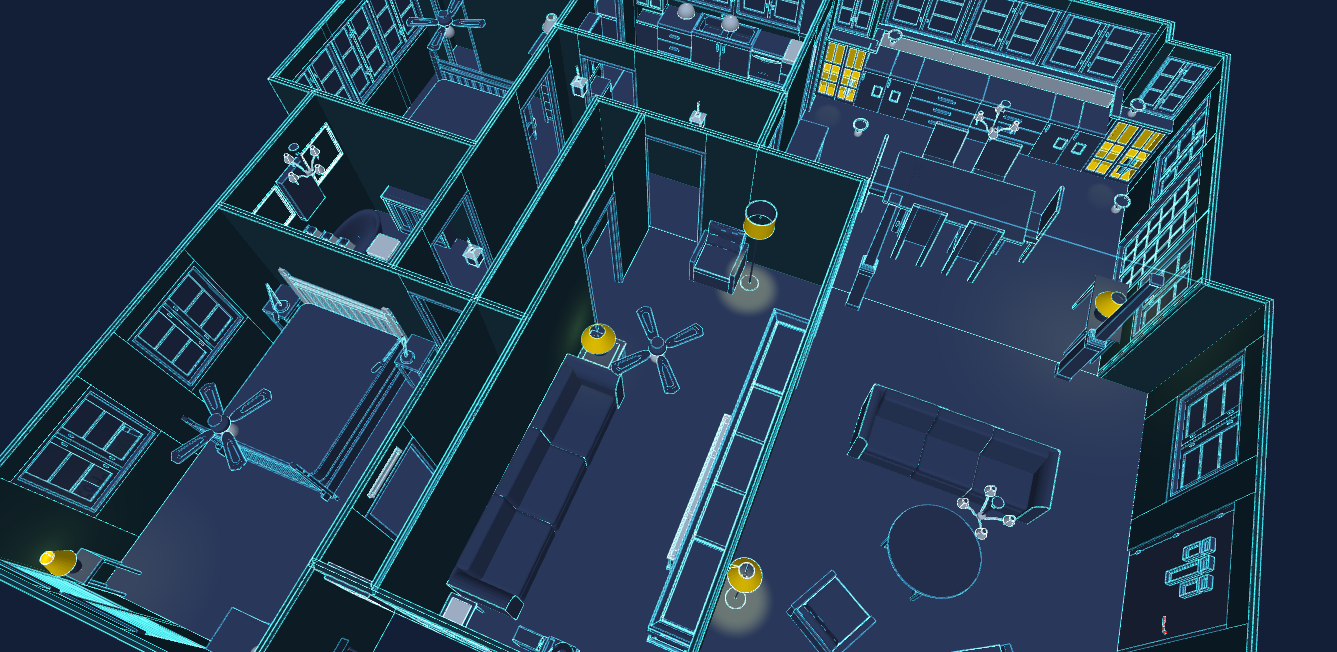
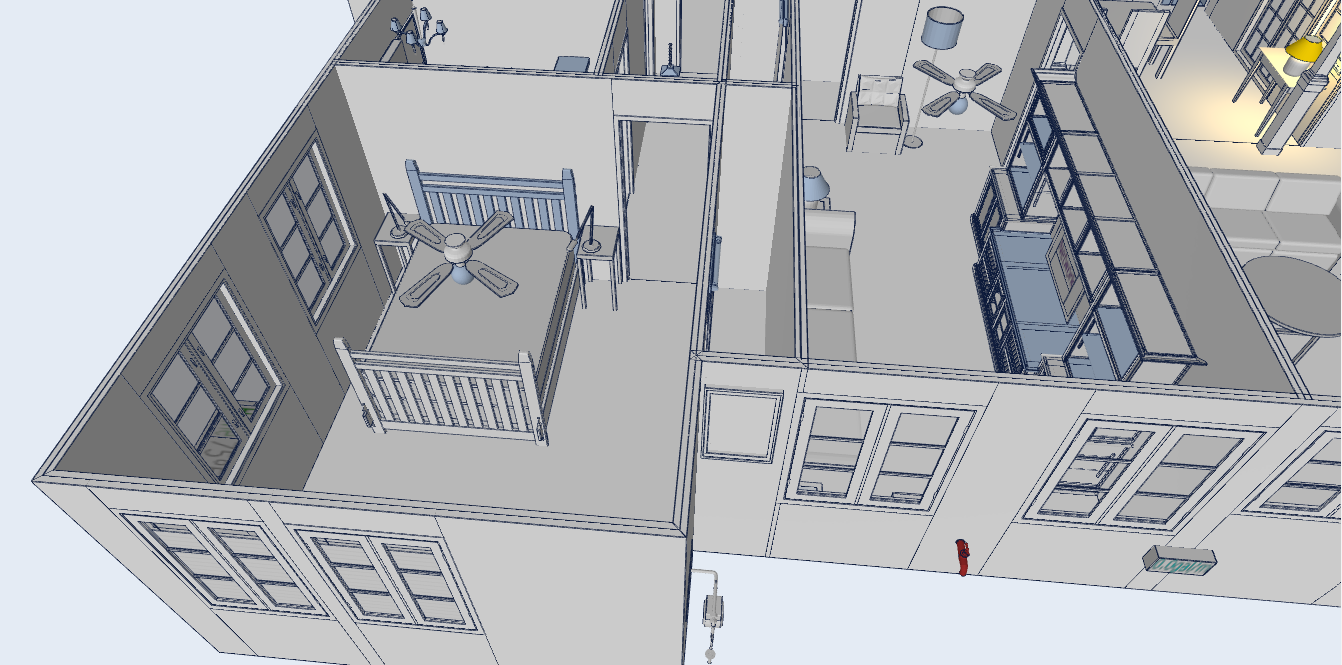
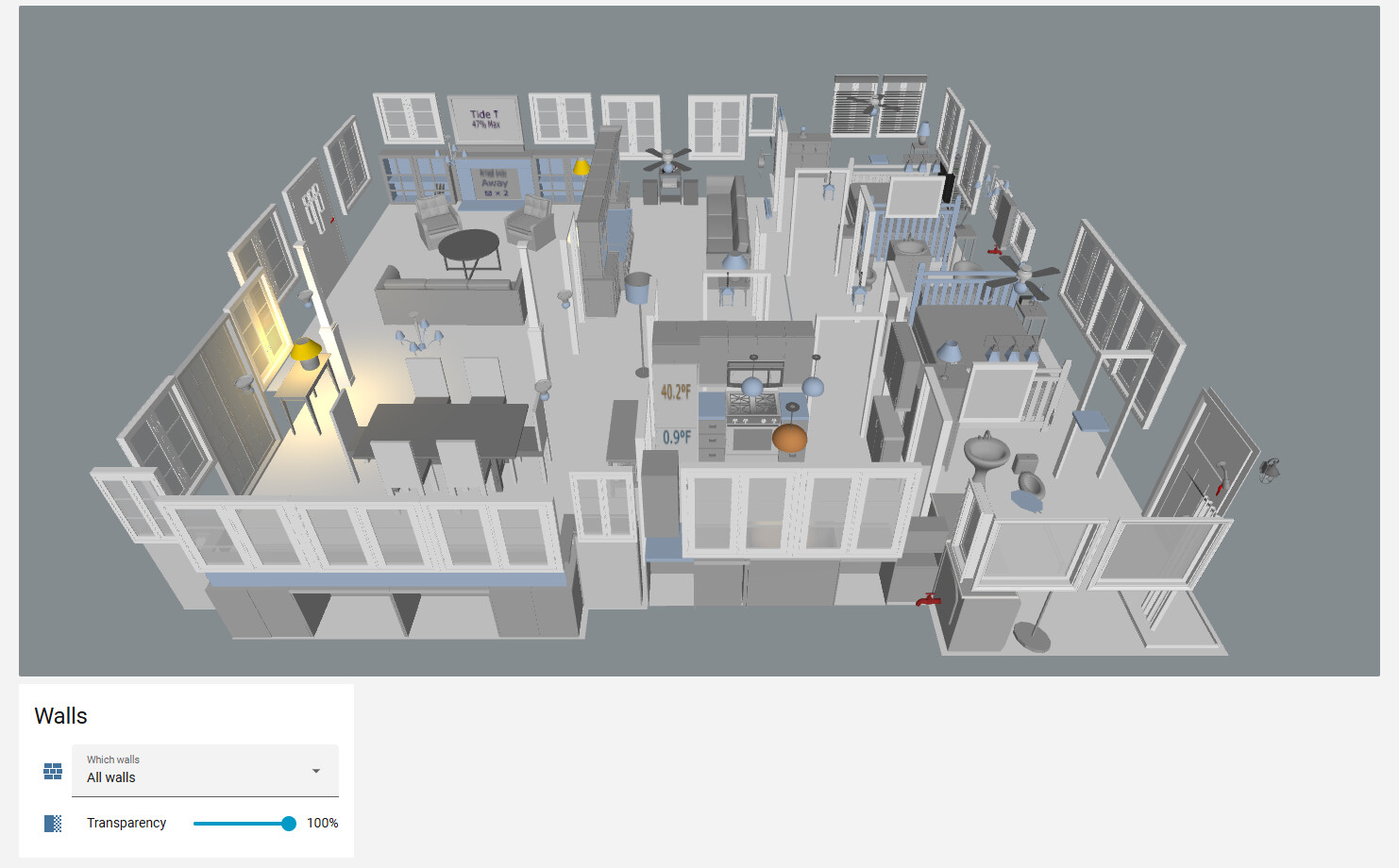
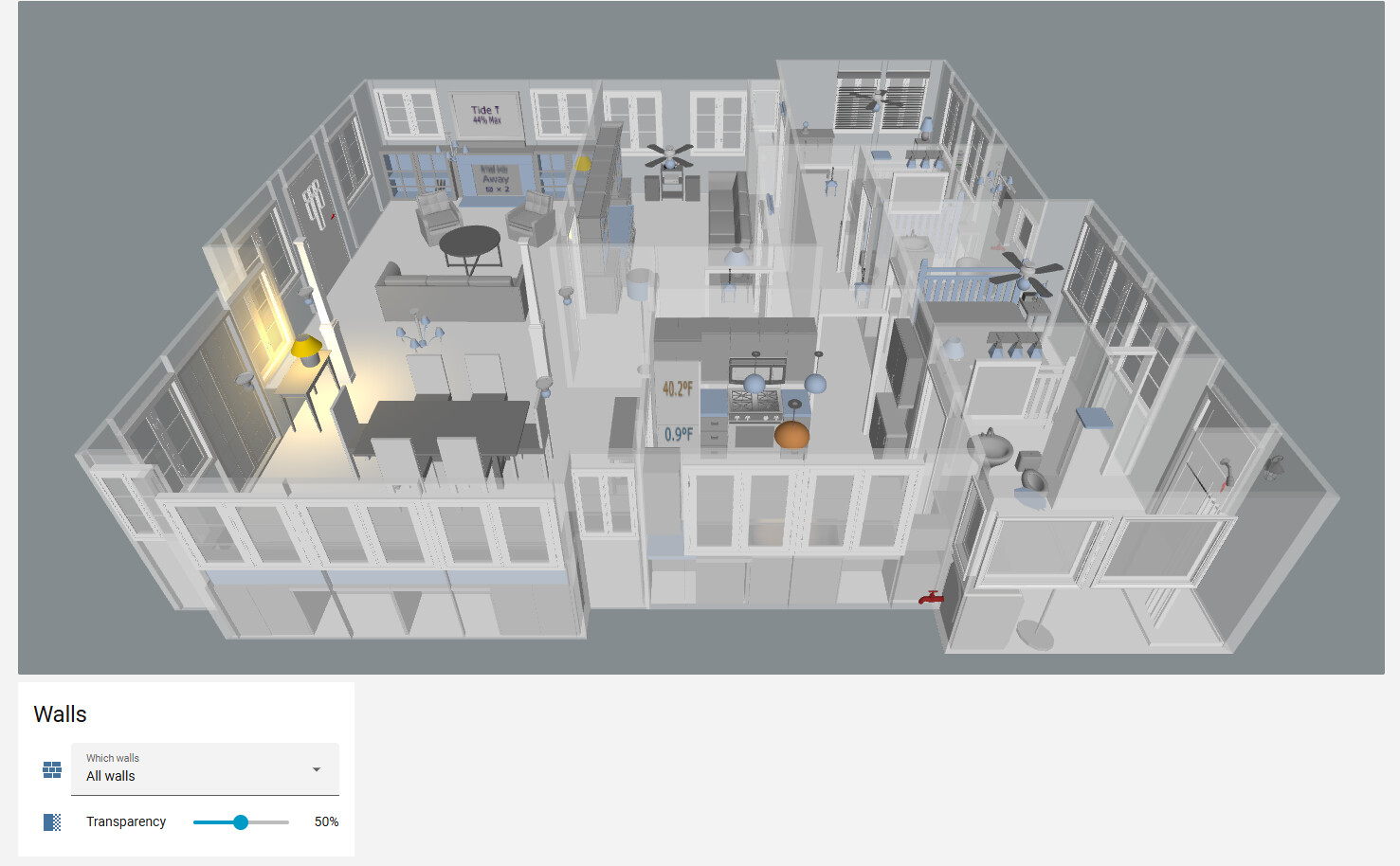
Shades that shrink with their position (type3d: shade), with a second motor for top-down/bottom-up shades. Transparent walls, by a fixed amount or an amount a slider sets, down to not drawn at all. Fans that ramp up and down. A loading bar with the model’s name, the step and the megabytes.

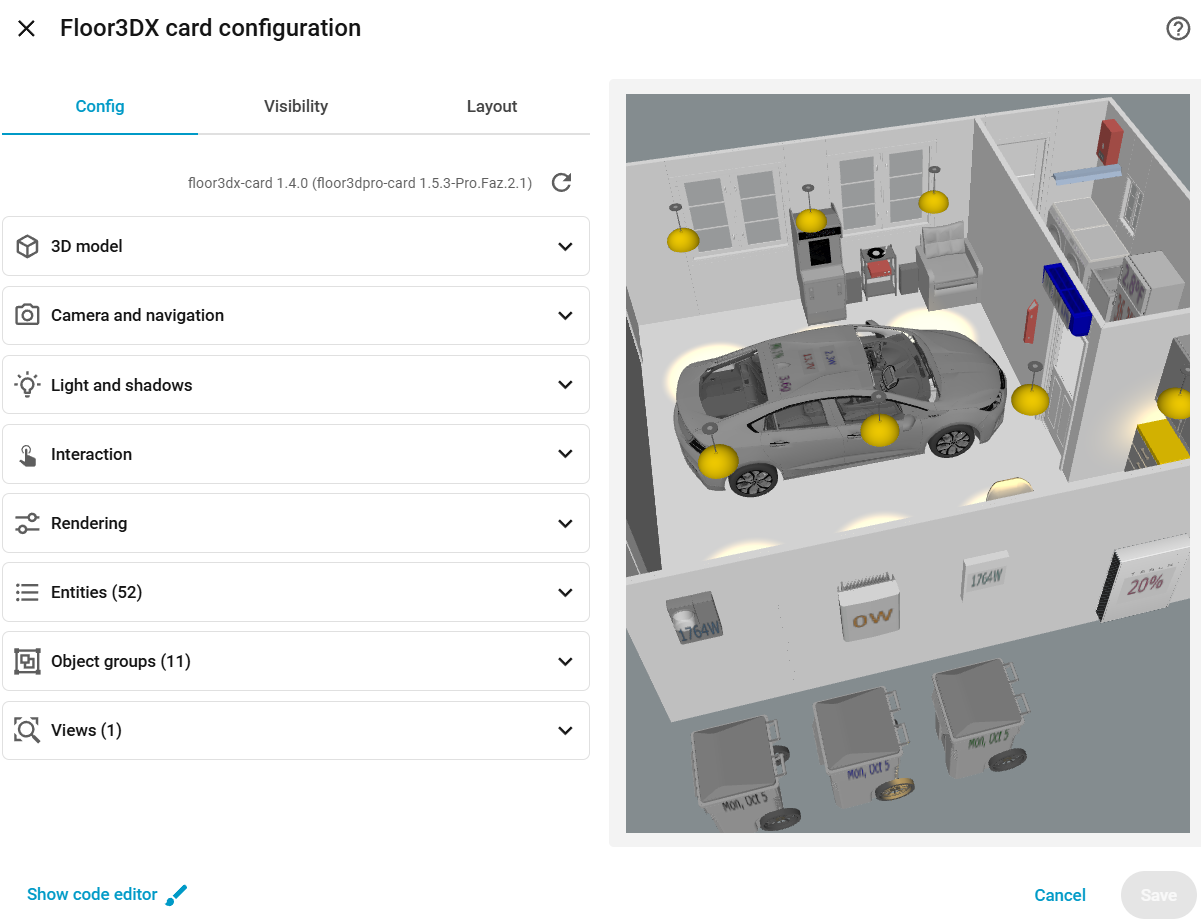
A visual editor on Home Assistant’s own form components (adapted from giosci1994’s fork, see table below): sections, sortable lists of entities and groups, every object of the model in the menus with a search, and a pick button that turns the preview into a picker: tap an object, the field fills in. The objects of the row you are editing are outlined in the preview.
Fixes to things the parent cards got wrong: doors and windows displacing on a return visit, Draco models rendering in a random order, scenes with more shadow-casting lights than the GPU can take going black, a re-render on every state change when colour tracking is on, the canvas staying low-resolution in masonry views.

Version 2.x: current three.js, same picture

The parent cards run three.js r130 (2021). Floor3DX 2.0 moved to r186, Lit 3 and TypeScript 5, and it was done methodically: the reference views of two real models differ minimally from the prior iteration using an earlier version of three.js. Two things three.js changed on the way (physical light units, sRGB colour management) are kept at their old behaviour by default and offered as options (lights: physical, color_management: managed), tuned so that switching them on needs no re-tuning of your lamps.

2.1 added merge_static: a Sweet Home 3D export is one mesh per wall, panel and chair leg, and the card issued a draw call for each, every frame. Merging the ones nothing refers to dramatically improved performance; it took a real house from 3,054 draw calls to 401 and a frame’s CPU time from 26 ms to 8 ms, with a pixel-identical picture. 2.2 made the card sturdier (one bad entity no longer blanks the card; a texture leak on updating text panels fixed) and added unit tests and a fake-WebGL test rig that counts draw calls and textures in CI without a GPU.

Two optional companions

Neither is required; both use the model and configuration you already have for the card.

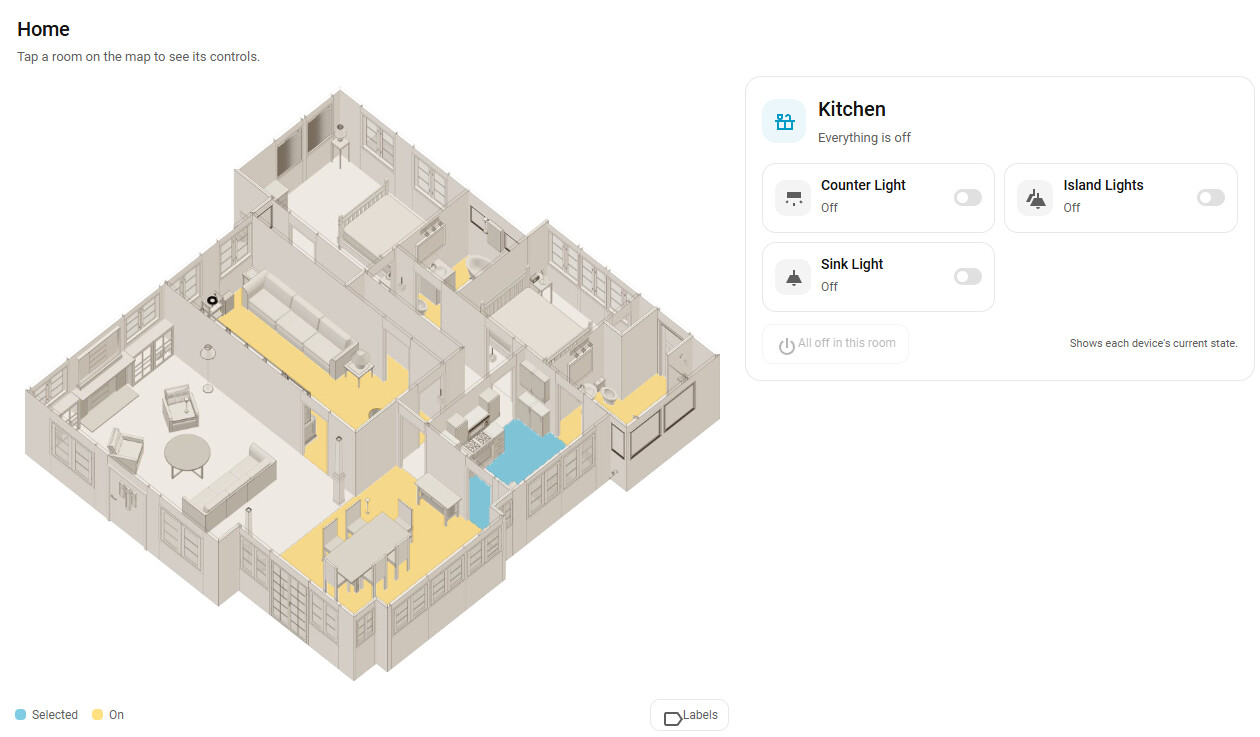
Floor3D Snapshot Card turns the model behind a floor3d card (any of the three) into a static, tappable 2D floor plan for wall tablets, phones and guests. Its editor finds the floor3d cards on your dashboards, renders the model once in your browser, detects the rooms and places the card’s entities in the room each one stands in. Tablets then load a 34 KB module and two images; no 3D runs on them. Tap a room for its controls; a guest mode limits locks, garage doors, alarms and volume. It offers the same themes as Floor3DX (plus custom colours) and a sunlight layer that follows the real sun. There is a separate thread for it.
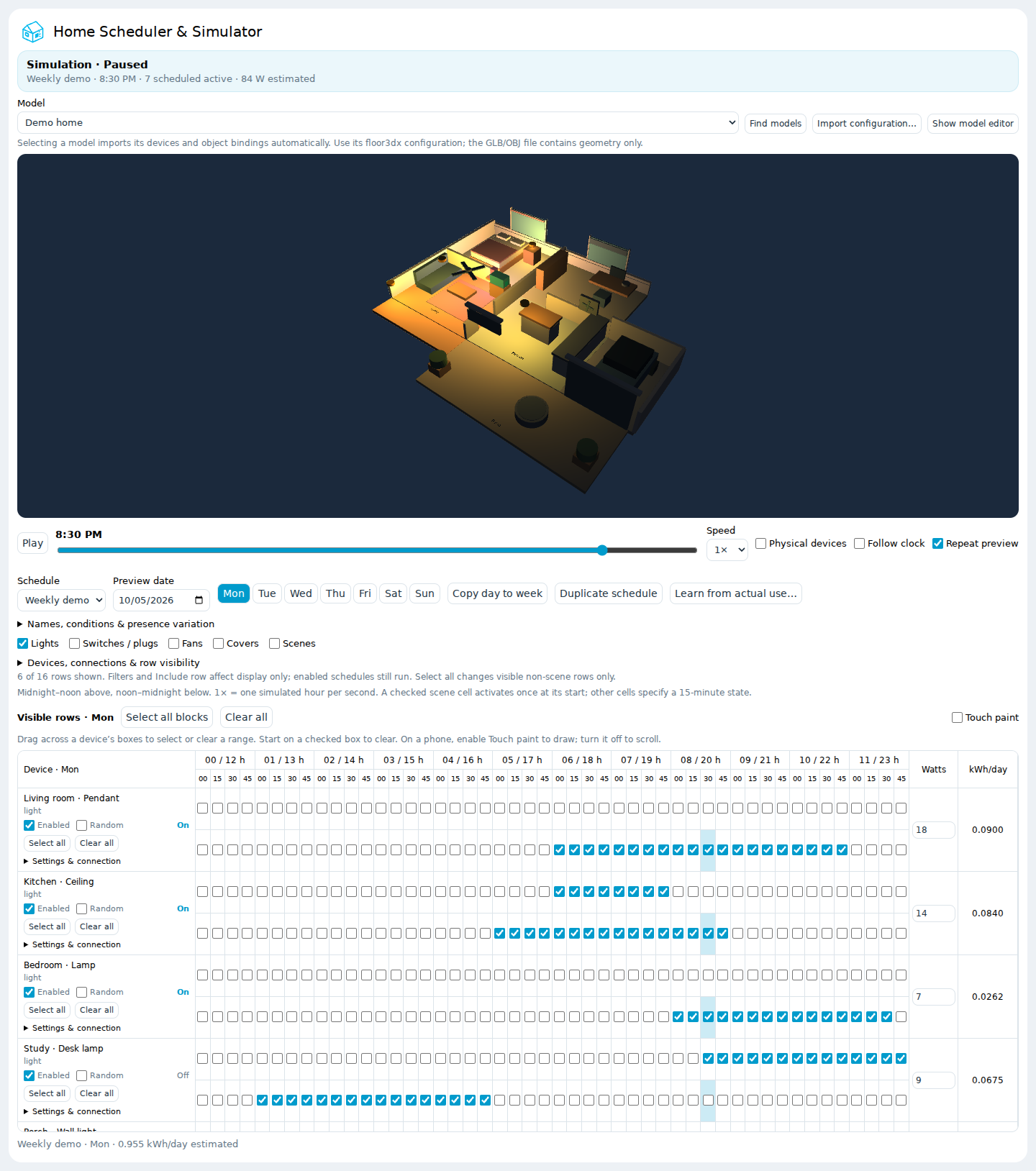
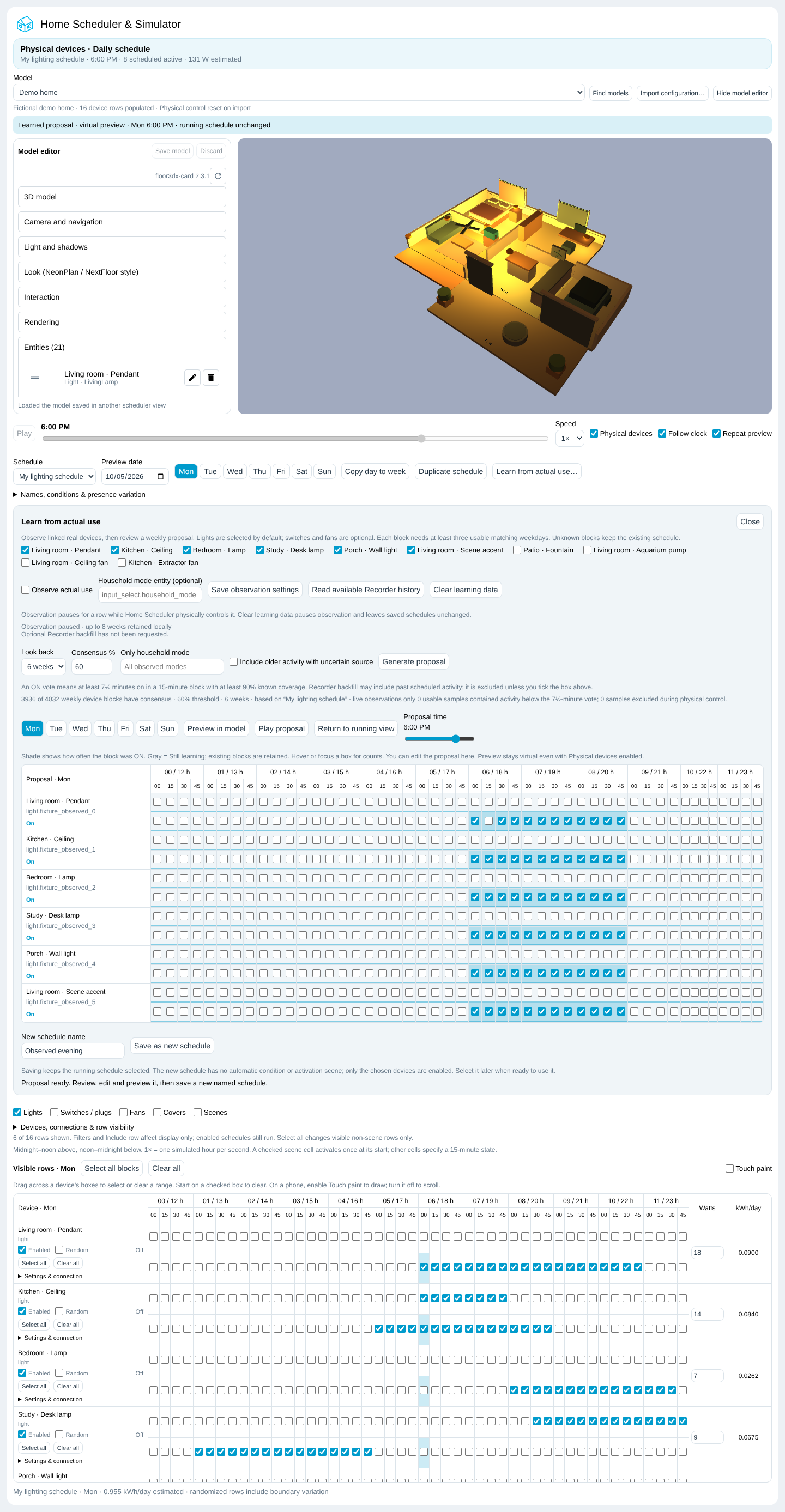
Home Scheduler & Simulator is a custom integration with a weekly quarter-hour grid for lights, switches, fans, covers and scenes. It embeds the installed Floor3DX card, so you can play a day in your own model before any real device moves, then arm it to run the house. Since 0.4 it can learn from actual use: it observes your linked lights, switches and fans, proposes a weekly routine from matching weekdays, and lets you review and play the proposal in the model before saving it as a schedule. It ships a fictional demo home, so you can try it without a model of your own.
How it relates to the other 3D floor plan projects

There are more of these than there were a year ago, so here is where each stands as of this writing (October 2026), to the best of my ability to determine their features.

floor3d-card (original) floor3dpro-card floor3d-card mod (giosci1994) NeonPlan 3D NextFloor Floor3DX
Repository adizanni/floor3d-card levonisyas/floor3dpro-card giosci1994/floor3d-card Mastershort/neonplan3d therealMRBK/NextFloor FortranFour/floor3dx-card
Forum thread Your Home Digital Twin (2021) Floor3D Pro Card (Jan 2026) floor3d-card mod (Sep 2026) NeonPlan 3D (Oct 2026) NextFloor (Oct 2026) this thread
Kind card card card integration + card integration + card card
Your model import (OBJ/GLB) import import drawn in its own editor drawn in its own editor (own GLB only for vehicles) import
Last release 1.5.3 (2024) 1.5.3-Pro.Faz.2.1 (2026) 2.13.0 (Oct 2026) 1.15 (Oct 2026) new (Oct 2026) 2.3.1 (Oct 2026)
three.js r130 r130 r186 its own its own r186
Runs floor3d-card configs — yes yes (sky → sun) no no yes, unchanged
Element name floor3d-card floor3dpro-card floor3d-card (replaces the original) neonplan3d-card nextfloor-card floor3dx-card (installs beside the others)
Compressed models (Draco/Meshopt/KTX2/WebP) no no Draco, Meshopt n/a n/a all four, decoders shipped
Visual editor partly broken on recent HA (mwc-menu) yes yes, HA components, pick in preview yes (drawing) yes (drawing) yes, HA components, pick in preview
Lights from the entity state state state colour + brightness colour + brightness colour + brightness, switch/bulb split, offset, shade tint
Pictures / video on surfaces — — TV screen (media picture) cameras cameras, TVs any surface: cameras, GIF, video, state maps
Sun / daylight sky sky sunlight + shadows sun sun daylight: ambient, window beams, glow, scrub slider
Themes — — — neon, blueprint, day neon, blueprint, day same three on your model + paper, ember, pastel, custom
Also has render scheduler, model cache, mobile profile person trackers, room state colours, animated shower, loading screen, languages heatmaps, vacuum, warnings, kiosk heatmaps, energy flow, furniture packs, kiosk shades, transparent walls, merge_static, fan ramp
HACS default default default (Oct 2026) custom (default pending) custom custom
AI assistance acknowledged none stated none stated Claude (as commit author in the git history; not stated in the docs) none stated (a CLAUDE.md is in the repo) Claude Code (stated in the README) Claude (co-author trailer on every commit, and here)

Two notes on that table. NeonPlan 3D and NextFloor are a different approach, not competitors: you draw the house in Home Assistant instead of importing a model, which is far quicker to start and gives up the detail of a real model. Floor3DX borrowed their looks for people who have a model and want that style. And giosci1994’s mod and Floor3DX now use the same three.js version and have some overlapping and distinct features. giosci1994’s mod keeps the original’s element name and replaces it; Floor3DX takes a new name and sits beside it.

Installation

HACS → Custom repositories → https://github.com/FortranFour/floor3dx-card, type Dashboard → install Floor3DX Card → reload the browser. HACS adds the resource and downloads the decoder files with it. Manual installation and the full option reference are in the README; the two parent cards’ documentation applies to everything not listed there.

If you have never built a model: Sweet Home 3D is free, the floor3d-card wiki still describes the process well, and the compression scripts in the repo take it from there.

Thanks to Andrea Di Zanni for the original card, Levent Erdem for the Pro engine this is built on, and Giovanni (giosci1994) for the editor foundation. Much of the code since the fork was written with Claude (Anthropic) under my direction and testing on two real models; every commit carries a co-author trailer saying so.
Floor3DX 2.4: 33 named colour themes and a new Rooms Card

Two new features added since the first post, both in the same floor3dx-card install (no extra download).

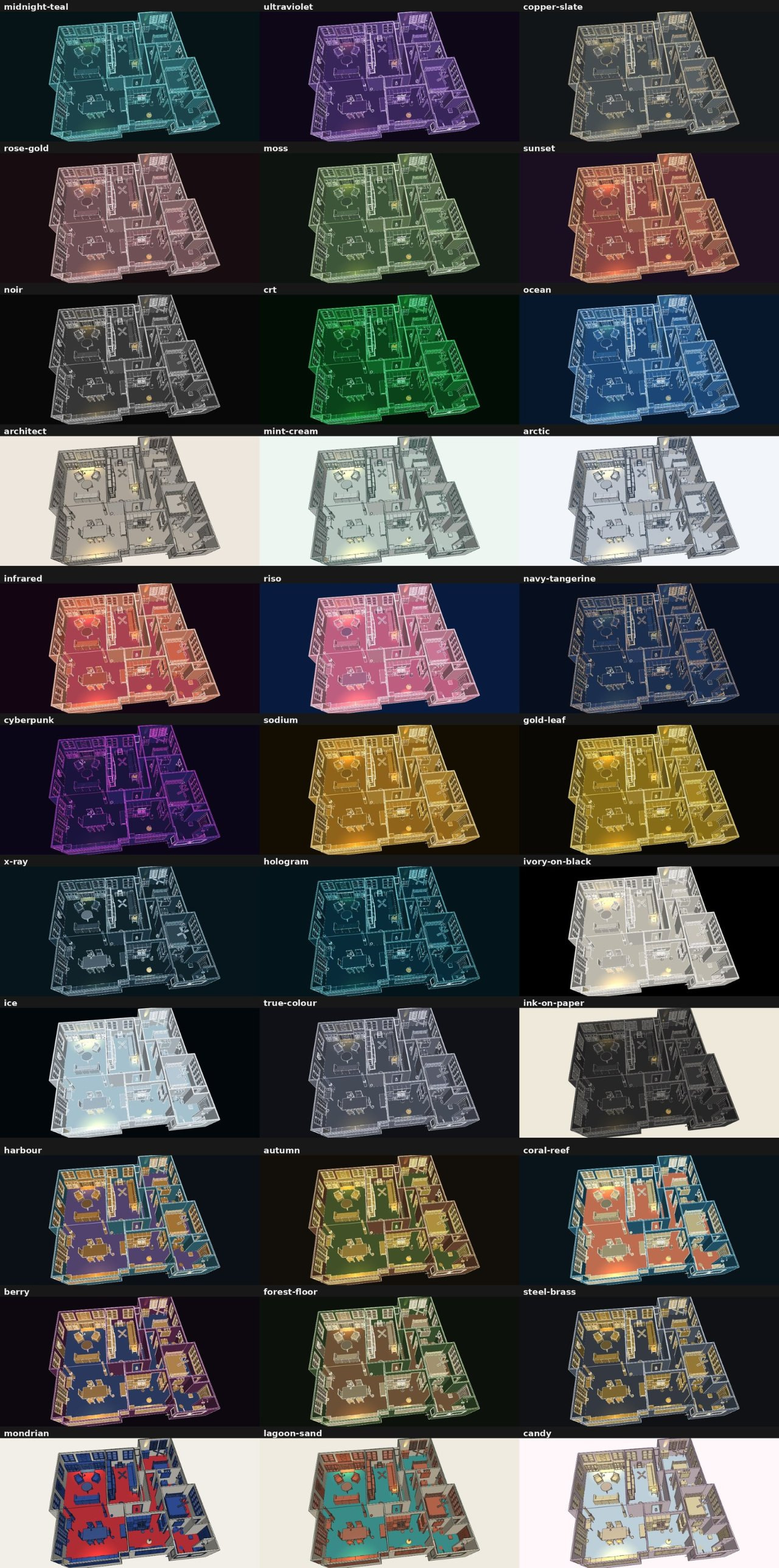
33 named themes for look

The look shader shipped with six looks (neon, blueprint, day, paper, ember, pastel) plus custom. 2.4 adds 33 ready-made palettes you can use by name, e.g. look: {theme: midnight-teal}. They were tuned on a real house with its lamps on, and fall into a few families:

  • one hue with a contrasting line - midnight-teal, ultraviolet, copper-slate, rose-gold, moss, sunset, noir, crt, ocean, architect, mint-cream, arctic
  • duotone / complementary - infrared, riso, navy-tangerine, cyberpunk
  • metals - sodium, gold-leaf
  • inverted, lines carry the detail - x-ray, hologram
  • pale model on black / dark model on cream - ivory-on-black, ice, ink-on-paper
  • the model’s own colours showing through - true-colour
  • three-tone: walls, floors and furniture each in their own hue - harbour, autumn, coral-reef, berry, forest-floor, steel-brass, mondrian, lagoon-sand, candy

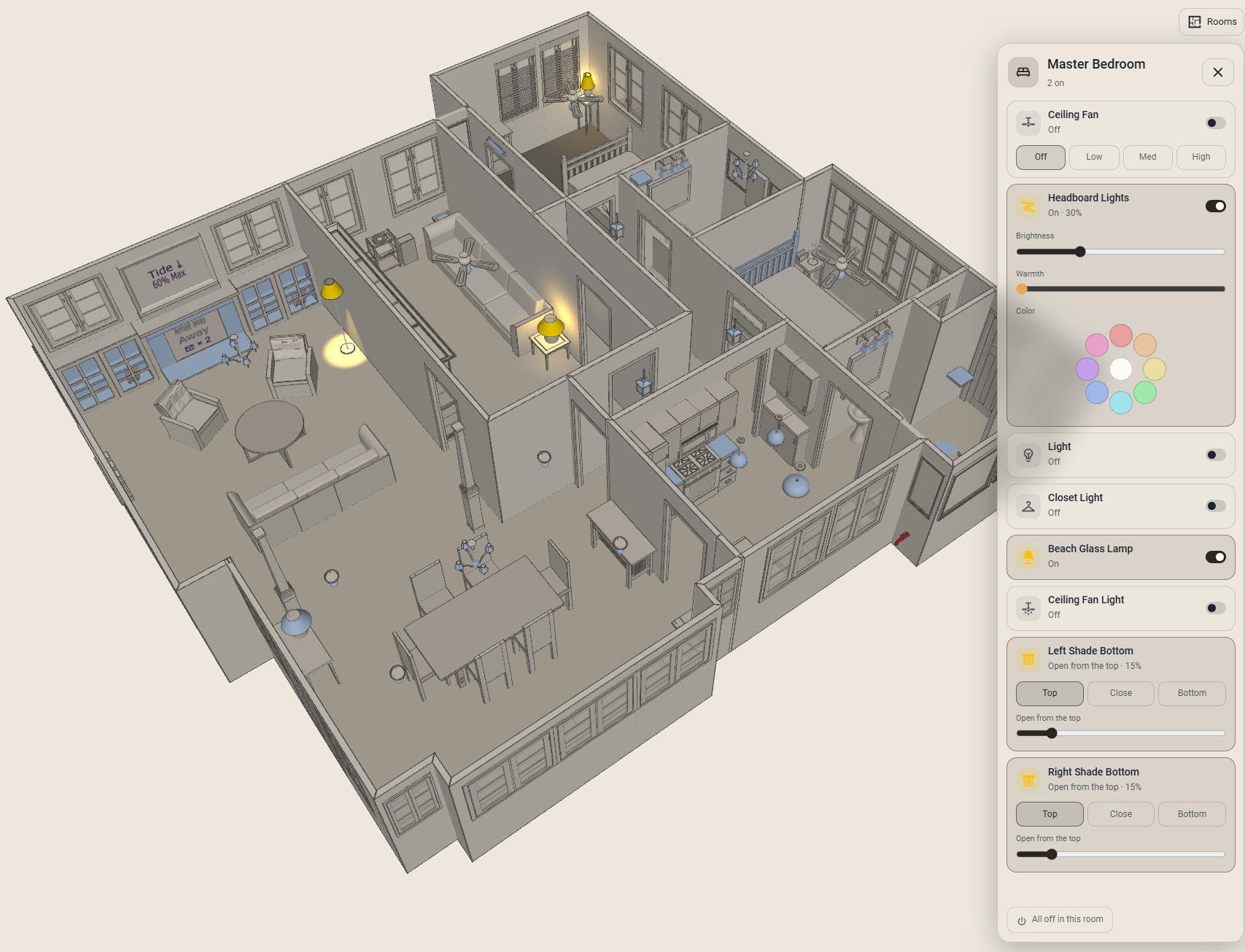
Floor3DX Rooms Card (custom:floor3dx-rooms-card)

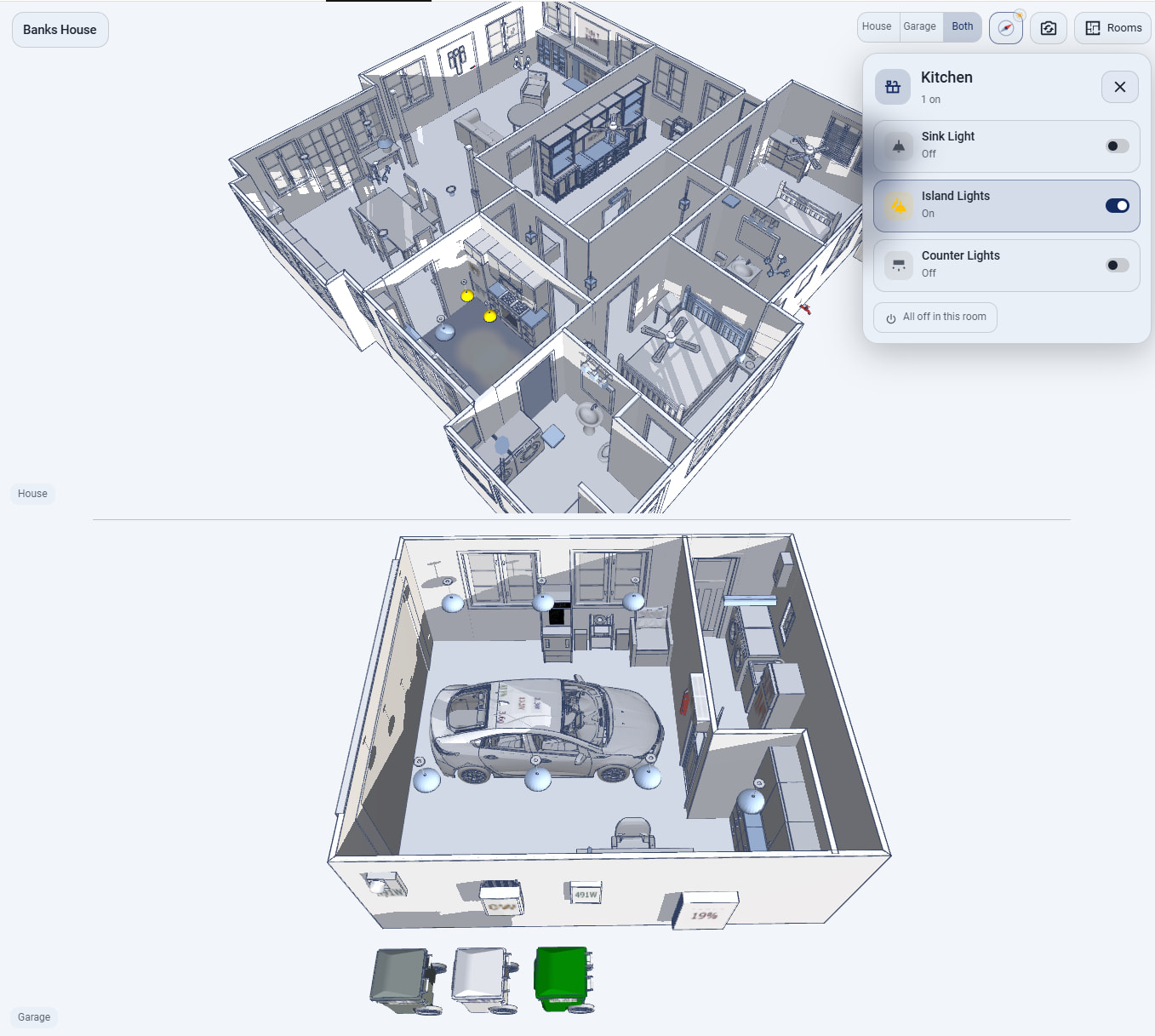
The second addition is a new card type. It automatically identifies your previously labelled rooms and their corresponding entities and creates popup cards when clicked from the small menu or within the room. It is installed alongside the main card. It is the live, rotatable 3D model used as a full-page room controller - the companion Snapshot Card’s room layer on top of the Floor3DX view:

  • Your existing floor3dx (or floor3d / floor3dpro) card configuration is embedded as it is, so every binding, lamp, shade, door and readout keeps working.
  • Rooms are detected from the model’s floor objects, named from the entity bound to each floor, and filled with the card’s entities that stand in them.
  • Tap a room (or the wall in front of it): its floor tints and a translucent panel of simple controls opens over the model, in the theme’s colours. Phones get a bottom sheet.
  • The controls are the Snapshot Card’s current tiles: switches with the bulb behind them (brightness, warmth, colour swatches), fan speeds, TVs and speakers with volume, channels and sources, covers with a position slider, top-down/bottom-up shades as one tile, thermostats with setpoints and modes, a guest mode that can follow a switch, and “All off in this room”.
  • An optional pin per room follows the camera; the panel’s transparency is a slider.
  • Any of the 40 themes (the six looks, the 33 palettes, or off to keep the card’s own look).

Setup is the Snapshot Card’s four steps in the visual editor: find your floor3d cards in your dashboards and pick one, detect rooms (it runs in the live preview, and you can edit the result), pick a theme, set the display options. Rooms can also be written by hand in YAML. Dashboards that bind entities through [[entity:role]] tokens (the dashboard-entity-reference convention) are resolved by the scanner.

Installing / updating

Repo and release notes: GitHub - FortranFour/floor3dx-card: Home Assistant 3D floor plan card. Fork of floor3dpro-card – Game Engine Backbone Edition (which, itself, was forked from Andrea Di Zanni's floor3d-card) with Draco/Meshopt/KTX2 models, full-resolution rendering and a door-cache fix, along with many new features · GitHub (current release v2.4.4; the CHANGELOG has the details of 2.4.0-2.4.4).

HACS note: a current HACS bug (hacs/integration#5644) can make the update fail for this and other repos. Until it ships, this one-liner in the HA terminal fetches the release files directly:

cd /config/www/community/floor3dx-card && curl -sSLO "https://github.com/FortranFour/floor3dx-card/releases/latest/download/{floor3dx-card.js,basis_transcoder.js,basis_transcoder.wasm,draco_decoder.js,draco_decoder.wasm,draco_wasm_wrapper.js}"

then hard-reload the browser. If you already have a Rooms Card, open its editor and click Detect rooms again to pick up the new defaults.

As before, the code was written with AI assistance (Claude), reviewed and tested on my own house model.

Floor3DX 2.5: Multiple models in one Rooms Card, saner taps, a hue slider, and a stock-dashboard theme

v2.5.0 is on GitHub and HACS. Most of it is the Rooms Card maturation after a couple of weeks of daily use; a few bits touch the regular card too.

Two (or more) models in one Rooms Card

If your snapshot card shows the house and the garage together, the Rooms Card now can too. models: replaces card: — one entry per model, each with its own floor3d configuration and its own rooms — and the card gets a House · Garage · Both switcher. One model fills the card; Both puts them side by side (stacked when the card is taller than wide, or force it with layout:), with a gap and a caption per view. Each model keeps its own camera, so they rotate independently and can’t collide. Only the shown models render; the others stay loaded, so switching is instant. The Rooms menu is grouped by model, and selecting a room of a hidden model switches to it.

type: custom:floor3dx-rooms-card
theme: dashboard
models:
  - id: house
    name: House
    width: 62
    card: { objfile: house.glb, entities: [...] }
  - id: garage
    name: Garage
    width: 38
    card: { objfile: garage.glb, entities: [...] }
rooms:
  - id: bay
    model: garage
    floors: [room_1_1]
    entities: [{ entity: light.garage }, { entity: cover.garage_door }, { entity: sensor.garage_temp }]

In the editor: Add another model, a Found cards go to selector, and Detect rooms runs on every model. Other dashboards can open a model or a room with #model=garage&room=bay in the URL (or a floor3dx-rooms-select window event) — handy if you already have your own view selector.

Taps that mean one thing

A single tap on a lamp (any object bound to a light or gesture row) now runs that object’s action — the lamp toggles — and leaves the room panel alone. A tap on a floor, wall or piece of furniture selects the room as before. The old double-tap convention had the first tap opening the panel and the second toggling the light; that’s gone. object_tap: panel instead opens the room with that lamp’s tile highlighted, and object_tap: room keeps the 2.4 behaviour.

Colour: a hue slider

color_control: slider swaps the nine swatches for a hue slider (thumb sits at the light’s current hue; both keeps the swatches underneath as presets). The swatches themselves are now two rows of saturated colours rather than the pastel ring.

Sensors as readouts

Sensors in a room (the “also add sensors” option of detection, or added by hand) are a labelled line under the room’s name — Temperature 12.6°F · Side Door closed — instead of a pile of read-only tiles. Open doors, windows and leaks are highlighted. sensor_tiles: yes if you preferred the tiles.

A theme that matches a stock dashboard

dashboard is a 34th named palette for look.theme (and the Rooms Card): Home Assistant’s default light dashboard — page grey, white walls, the pale blue of HA’s summary capsules on the floors, slate lines, HA’s icon blue for toggles, sliders and the selected room. Palettes can now carry an accent and panel colour for the Rooms Card overlay.

Smaller things

  • Reset view button next to Rooms (flies the camera home; lists the card’s saved views if it has any).
  • The room panel is as tall as its contents, not the card, and scrolls when a room has many tiles; the editor’s preview fills the dialog’s preview column.
  • Entity-reference workflows: if your dashboards bind entities through [[entity:role]] tokens (one source block, wrapper cards everywhere else), the Rooms Card editor can keep the references when it copies a card, and the regular card’s editor gained Find rooms cards in my dashboards to take a model’s card: block back out of a Rooms Card — so either card can be rebuilt from the other.
  • edge_skip: ceilings (2.4.4): a Sweet Home 3D ceiling is invisible from above but its outline still drew as a line across any opening between rooms that has no wall. Default in the Rooms Card; available in the regular card.
  • A shader warning that Windows browsers logged (X4000: potentially uninitialized variable) is gone; the picture is unchanged.

Installing / updating

Repo and full CHANGELOG: GitHub - FortranFour/floor3dx-card: Home Assistant 3D floor plan card. Fork of floor3dpro-card – Game Engine Backbone Edition (which, itself, was forked from Andrea Di Zanni's floor3d-card) with Draco/Meshopt/KTX2 models, full-resolution rendering and a door-cache fix, along with many new features · GitHub. The HACS bug (hacs/integration#5644) can still make the update fail; if so, this fetches the release files directly in the HA terminal (the rm clears stale precompressed copies, which otherwise shadow the new file):

cd /config/www/community/floor3dx-card && rm -f -- *.gz(N) && curl -sSLO "https://github.com/FortranFour/floor3dx-card/releases/latest/download/{floor3dx-card.js,basis_transcoder.js,basis_transcoder.wasm,draco_decoder.js,draco_decoder.wasm,draco_wasm_wrapper.js}"

then hard-reload. Existing Rooms Cards keep working unchanged; open the editor and Detect rooms again to pick up the new defaults.

As before: written with AI assistance (Claude), tested on my own house and garage models; bug reports and awkward models welcome on GitHub.

One source of truth for entities across dashboards: the [[entity:…]] reference convention

First, two things up front. You do not need any of this to use floor3dx-card, the Rooms Card or the Snapshot Card — they take ordinary entity ids and work on a plain dashboard like any other card; this is an optional convention for people whose dashboards have grown large enough to want it. And it is not only about the 3D cards: the editor half of it gives you back Home Assistant’s visual editor for any card that carries card_mod, layout options or other extras — the ones where HA today says “this card has no visual editor” or where the editor silently strips what it doesn’t understand — because the editor works on a clean copy and puts the extras back on save.

A few people asked how the 3D cards in my screenshots stay in sync with the rest of the dashboard when an entity gets renamed or swapped. The answer is not a Home Assistant feature — HA has nothing like it out of the box — but a small convention plus three frontend resources I wrote for my own dashboards and that floor3dx-card (the 3D card, its Rooms Card and the Snapshot Card) now understands natively. Moreover, when you start adding custom stuff to cards, like with card-mod, you lose the ability to edit the card with the card’s visual editor (meaning it has to be edited in YAML). This post explains the idea, what you need to run it, and where it stops.

The problem this addresses

A house dashboard binds the same entity in many places: a tile on the Overview, a lamp in the 3D model, a row in a room popup, a readout panel, an automation button. Replace the kitchen switch with a different device, or re-ID an entity, and you edit every one of them — and the 3D card’s YAML alone has a couple of hundred entity: lines. Decluttering templates and !include help with repeated layout, but not with “this is the kitchen counter light, wherever it appears”.

The idea

  1. Source cards name their entities once. Any ordinary card on the main dashboard can be a source: give it a card_reference_id, and inside it label entities with entity_reference_id (one per row), entity_reference_extra (a plain role → entity map), or entity_reference_fields (for entities buried in a template string, found by a JSON path and a domain). Roles are dotted names you choose: indoor_lights.kitchen_counter_lights, shades.left_top, house_thermostat.climate.

    type: entities
    card_reference_id: indoor_lights
    entities:
      - entity: switch.in_wall_paddle_switch_qfsw_700s_6
        entity_reference_id: indoor_lights.kitchen_counter_lights
      - entity: light.kitchen_sink_light_bulb_zigbee
        entity_reference_id: indoor_lights.kitchen_sink_bulb
    entity_reference_extra:
      fans.family_room: fan.family_room
    
    
  2. Everywhere else, refer to the role, not the id. Any card wrapped in custom:dashboard-entity-reference may write [[entity:role]] anywhere a string goes — entity:, color_entity:, inside a Jinja template, inside a popup’s YAML. The wrapper reads the saved configuration of the source dashboard over HA’s own websocket (lovelace/config), builds the role → entity index once, substitutes the tokens, and renders the inner card. It re-indexes when the dashboard is saved.

    type: custom:dashboard-entity-reference
    dashboard: lovelace                     # where the source cards live
    card:
      type: custom:floor3dx-rooms-card
      theme: dashboard
      card:
        objfile: house.glb
        entities:
          - entity: '[[entity:indoor_lights.kitchen_counter_lights]]'
            type3d: light
            object_id: '86_1'
      rooms:
        - id: kitchen
          floors: [room_0_1]
          entities:
            - entity: '[[entity:indoor_lights.kitchen_counter_lights]]'


    Rebind the switch on the source card, save, and the Overview tile, the 3D lamp, the Rooms Card tile and the popup all follow. Nothing is duplicated, nothing drifts.

  3. A second card type reuses whole cards. custom:dashboard-card-reference with card_id: <card_reference_id> renders the current saved configuration of a source card somewhere else — in a Browser Mod popup, on another dashboard, inside tabs — so the popup for a room is the room’s card, not a copy of it.

Editing without breaking the links

Tokens are strings, so a native visual editor would show [[entity:…]] in an entity picker and choke. Two more resources handle that:

  • dashboard-component-editor.js wraps HA’s card editor dialog: pick a component inside a stack/wrapper/popup, edit it with its own visual editor on a working copy where tokens are resolved to real ids, and on save it maps the ids back to the roles and re-attaches the metadata (card_mod, layout, references). If an edit would make a binding ambiguous, it refuses instead of guessing.

    This is the part that is useful even if you never write a single [[entity:…]]. HA’s visual editors bail out, or quietly drop keys, when a card carries card_mod, view_layout, grid_options, visibility or a popup id — so a styled card is YAML-only forever. The component editor hides those keys from the native editor and restores them untouched, so an entities card with a card_mod style, or a card nested three deep in a vertical stack inside a conditional, gets its normal visual editor back. It installs itself for every card; cards with nothing special on them see no difference.

  • dashboard-reference-editor.js does the same for the floor3d family with its own editors, plus discovery across dashboards and expected_domains checks.

floor3dx-card 2.5 meets the convention halfway: its scanner resolves tokens when copying a card into a Rooms Card, or keeps them when the Rooms Card will itself sit inside a wrapper (Keep references), and the regular card’s editor can take a model’s configuration back out of a Rooms Card with references intact. Detection places token rows by their type3d, so it works on a card it cannot resolve.

What you need

  • Home Assistant with storage-mode dashboards (the index is built from the saved configuration over lovelace/config; YAML-mode dashboards can be read but not edited this way).
  • The three JavaScript files, added as frontend resources (Settings → Dashboards → ⋮ → Resources, type JavaScript module): dashboard-card-reference.js (the runtime: both card types, required), dashboard-component-editor.js (visual editing of any card with extras — worth installing on its own) and dashboard-reference-editor.js (the same for the floor3d family’s own editors; only needed with references). No integration, no backend, no polling.
  • Browser Mod if you want the card references in popups (it supplies the popup; the reference supplies the content). Not needed for in-page use.
  • Cards that put entities in string fields: anything works, since substitution happens before the card sees its config.

The files live in the floor3dx-card repository under extras/dashboard-references/ with a short README; they are plain resources, not a HACS package:

(Right-click the raw link → Save link as…, or on the HA terminal: cd /config/www && curl -sSLO https://raw.githubusercontent.com/FortranFour/floor3dx-card/main/extras/dashboard-references/{dashboard-card-reference.js,dashboard-component-editor.js,dashboard-reference-editor.js}.)

Limits, honestly

  • One role → one entity. A role used in two source cards with different entities is reported as ambiguous and left unresolved.
  • Resolution happens in the browser when the card renders; automations and the backend never see roles. It is a dashboard convention, not an entity registry.
  • Source cards must be readable by the user viewing the dashboard (non-admin users can read dashboards, so guests are fine).
  • The visual editors can’t pair rows that all changed at once; big rewrites are easier in YAML, and dashboard-component-editor tells you when that is the case.

Why not just …

  • Decluttering / streamline templates: those parametrise layout per card instance; you still pass the entity ids in at every instance. Here the ids live in one place.
  • Entity renames: renaming keeps the old id’s references working, but doesn’t help when you replace a device, split a switch into switch + bulb, or move a binding between rooms.
  • A backend integration: would be cleaner for automations too, but a frontend-only convention needs nothing installed on the server and survives HA upgrades with no code.

Floor3DX 2.6–2.9: a real sun, lamps that stay in their room, a day/night switch

Four releases since 2.5, on GitHub and HACS. All of it is about light.

A real sun (2.6). daylight: { sun: 'yes' } adds one directional light with a shadow map over the model, so sunlight comes in only through the openings; glass casts no shadow and the Sweet Home 3D ceilings stand in for the roof. Walls, frames and furniture throw shadows that move across the floors through the day, warm at dusk and dawn. glow: auto makes every glass pane glow after dark, lamps: { night, reach } fades the lamps up as it gets dark, time: 7.5 fixes the hour for a preview. Set north to the scene direction that points north.

Lamps that stay in their room (2.8). A point light in three.js shines straight through walls unless it casts a shadow, and shadows cost a texture unit per lamp (16 or 32 per GPU; my house has 43 lamps). light_rooms: 'yes' confines every lamp to its room in the shader instead: the floors are drawn once into a room map when the model loads, and each lamp lights only surfaces in its own room, plus the room’s own walls. No shadow maps, no measurable cost, works on phones. The trade: no spill through open doorways.

Rooms Card: a day & night switch (2.7). When a model has daylight, a compass button appears next to Reset view. Its needle points to where north is on screen as you orbit, a sun or moon badge shows the current state, and a tap turns the day-and-night effects off (a steady neutral day) or on again — remembered per card in that browser. With a weather_entity in daylight (2.9), the weather is in the light too — clouds take the direct sun before the diffuse light, rain and fog cool the tint, snow stays bright — and the badge shows the sky: sun, cloud, rain, snow, fog, or the moon at night; hold the compass for Follow the weather and Fix the time.

Also: the room panel no longer blinks or slides when a switch or a sensor changes; on phones the buttons take the first row and the House · Garage · Both switcher the second; and Home Scheduler 0.4.2 drives any imported model’s daylight from its preview clock and finds each model of a Rooms Card.

Repo and CHANGELOG: GitHub - FortranFour/floor3dx-card: Home Assistant 3D floor plan card. Fork of floor3dpro-card – Game Engine Backbone Edition (which, itself, was forked from Andrea Di Zanni's floor3d-card) with Draco/Meshopt/KTX2 models, full-resolution rendering and a door-cache fix, along with many new features · GitHub. Everything new is off unless configured. If HACS’s update stalls (hacs/integration#5644), fetch the release files in the HA terminal and hard-reload:

cd /config/www/community/floor3dx-card && rm -f -- *.gz(N) && curl -sSLO "https://github.com/FortranFour/floor3dx-card/releases/latest/download/{floor3dx-card.js,basis_transcoder.js,basis_transcoder.wasm,draco_decoder.js,draco_decoder.wasm,draco_wasm_wrapper.js}"

As before: written with AI assistance (Claude), tested on my own house and garage; bug reports and awkward models welcome on GitHub.

Floor3DX 2.10: templates in the Rooms Card, readouts in groups, doors and windows at a glance

A smaller round since the 2.6–2.9 post, all in the Rooms Card and all about what the room panel says. On GitHub and HACS (2.10.7).

Templates. Two places now take a Jinja template, rendered live by Home Assistant (pushed on every change, not polled):

  • In a room entity’s Entity field — the result becomes a readout line under the room’s name, with the label in front: Washer Running · 12.3 W.
  • In a control tile’s new Status template field — the result replaces the tile’s status line while the tile keeps its toggle: Stereo — Playing · Kind of Blue · 35% · 18.6 W instead of On.
- entity: switch.stereo_plug
  name: Stereo
  status: "{{ 'Playing' if is_state('media_player.node', 'playing') else 'On' }} · {{ states('sensor.stereo_power') | round(1) }} W"

Readouts in groups. After this readout on a sensor: start a new line, or a thin divider and a new line — so a garage with the car, the house’s energy, the freezer and the doors reads as sections. On a phone, several lines fold to the first one with a chevron to open them, and the readouts and tiles scroll together, so the sheet no longer squeezes the tiles into a two-row slot.

Doors, locks and windows in the subtitle. Under the room’s name, after the lamp count: Doors shut & locked · Windows closed, or the specifics — Back door open, Side door unlocked · West window open. An open window is named by the compass side of the room its object stands on, worked out from the 3D card’s row bound to that sensor and the card’s north, so nothing needs naming. Only in the room’s subtitle keeps such a sensor out of the readout lines. Per room, from the room’s own entities.

Second tap to open. A garage door, gate or door cover opens on a second tap within a few seconds, as a lock unlocks; Close stays one tap.

Fixes. A row without an entity (a gesture row) or an entity HA doesn’t have shifted every later row’s state at load, so a lamp that was on came up dark until its switch next changed — a bug inherited from the original adizanni/floor3d-card, now gone. Editing the card in the visual editor no longer closes the open room. The gap between two models follows the daylight’s colour. No console noise from hovering over a model that is still loading.

Repo and CHANGELOG: GitHub - FortranFour/floor3dx-card: Home Assistant 3D floor plan card. Fork of floor3dpro-card – Game Engine Backbone Edition (which, itself, was forked from Andrea Di Zanni's floor3d-card) with Draco/Meshopt/KTX2 models, full-resolution rendering and a door-cache fix, along with many new features · GitHub. Everything new is off unless configured. If HACS’s update stalls (hacs/integration#5644), fetch the release files in the HA terminal and hard-reload:

cd /config/www/community/floor3dx-card && rm -f -- *.gz(N) && curl -sSLO "https://github.com/FortranFour/floor3dx-card/releases/latest/download/{floor3dx-card.js,basis_transcoder.js,basis_transcoder.wasm,draco_decoder.js,draco_decoder.wasm,draco_wasm_wrapper.js}"

As before: written with AI assistance (Claude), tested on my own house and garage; bug reports welcome on GitHub.

2.11 – edit the 3D card from inside the Rooms Card

A quick explanation of how the two cards relate, because 2.11 changes where you edit things.

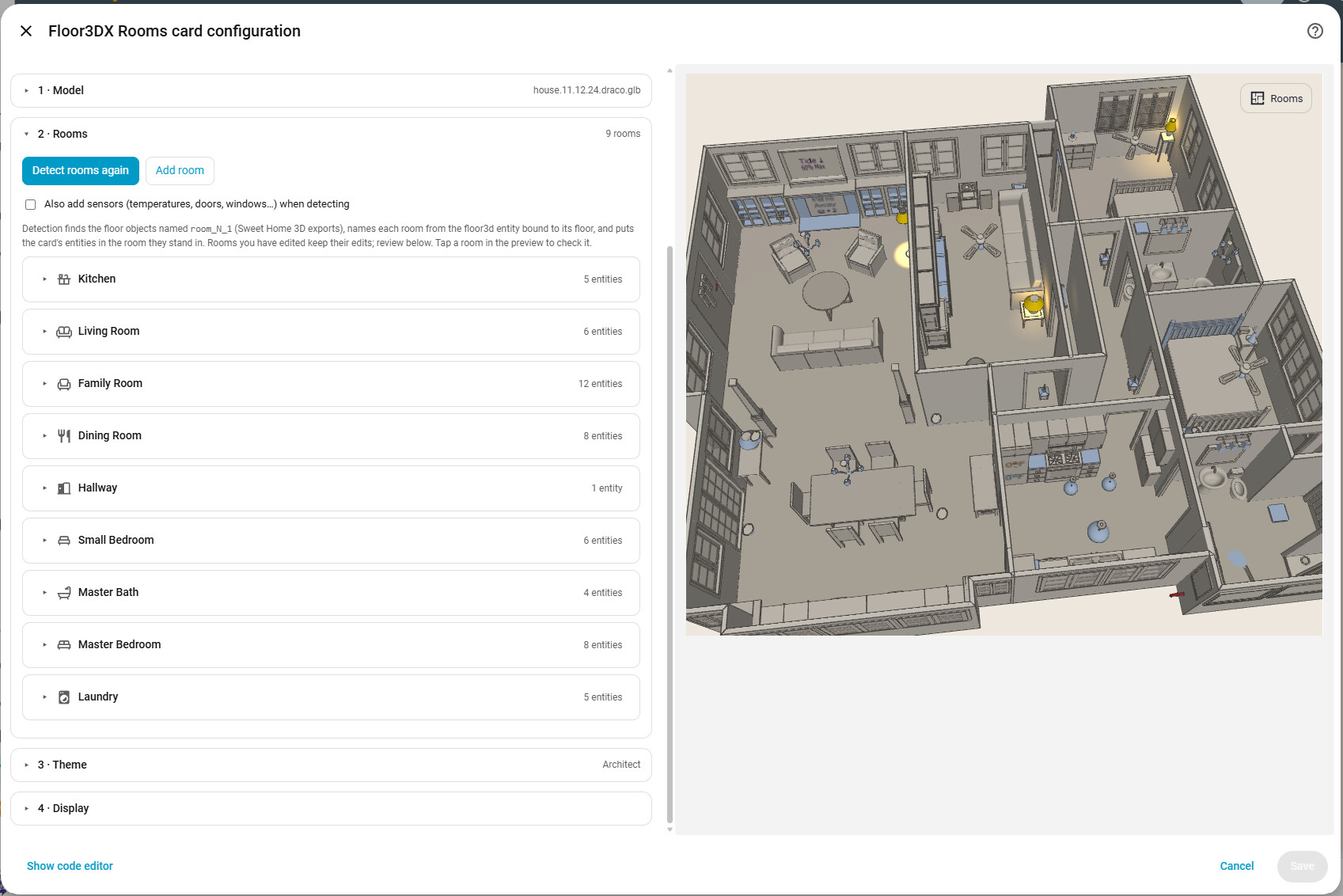
Two cards, one model. The regular floor3dx-card is the 3D engine: the model file, the camera, every lamp, door, shade and text panel, the look. The Rooms Card sits on top of it: rooms detected from the floor plan, a panel of controls and readouts per room, a theme, and (since 2.5) several models with a |Model 1|Model 2|Both| button switcher. When you set up a Rooms Card your existing 3D cards are scanned and you pick one whose configuration is copied into the Rooms Card (card:, or models[].card with several models). From then on the two are independent – the Rooms Card does not read the original card again, and you can delete the original once the Rooms Card is the way you want it.

The catch, until now. Because it is a copy, anything that belongs to the 3D engine – retuning a lamp, moving the camera, the weather entity – had to be edited in the Rooms Card’s YAML; its visual editor only covered rooms, theme and display.

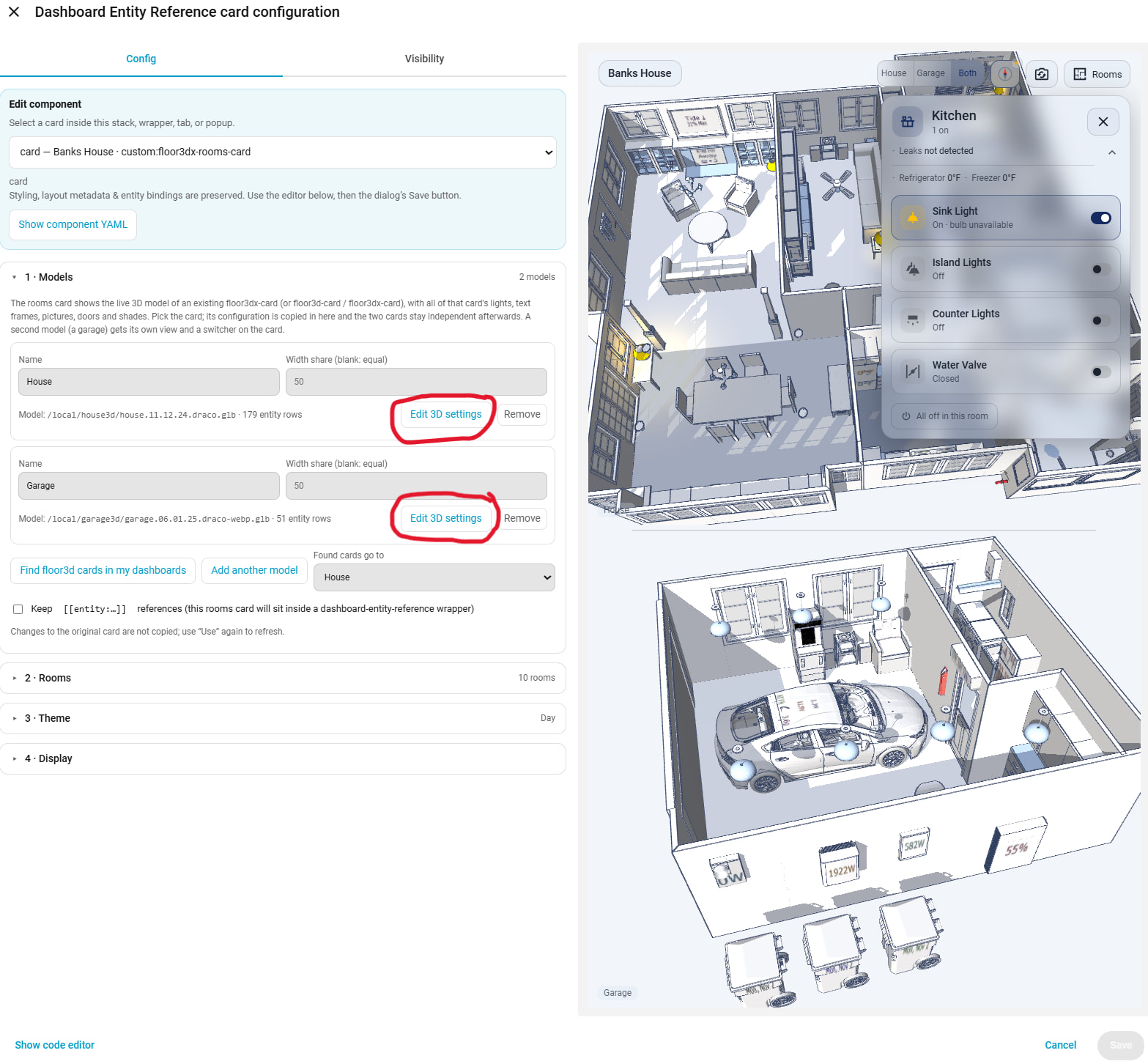
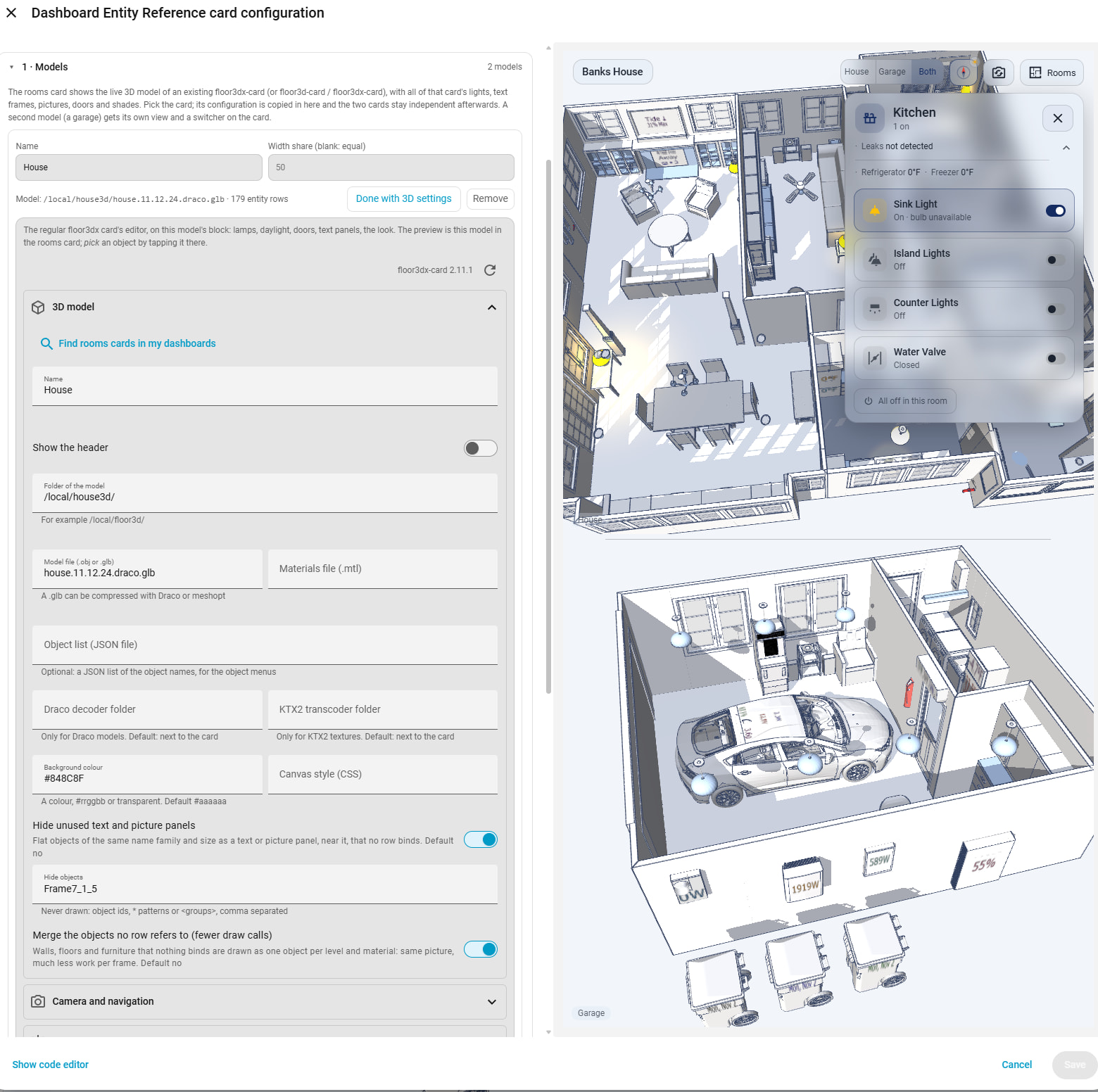
2.11: Edit 3D settings. In the Rooms Card editor each model now has an Edit 3D settings button (first screenshot, the two model blocks). Pressing it opens the regular card’s own visual editor right there under the model (second screenshot): the same 3D model / Camera / Lights / Daylight / Entities sections you know from the regular card, working on the Rooms Card’s copy. The preview on the right is the Rooms Card itself, switched to the model being edited, so Pick from model works by tapping an object in it. Done with 3D settings closes it. The regular editor is loaded the first time you press the button, so a dashboard that only shows the card pays nothing for it.

What is written back is minimal: only the keys and entity rows you actually changed; everything else keeps its original text, so the YAML diff is your edit and nothing else.

(Aside: the “Edit component” box at the top of the first screenshot is my optional dashboard-reference editor, which lets a card inside a wrapper keep its [[entity:…]] references while using the native editors; it is not part of the card and not needed for any of this.)

Also in 2.11.1: the editor preview now fills the whole pane for cards in a sections view (Home Assistant caps that preview at 500 px).

Hi @FortranFour, great card! I’ve been playing with this for a bit and I must be doing something wrong as I cannot seem to find the correct settings to get spot lights to work. I’ve read and read the instructions but I have to be missing something. What I’m finding is that if I turn off shadows, the spot light seems to act normal with the exception of passing thru walls (if in the same ‘room’) and objects (and obviously not creating shadows). When I turn shadows on the shadows appear but the spot light does not cast light on the wall or object that is creating those shadows. I’m on the latest version and I’ve tried all kinds of combinations in the settings (room lights off/on, global shadows off/on, spot angles, directions, etc) to no avail.

i.e. I have 2 simple setups I started with. One is a pool table light. With shadows off, the table is highlights with the spot but the light is cast all the way to the floor with no shadows. When I turn shadows on, the table no longer has any light spot cast on it but there are shadows now on the floor. I was hoping that the light spot would remain on the table and now the floor has the shadow of the table.
The other is simple recessed ceiling lights. With shadows off, the light arcs show the walls, with shadows on the walls get no light at all.
Any advice? Thanks!

Thanks for the clear description; it makes this easy to pin down. Both of your setups point to the same thing: with shadows on, the light is boxed in by whatever sits right next to it.

The card puts a light at the centre of its object. With shadows off, three.js never blocks light, so it shines through everything: walls, the table, the lamp itself. That’s why it looks right apart from passing through walls. With shadows on, any mesh between the light and a surface blocks it. The card stops only the light’s own object from casting a shadow, not the rest of the fixture, and not the ceiling it’s set into.

**Pool table light.** If the fixture is more than one object (shade, frame, bulbs), the light at the centre of one part is enclosed by the others. They throw a shadow straight down, about the size of the table, so the table goes dark while light still escapes past its edges and the table’s own shadow shows on the floor. Move the light to the bottom of the fixture and slightly below it:


light:

  light_object: pool_light_bulb        # the lowest part of the fixture, if it has several

  vertical_alignment: bottom

  offset: { x: 0, 'y': -5, z: 0 }      # model units; centimetres in a Sweet Home 3D export

  light_direction: { x: 0, 'y': -1, z: 0 }

**Recessed ceiling lights.** A recessed fixture usually sits flush with the ceiling or partly inside it, so its centre ends up at or above the ceiling surface. With shadows on, the ceiling then blocks all of its light. Same fix: vertical_alignment: bottom with offset: { x: 0, 'y': -3, z: 0 }, so the light hangs just below the ceiling.

If the light still doesn’t reach the table, post the entry’s YAML and the names of the objects that make up the fixture, and I’ll take a look.

Thanks for the reply and that’s what I thought (based on the instructions) so I did try multiple combinations of spacing the light away from the object, using one piece of the object, etc. Here’s the YAML. Pool_Table_Light is a group of the 5 pieces comprising the light. Pool_Table_Light_2 is the lowest component. I also left the light_object blank and used much larger negative ‘y’ numbers, both with the same result.

Shadows ‘no’: Light appears on the table and can be manipulated normally.
Shadows ‘yes’: No light on table, but shadows on the floor. I can change the ‘y’ to any negative (I also tried positive numbers but it gets wonky) number and it only changes the location of the shadows on the floor in relation to the table with still no light on the table. And it’s pretty much the same result with the recessed lighting, shadows work fine but no light on the walls.


type: custom:floor3dx-card
path: /local/community/floor3dx-card/Basement
pro_log: []
pro_skill: []
name: Floor3D-Pro
objfile: home.draco.glb
header: 'no'
backgroundColor: '#000000'
globalLightPower: '.4'
overlay_alignment: top-left
north:
  x: 0
  z: -1
camera_position:
  x: 944.1
  'y': 479.96
  z: -79.76
camera_rotate:
  x: -0.8521
  'y': 0.7194
  z: 0.6455
camera_target:
  x: 377.39
  'y': -6.93
  z: -505.71
entities:
  - entity: input_boolean.test_button_1
    type3d: light
    object_id: <Pool Table Light>
    light:
      lumens: 500
      offset:
        x: 0
        z: 0
        'y': -5
      light_direction:
        x: 0
        z: 0
        'y': -1
      vertical_alignment: bottom
      shadow: 'yes'
      light_object: Light_Pool_Table_2
      angle: 75
      follow_entity: 'no'
      decay: 1
mtlfile: home.mtl
objectlist: home.json
shadow: 'yes'
grid_options:
  columns: full
draco_path: /local/community/floor3dx-card/
basis_path: /local/community/floor3dx-card/
click: 'yes'
hideLevelsMenu: 'yes'
extralightmode: 'yes'
lights: physical
color_management: managed
object_groups:
  - object_group: Pool Table Light
    objects:
      - Light_Pool_Table_1
      - Light_Pool_Table_2
      - Light_Pool_Table_3
      - Light_Pool_Table_4
      - Light_Pool_Table_5

Thanks again for the great card and help!

Thanks for the YAML — it let me reproduce this, and it’s a bug in the card, not your config. No amount of offset/light_object fiddling would have fixed it, sorry for the wild goose chase.

Short version: a light with a light_direction is a spot light, and since the three.js upgrade in 2.3 the card’s logarithmic depth buffer and spot-light shadow maps disagreed about what “depth” means. Result: shadows land in the right place, but the surfaces that should be lit aren’t — your table, the walls under the cans. Point lights and the sun weren’t affected, which is why it hid for so long.

Fixed in 2.13.0 (2.13.1 is current — it only quiets some harmless Rooms Card console errors) — update and hard-refresh, your YAML works as is. If you see speckles on a lit wall, nudge light.shadow_normal_bias up a bit (default 1).

Also new in 2.13, all optional and off by default, in the editor’s new Effects section:

  • Ambient occlusion (ao: 'yes') — soft contact shadows where walls meet floors and furniture meets ground. Big realism gain for the day look.
  • Depth of field (bokeh: 'yes') — the room you orbit stays sharp, the rest softens.
  • SMAA — edge smoothing that kicks in automatically with either effect.

I don’t actually care for them, but thought’d I’d give them a try.

And from 2.12 for Rooms Card users: the room panel can take its own colours (panel_theme, or follow day/night with panel_daylight).

Great! Thanks for looking at this. I’m just glad it wasn’t me :slight_smile:

I’ll give a try first thing tomorrow, thanks again!

EDIT: Works great! And my sanity has returned :slight_smile: The card is looking great, thanks!

Feature request: Is it possible to have entity overrides while in edit mode (off/on slider, color selection, etc)? The scenario is while making adjustments to the display you can’t see the results unless you actual manipulate the entity or have created some helpers and temporarily set them as the entity. Not a big deal, strictly a ‘nice to have’, but I thought I’d a least mention it.

2.14 – A new perspective: straight verticals and a choice of lens

Two small camera options that change how the house reads without changing anything you do with it.

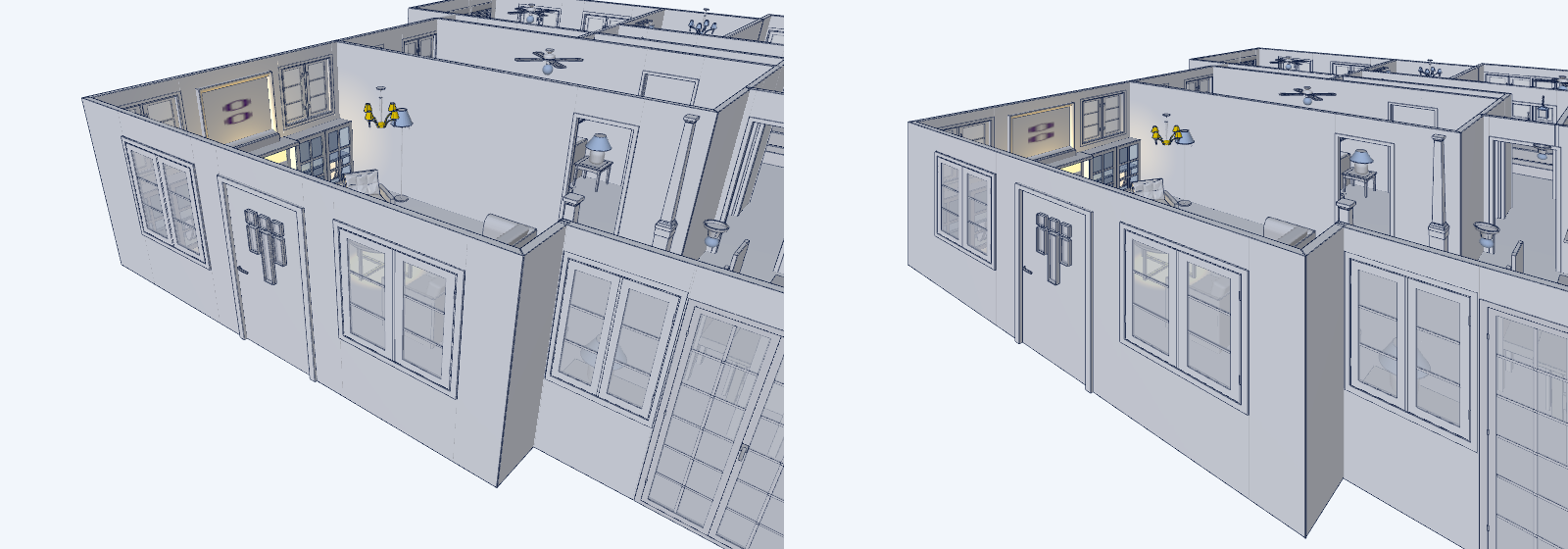
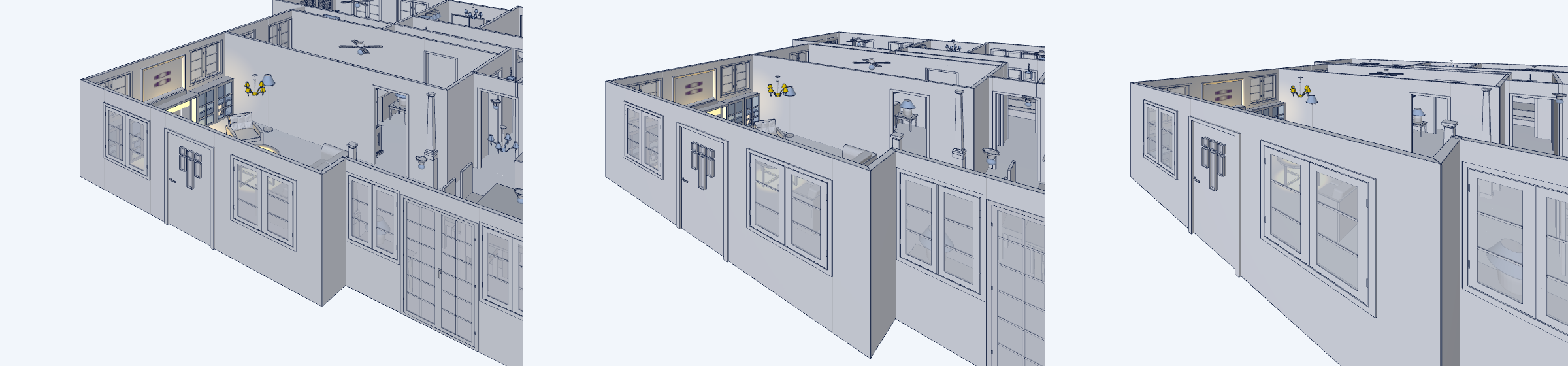
Two-point perspective. A camera tilted down over a model makes the walls lean inward toward the top of the frame — that’s three-point perspective, and it’s what every 3D plan has done so far. camera_projection: two_point does what an architectural photographer does with a tilt-shift lens: verticals stay vertical whatever the tilt, while depth, size cues, lighting and shadows are untouched. Same spot, three-point on the left, two-point on the right:

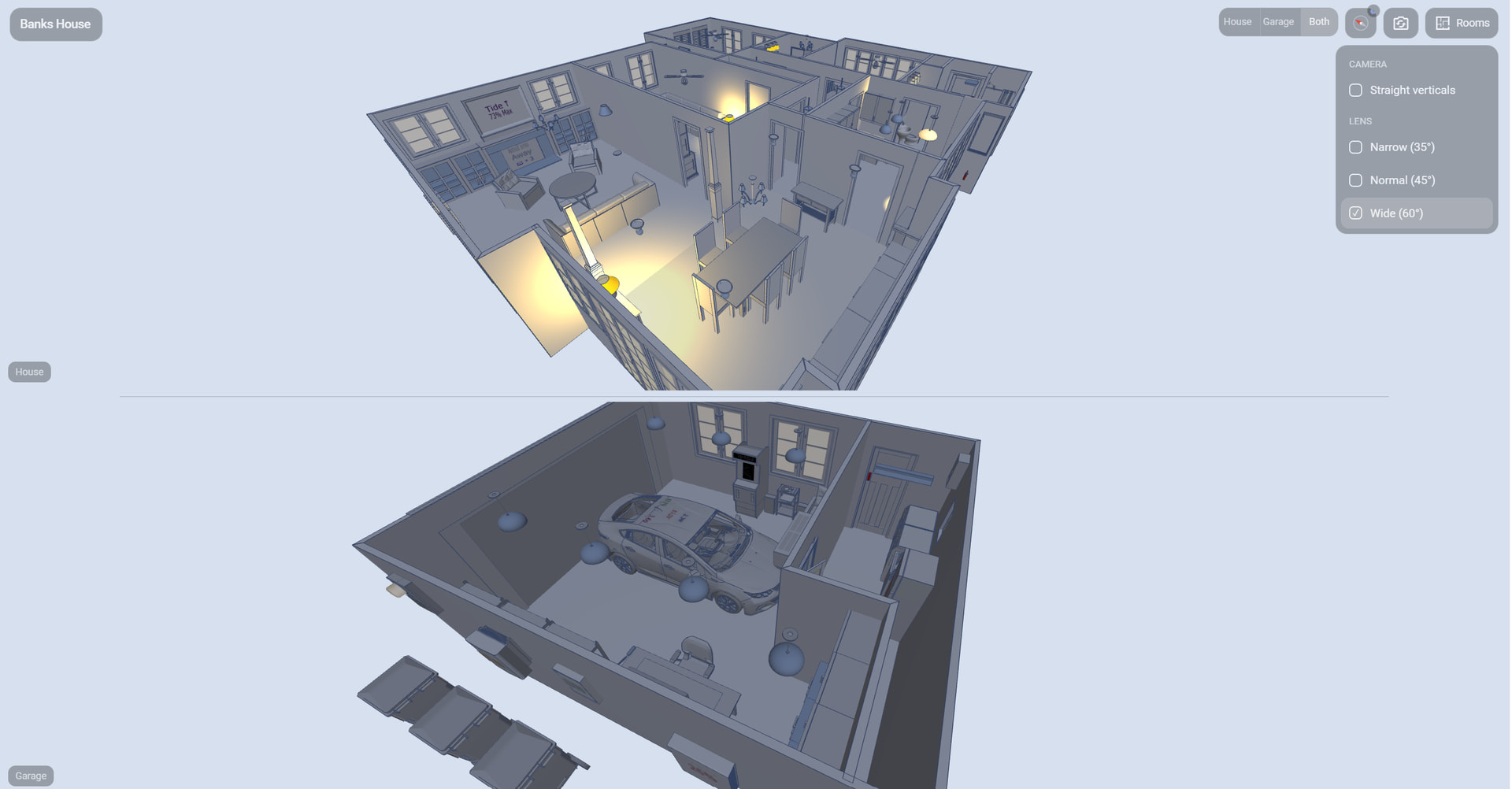
Lens. camera_fov picks the field of view — 25° telephoto, 35° narrow, 45° normal (the default), 60° wide. A long lens flattens the perspective, a wide one exaggerates it, and changing it keeps the framing: the room you’re looking at stays the same size on screen, so your saved camera position still means what it did. 25°, 45°, 60°:

Both are in the editor’s Camera section, and both are computationally free — it’s a matrix, not a render pass.

Rooms Card users: nothing new on screen. Hold the camera button (Reset view) and you get a small menu with Straight verticals and Narrow / Normal / Wide; it applies to every model in the card and is remembered per browser, like the day & night switch.

Also since the last post: 2.13.1–2.13.2 fixed some console noise and an iOS quirk where tapping a room could also toggle the first light in the panel that opened under your finger.

2.15 – Orthographic (flat) view option and YAML editor switch in the Rooms Card’s inline editor

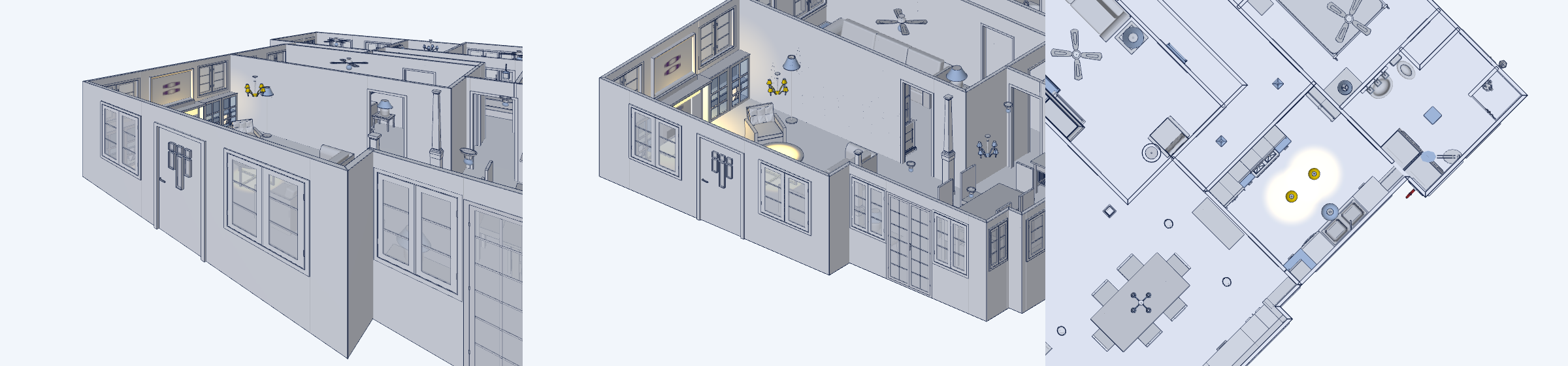
Rounding out the camera options from 2.14: camera_projection: orthographic drops perspective entirely. Parallel walls stay parallel, every room is the same scale whatever its distance, and from straight overhead you get the floor plan an architect would draw. Zoom becomes a change of scale rather than distance, so nothing clips through a wall when you come in close. Switching keeps the framing in both directions. Same spot as last time — two-point, then orthographic, then the flat view from overhead:

Rooms Card: it’s the Flat view row in the camera button’s long-press menu, remembered per browser like the rest. The lens and the rendering effects don’t apply in flat view (they need a perspective camera) and come back when you switch out of it.

Also for Rooms Card users: the inline Edit 3D settings editor now has Show code editor, so you can work on a model’s block in YAML without leaving the Rooms Card. Hand edits go through the same minimal write-back as the form — only the keys you touch change.

2.16 / 2.17 – Faster loading, and some phone polish

The desktop browser went unresponsive for a while after the model appeared (Chrome/Edge offering to close the page). Two things were going on. The scene set-up and the compile of every shader program ran in one blocking task on the first frame, and on Windows — where WebGL shaders are translated to Direct3D — that compile alone can take many seconds. On top of that, the card was asking three.js for a shadow filter that r186 removed; three.js fell back to the plain one on the first frame and, since the filter is part of every program’s identity, every shader has been compiled twice.

Now the set-up runs in stages with the page kept responsive (the progress box says preparing the 3D scene · placing lights · compiling shaders), the shaders compile in the background before the first frame, and they compile once. The picture hasn’t changed. A line in the console (Function F12) tells you where the time went:

floor3dx house.glb: model 6.5 s · scene 0.5 s · shaders 12.1 s (7 programs, 10 shadow-casting lights, pcf shadows) · ready 19 s after start

The shader figure is paid once per version — the browser caches compiled shaders, so plain reloads are quick. If it’s still long, the number of shadow-casting lights is the lever: each one adds to every program, so shadow: 'no' on lights whose shadow you never notice trims it in proportion. New shadow_map: pcf | basic | vsm if you want to trade shadow edges for compile time. Note the startup time is primarily an issue with loading a new version of the card (or resetting the browser cache) on Windows.

Rooms Card, mostly for phones:

  • Compact model switcher. On a phone-width card the House / Garage / Both control becomes one small corner button: tap for the next model, hold to pick. models_menu: segments | compact forces either form.
  • The long-press menus and the Rooms/Views lists close on a tap anywhere else and when a room panel opens — no more menu sitting over the panel’s close button.
  • In dashboard edit mode the card is shorter and vertical drags scroll the page, so Home Assistant’s edit bar is reachable on a phone.
  • Typing in the inline Edit 3D settings editor no longer redraws the editor around it (focus and scroll stay put).

Changelog has the details.

2.18 – icons in the readouts, templates in the title bar

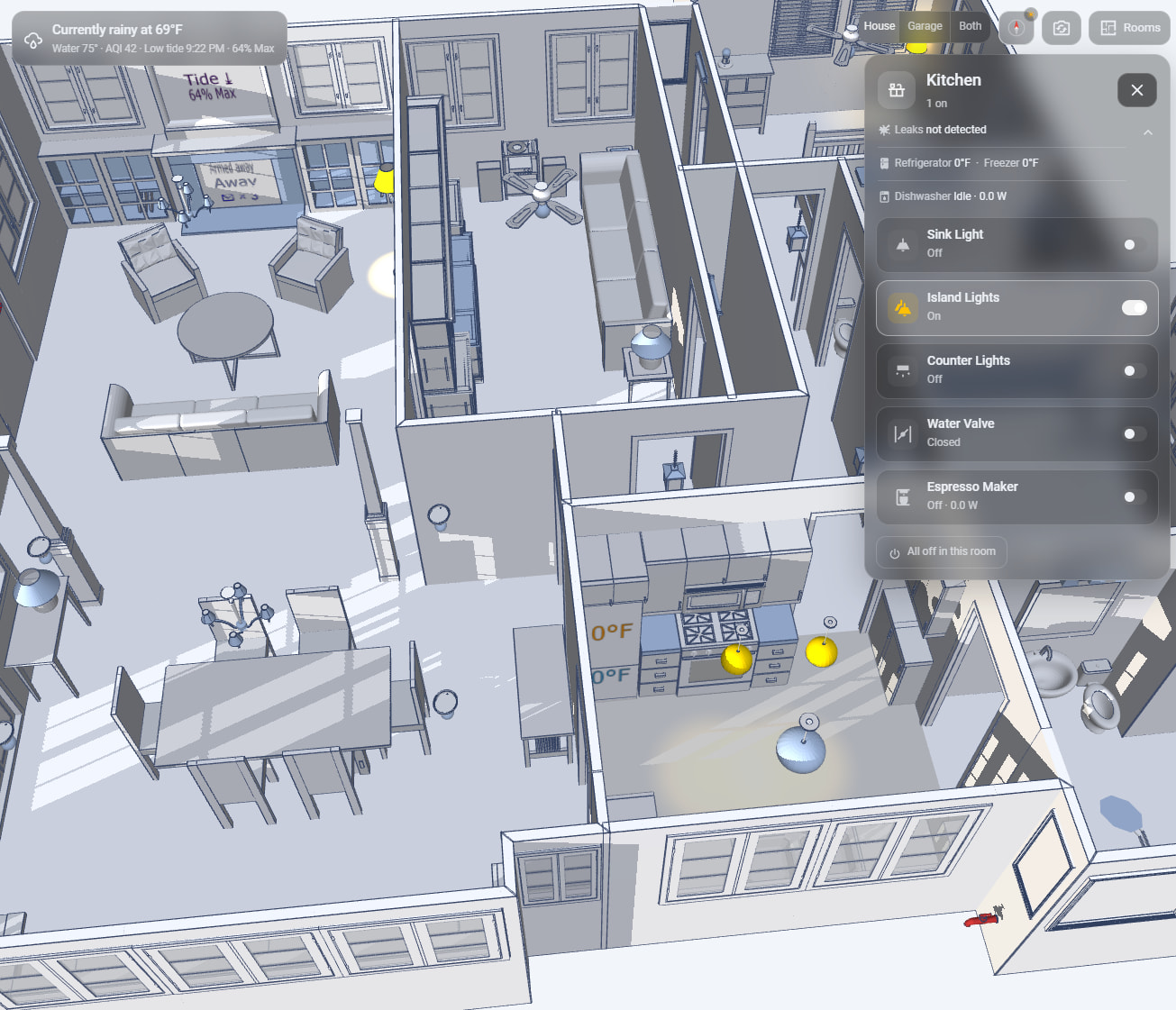
Icons instead of bullets. Any readout — a sensor, a binary sensor or a template readout — takes an icon:, and it replaces the · in front of it, scaled to the text and taking its colour (an open door’s alert colour includes the icon). The icon can itself be a Jinja template, rendered live by HA like the readout:

- entity: binary_sensor.side_door
  icon: "{{ 'mdi:door-open' if is_state('binary_sensor.side_door', 'on') else 'mdi:door-closed' }}"
- entity: sensor.hall_humidity
  icon: mdi:water-percent

readout_icons: yes on the card uses each entity’s own icon for the readouts that don’t set one.

The title bar. title, subtitle and icon all take Jinja templates now, so the card can say “Currently rainy at 69°F” with the matching weather icon beside it. And subtitle can be a list of readouts — the same entity/text, name, icon, break items as a room — shown under the title over as many lines as you like:

subtitle:
  - entity: sensor.outside_temperature
    icon: mdi:thermometer
    break: 'yes'
  - entity: "{{ 'Valve open' if is_state('switch.water_valve', 'on') else 'Valve shut' }}"
    icon: "{{ 'mdi:valve-open' if is_state('switch.water_valve', 'on') else 'mdi:valve-closed' }}"

Both are in the editor (an icon field under each readout entity; title and subtitle in Display — a list subtitle is YAML). Changelog has the details.