Why and how to avoid device_ids in automations and scripts

Background

When you start writing automations, a device trigger seems the obvious choice. Everybody knows what a device is and it comes at the top of the UI dropdown list.
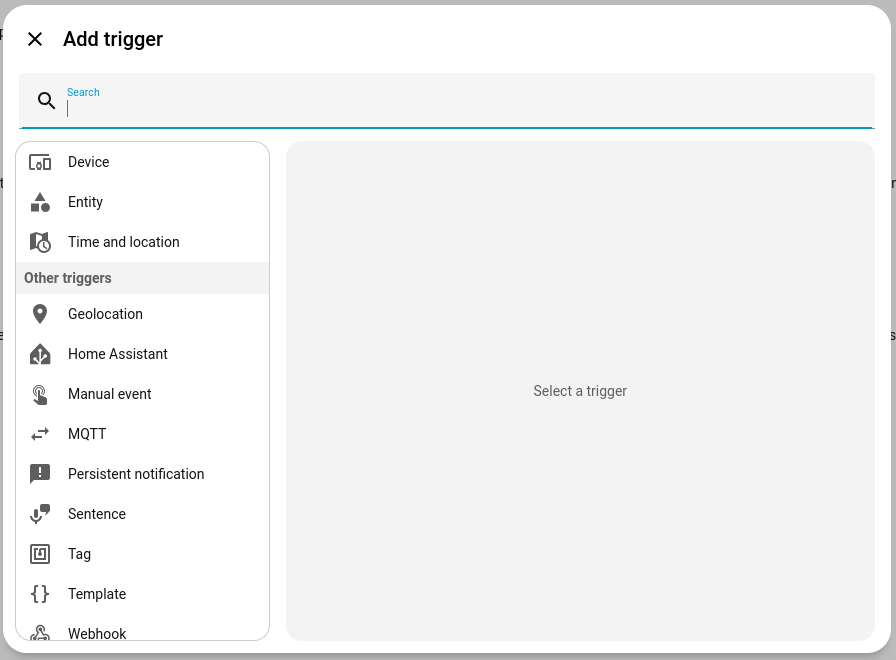
It works... but it is not a the best way to start because it is storing up problems for the future. Far better to use an entity, with state or numeric_state.

This topic is part of the community-driven cookbook where you can find other topics you might be interested in or might like to contribute to.

Device_id problems

  • The yaml will be longer and harder to follow, which may make maintenance difficult, especially a few months down the line when you have forgotten the details. For the same reason, sharing code (on this forum, for example) is harder. Since you can't add comments to automations each step needs to be as clear as possible. Why have this:

    trigger: 
      - type: battery_level
        platform: device
        device_id: 16fbcd84302f4606819c58559aa90c82
        entity_id: 6c2e634686ebe58e571fefcdd6474f22
        domain: sensor
        below: 20
    

    When you could have this:

    trigger:
      - platform: numeric_state
        entity_id: sensor.mobile_battery_level
        below: "20"
    
  • If you replace a device you will have to go through every automation it appears in, changing the device_id. If you only ever use entity_ids in your triggers, conditions and actions, then when you have to replace a device you can change the new entity_id to match the old one in one place, and all your automations keep working. Your long-stats will also remain intact.

  • Automations using device_id report as unavailable if they depend on missing devices.

  • Using entity states you can exclude "unavailable" and "unknown" from your triggers:

    trigger:
      - platform: state
        entity_id: button.EXAMPLE
        not_to:
          - unavailable
          - unknown
        not_from:
          - unavailable
          - unknown
    
  • Device actions, triggers and conditions do not support more advanced features like templating.

    Templating - Home Assistant

Devices and entities

So entity ids are preferable to device ids. What's the difference?

Essentially devices, often physical objects, are containers for a group of related entities. The entities are the functions or services the device provides.

For example, a Philips Hue motion sensor is a device which acts as a container for seven entities.

  • Three of the entities are sensors (temperature, light and motion). The temperature and light sensors have a numeric state; the motion sensor is binary - its state will be either "on" or "off".

  • Two are switches allowing light and motion sensors to be switched on and off; these are also binary.

  • Two are diagnostic (battery level and zigbee connectivity). The battery level sensor will have a numeric state; the zigbee sensor will have a state such as "connected".

While all devices have associated entities, an entity does not have to belong to a device. For example, you might want to have a binary sensor that was "on" when your phone was connected to your home wi-fi and otherwise "off", even if it was connected elsewhere. In this case you could create a template sensor, derived from, but not part of the device:

template:
  - binary_sensor:
      - name: "phone on wifi"
        state: >
          {{ is_state('sensor.mobile_wifi_connection', 'MyNetwork') }}

In addition a great many entities are created by integrations that have nothing to do with any device:

A few entities are not part of a device or service. Examples of standalone entities are automation, script, scene entities, and helper entities.

States

Numeric state triggers are for anything you can count. Both binary sensors and non-numeric sensors use State triggers and conditions (binary sensors will just be "on" or "off").

Unfortunately, in an effort to make the UI more friendly, some developers have introduced substitutions. In the Philips Hue example above, for example, the motion sensor will show as either "Clear" or "Detected" in the UI.

But it's a binary sensor, and if you look at the yaml it will always be "on" or "off":

trigger:
  - platform: state
    entity_id:
      - binary_sensor.yard_motion_sensor_motion
    from: "off"
    to: "on"

If you write in yaml, "on" and "off" are the states you have to use. Note too that in the UI all the states have an initial capital letter; in yaml they should be lower case. If you need to check which states you should be using, go to Developer Tools | States:

Buttons

Having said all that, buttons are an oddity. They do not have a state. A button press is an event - it doesn't remain on or off. The entity does, however, retain a timestamp showing the last time it was pressed and this becomes its state, allowing it to be used as an automation trigger when it changes.

Then do...

To avoid device ids in the "Then do" section of an automation, choose other actions and perform action from the dropdown lists.

Most action names begin with the device class - light, switch, media_player etc. - followed by the action - turn on, turn off, play, pause, etc.

You will then be invited to select one or more target entities.

Changing the entity name on a new device

If you replace one of your devices, say the motion sensor mentioned above, you can change the names of the entities associated with it to the names you have already used in your automations, saving yourself a lot of work. Go to Devices & Services | Devices and select the device. For each of the entities in turn, click on the name, then on the cogwheeel "settings" icon top right.

You can edit the Entity ID field to match the entity ID from the old device.

Consider Using Groups

Even if you currently have only a single sensor, it can be worth creating a group from the start. While it may seem unnecessary at first, the group acts as an abstraction layer that allows you to add, remove, or replace sensors later without needing to modify any automations that depend on it.

For example, you might initially have a single motion sensor covering a room. If you later discover a blind spot and add a second sensor, you can simply add it to the existing group. The automation continues to reference the same group entity and requires no changes.

The group will show up as an entity, so if you only access sensors (in automations) through groups, they will be accessed as entities.

Groups can also be used for other device types (lights, fans, etc) so you may want to consider grouping them as well, however in practice (in a given room), I typically only have multiple sensors and lights, I use scenes for managing lights, so only my sensors are grouped.


The Home Assistant Cookbook - Index.

64 Likes
The Home Assistant Cookbook - Index
Why are device and entity_id numbers instead of names?
How to best deal with devices involved in automations that go unavailable occasionally
With ZHA is there an easy way to use an easily readable name like switch.ikea_switch_1?
Need assistance with my first automation
Help understanding Conditions templates
Use automation to set an entity's value based on input from another template sensor
Is there an easy way to manage central heating?
Automation using HA calendar if no event as criteria
Automation to arm/disarm alarm - looking for feedback
Temperature sensor not reliable
🔹 Browser_mod - turn your browser into a controllable device, and a media_player
Add a method of replacing devices
How to use jinja template in automation?
How to extract the “name_by_user” and “id” in templates
How do i add the light effect attirbute to automation - colorloop
Camera Motion doesn’t trigger automation
Automation gets disabled automatically
Issue with Home Assistant Automation when Reading Multiple Sensors
How to pause an automatisation
Automation problem, what am i doing wrong?
Automation for "dummy" dimmer to control actual dimmer
Script with field leads to "Message malformed" error
Newbie asked ChatGPT for an automatization. Tell me why it doesn't work. One button Toggle on/off and dimming
Weather automation help
Help using an input_number as a trigger in automation
Automation sending notification without sensor value
Shelly triggers automations when becoming available/unavailable
WTH duplicate an automation is not so easy?
AUTOMATISATION: Rackvents depending on cpu temperature
Solar 2 boiler integration
Hi, just testing notifications
Automation help - brightness based on time, 10 zigbee lights
Trigger ID doesn't work at all
How to make a trigger "for" based on a counter variable?
Sensor Light to come on between certain times from sunset
Lightswitch autoamtion help needed
Can I trigger an automation based on a media_player’s source?
What am i doing wrong with this automation?
Automation issue with Enbrighten Zwave
Time above and below trigger issue
Why are people asking the same questions over and over again? (Or the Regulars' Chatroom) 🤷
Automation: Is this the best way to trigger something after 1 hour?
Wait for trigger not working in scripts/automations
Is this the best approach for monitoring multiple sensors?
Enable templating in the discovery_id field
Help with Repeat Until automation?
[solved] Why automations are often broken after update of hass ? will that ever stop?
Select_Option with sensor input
Need help in Blueprint script giving errors
Upgrade to Core 24.0.0 causes Automations failing to set up
Automations become Unavailable / Are Turned Off/On?
Automation not continually running?
Please check my first automation yaml
Timer function in Automation complex to configure
Struggling with a variety of topics
Activate plug when device 1 or device 2 is at home
Aqara motion sensor P1 - bug - automation is missing Illuminance
Device is offline notification error
Motion activated lights automation problem after HA reboot
Temperature sensor not triggering in any given case
Automation not triggering on sensor depth change
Script trigger not firing
HA not logging automations?
Set datetime to text entity by automation
How to use Device triggers in blueprint?
Bathroom fan timer not working
Editing complex automations in UI gets slow and messy quickly
Where do I find some entities?
Automations disable them self when put in a specific group
Automations not showing in GUI
How to install configuration files from git repo
Round sensor value
Ewelink devices
[Solved] Could someone help explain why this Automation isnt working?
Combine "Automation" with "Scripts" (Object-oriented inhertiance)
How do I write automations that handle both turning something on *and* off again?
Nvidea Shield Remote to Turn On TV LED Lights
Add a method of replacing devices
What to use - 'device' or 'state'?
Camera Notification V0.7 with Actionable Buttons Android IOS - Frigate LLM Vision AI
With ZHA is there an easy way to use an easily readable name like switch.ikea_switch_1?
Scenes keep modifying themselves
Can't get timer.finished to work as a trigger in automation
Automation trigger "15 min before specified time"
Entity Name Fix & Cleanup Process
A trigger in my automation triggers at least once/second unnecessarily. How can I "slow" this down?
Simple automation not behaving as expected
Automation disappears
Set entity value with template
Unable to set up dependencies of default_config. Setup failed for dependencies: automation
Automation Executed, Device Did not Turn Off
How can I find what's going wrong?
Script not working and non helpful error message
Device triggers vs states in Z2M
Set HVAC_MODE at Air Condition to value of variable
Solar Surplus not triggering when already above X for?
Automation to turn on fan when Temperature is lower than Thermostat target
How to: Select random WLED preset from provided list in the Automation
Return to previous state double trigger problem
Best way to connect switch with light
Set target temperature half a degree lower than target temperature of another entity
Need help with LG Fridge door open notifications
HA using gibberish IDs (like "12bf...76c4") leading to impossible untangling after Tasmota/MQTT screw-up
2023.11 To-do: Add release title
Passing variables to a script from an automation
Shortest variant to repeatedly send a message based on a status
How to access trigger to/from for condition under action?
WTH there is no seasonal device handling
If no motion for 4 minutes turn off, but if motion, reset the 4min timer
Newbie trying to utilize a while loop in an automation
Need help finishing an automation please
Switch timer every hour at minute 51 for 20 minutes?
Harmony Hub and delayed turning lights off with scene change help
Entity ID insert into notification via UI/Lovelace?
Do labels propagate down the area → device → entity hierarchy?
What's going wrong here? Lamp does not respond to button (lidl smart button)
How do I troubleshoot my automation not firing automatically but it works manually
Question About Motion/Presence Sensors in Automations
Automations sometimes not working, how to use the entity_id string instead of number
Template in "wait for trigger" not working
Automation disabled?
Automation with trigger of multiple devices
ELK M1 Integration - IP Address Fix?
How Do I Use Fan Switch Speed in Automations?
LGTV turned_on automation runs when switching apps
Entity IDs in automations are more cryptic now?
Automation won't run, can you help
Problem with automation for turning thermostat off when we are all away from home
Passing variable in automation
Turn on off smart plug based on bluetti battery states
Roborock integration clean several specific rooms
Triggering automation
Use zwave trigger value in action for brightness
Humidity changes but automation doesn't trigger
Adjust IP addresses in Home Assistant after network conversion – without reinstallation?
Automation not triggered by device tracker
New Automation GUI: Put Device at the bottom of the drop down trigger list
Using timer vs state with duration in a trigger
Inconsistent Execution Time for Simple Automation
Adding a while loop
Using Alarm Service as an Automation Trigger
Check My Logic Please
Automation that enables a device when a button was pressed in the last 12 hours
Turn off a light if left on solidly for an hour?
Smart switches turning on after a reboot
Renaming devices/entities without updating automations/scripts/scenes/groups
Motion light doesn't switch off
Motion sensor to action problem
Notification on app with time in message
Test conditions continually and switch a sensor based on the outcome
How do I get a value from a z-wave event in an automation
I've read all of the information Multiple Triggers, but can not get it to work
Automation triggered on state change instead of button press
No triggers listed for devices in creating new automations
Turn on, for a short duration, then turn off code
Same automation for different pairs of trigger and action - best way to do
TV play - dim esphome.io light
Create automation to turn off tv in kids room between the hours of 8pm and 6am
[solved] Why automations are often broken after update of hass ? will that ever stop?
Rethink the relationship between devices and entities in Lovelace
Using ELK Motion to trigger Zwave Switch
Why does my choose condition block not work?
'expected float for disctionary value' error when setting light brightness (solved)
Trigger to set a switch on if current and forecast temperature are below defined value
Using variables in wait trigger statement
Mystery running of automations
Use names in automations/scripts for device/entity ID
No connection error
Stopping a notification for a certain condition
Lights wont turn off
What is the best way (or any way) to run(trigger) multiple automations?
Friendly name/Device Alias
Automation triggers twice?!
Automation Triggers when HA restarts
Turn off TV between certain time when no motion detected
Can not save a climate state to a text value
Using boolean Climate automation
Reloading ZHA pointlessly triggers automation
Delay in automations - error "Message malformed"
"Choose" building block automation
How to turn off siren after motion stops
EnOcean easier device setup
Waterproof / outdoor Motion Sensor recommendations
Can not trigger on IKEA rodret events
How to use friendly_name for an hardware switch in automations.yaml
I'm trying to understand the difference
Lighting automations with other conditions
Help needed with Unifi Protect - Home assistant integration for outdoor lights
Config removed from configuration.yaml? vlc_telnet
After a ha restart some automation only work again after deactivation and activation
Legrand switch and triggered state
Friendly name in Automation
Conditionally execute an action or conditionally execute another action or default to else
ZigBee device configuration help needed
Cant customize washer program in HomeConnect
Improving Light Automation
Deleting Device IDs
Basic absence automation
"Device triggers" in HomeKit bridge
Blueprint that can use multiple Ikea Switches as trigger
Visual Editor not capable of doing what I need - Simple YAML
Get device name from unique device ID
Automation triggers when it shouldn't
Automating my AirCon
Stop an automation loop
State Attributes Issue
Waze time off on person card
Enhanced Device ID Search and Friendly Naming in Developer Tools
Z-wave actions in Automations
Random Position for Cover
How would I create a custom entity?
Hoping to Get an Assist w/My Current Timed Coach Lights w/Motion Adjust Automations
Device IDs are driving me insane
Help with using input_number in "below" automation
Different humidity sensors with different automations
Splitting my Zigbee network in 2: advise wanted for a minimal effort "migration"
Automation will not trigger despite tracing
Is there an easy way to detect broken automations?
Automation yaml not working anymore zha.set_zigbee_cluster_attribute
Nodered displays Device IDs instead of Device Names
Automation to flash the lights
Trigger Automation when one sensor tripped but other hasn't
Presence not working in automations
Why do my devices not show in Configuration.yaml?
HA Restart
After restarts, automations stop working
Wallbox Integration, API error + Solar
Script field is not resolving to its value
Entity ID Help
Automation actions GUI issue in 2024.8
Light doesn't switch off in automation (but does work with card and switch on automation)
Can a automation be assigned to one specific "area"?
Shelly replacement - any easy way with fix IP address?
Relative newbie would like someone to check my automation
Stability of Home Assistant?
Multiple Lights and grouping Automation headache
[SOLVED] Cannot use a variable for set_value action value in automation
Automation doesnt work with all attributes
Single automation with several triggers to turn light on/off during day
Vibration sensor for "No Motion\Vibration" by a certain Time
Device "turned_off" (also) always triggers on a reboot. How to avoid?
Toggle with failsafe UI issue
Solved: From binary to output (Noob)
Z2m to zha compatibility
Solved Samsung battery level automation stopped working
'TuyaLocalLight' object has no attribute 'device'
Automation is not triggered when GoodWe inverter sensor.pv_power comes above value
How to include automation triggering device's name in notification message (trigger.to_state.name fails)?
If device is removed what happens to it's automation(s)?
Power Outage Oddities
Sony TV off but triggered on by notification?
Trigger is not fired
Change device_id
Getting Error: Message malformed: expected float for dictionary value @ data['below']
Sensibo Pure not exposing Fan Speed to Automations
Send notification only when door is open for at least 5 min
Swith on smart plug when solar excess > smart plug power
Help with climate.set_temperature
Referenced entities switch.elektrische_deken_2_socket_1 are missing or not currently available
Best procedure to replace a failed device
Using template generated list of device_id in action service
Automation Restarting
A restart changes entity_id so Automations fail to set up
Keenetic NDMS2 Router Addon Password Change
Automation CONDITION variables [Solved]
How to copy a lovelace UI from one system to another
WTH aren't possible entity values available when creating a state trigger?
Struggling with blueprint syntax/debug
Script generates an error
Blueprint For Sonoff SNZB-01 for Matter
Dynamic WLED preset from calendar entry description
What happens, if an Aqara device has its battery exchanged?
Automation lights based on motion or door sensor will not not work
Choose & zwave_js_value_notification node_id
Setting z-wave config value with fields in script
Using an Attribute for And If in Automations?
Options available in Automations actions are less than from the entity itself
Rant about constant maintenance of HA (changing entity names among other things)
Help with Zwave Door Lock automation?
What Is Your Most Useful Automation?
ZA03 sirene in automation - help needed
Niko Zigbee switch no buttons in trigger, but buttons show up in logs when pressed
Assistance with state change in automation
Automation Action device_id Template
Light automation using Hue motion sensor light value as trigger, failing
Started and stopped detecting motion triggers gone?
Newbie my confusion with automations dealing entities, state, and devices in the GUI
How do I use a random number helper in an automation
Dog mode for Covers
How to use variables?
Introduction to Home Assistant & the Official Documentation
WLED not adding devices
Control thermostat using external temperature sensor
YAML Not Completely Supported
A way to filter a entity based on device
Temperature automation just won't run
WTH can't I add easy automations to devices
WTH is it so hard to replace broken devices
Device_id madness
WTH can’t we easily replace devices
lock service not working
Updates causing a few weird changes
WTH: I loose all energy data history if I need to change a energy entity
Error when templating values in device trigger?
WTH Do I still need to be a rocket scientist to get things done in HA
Need help with trigging automation with Ring on a new HA NAS install
Automation with alias '<alias name>' failed to setup actions and has been disabled. Unknown device: '<device ID>'
Difference between two modes/ways of cover settings
Node Red strange behaviour
Automation sunset nano switch
LG TV with Govee TV Backlights
Device Lookup by Tag in all parts of Home Assistant
Migrating some smart plugs from Meross Lan to Zigbee
Prevent Motion Sensor Automation from Reactivating After Manual Light Switch Toggle
Automation triggers more than it should. (Z2M)
Automation using complex vs entity names - why?
Automations failing
MQTT messages ignored...sometimes
Automation for presence detector switches on smart plug but immediately switches it off again
Setup intensity input for EV charger with variable
Simpler code
How to prevent automations to run on reboot?
How to use Zigbee smart buttons without device ID?
"Great way to start": More device ids in automations lately?
Is there a better way to replace a device?
How to add an additional condition to a motion controlled light YAML
Make automation creation easier - Our plan as Home Assistant maintainers
Error in describing condition: e is not iterable
Aqara FP2 won't trigger automation after midnight
Help needed creating a rule please
How do I specify a trigger that fired an automation in an event?
Make Device Id easier to find
Home Assistant Cookbook - Discussion Thread
2025.4 Time to continue the dashboards!
Trigger with a variable
Upload Images & Videos to S3
Problem records only 12 hours
Slow/Inefficient Automation
Using zigbee smart sensor model C3007 to automate my 4 rooms. Having so much issues
Automation needs to periodically check if conditions are met during time period
What is the secret of thermostate -> preset_mode
Using a Input Number Helper in an Automation
Sonoff SNZB-01P Automation single, double, long press missing
Very basic newbee question about condition for action season
Timed automation stopped working
My conditions does not seems to work
Automation trigger works but action doesn't run
Help with Automation - Light/Temp triggered blinds
Repeate phone notification
Shelly Addon Automation Bug?
Gate opens alone after HA start
Home Assistant Cookbook - Discussion Thread
Photovoltaic
Which helper sensor for mapping data from other sensors?
How to name entities as of 2025.6 (or newer)
Add entity name as comment after numeric ID in YAML configuration
How can I add the same device again from anotjwr integration so I don't need to redo all my automations
Device replace and invalid automations
Using Aqara mini switch entity causes HA to reboot
Automation to disable an outlet between certain hours - review/opinions wanted
Automation for filling a barrel with water
Trying to use a zwave value in a notification message
Swaping lamps keeping old history on each
Automation only with open app
Delay automation if device isn't in certain state long enough
Physically replace failed device
Automation Action to Set Value of Input Helper Based on Device Attribute
Template switch issue
Can not see z2m devices to make dash boards
# MultiOutout Device shown as only one device in automations? Help
Error with automation suddenly
Several automations disappeared after disabling entities
Vallhorn Ikea - a way to turn it off/on it's automation with a switch on the application?
Bathroom Fan Automation
Trigger heap pumps off forecast?
Starting out: What do you wish you knew when you began your smart home journey?
Has anyone switched from areas to labels?
Illuminance criteria not working in an automation
Persistent alarming, alerting for leak sensor
Hardware abstraction layer for broken devices to achieve uninterrupted data collection
Missing the target select options in automation editor
Correct procedure for renaming devices
Kwikset 914 Z-Wave not sending events, can't trigger automations
Action sets the wrong value
Automation does not start again
Zwave automations: Message malformed for condition
Should automations run after devices disconnect
Shutter automation only triggers the last action
Identifying and alerting on "Missing Devices"
Can’t save automation because it must contain at least one of below, above
MQTT to control existing switch
2026.1: Home is where the dashboard is 🥂
Issue with actionable notifications and wait for trigger?
Having trouble with automation differentiating between off and unavailable device
Error in describing trigger: Cannot read properties of undefined (reading 'includes')
Help with Yaml code for PIR Occupation
Automations fail to load after HA restart
Change upstream device without changing energy history
Motion Automation
ZHA: HUE Dimmer Switches not working after reconnecting to ZHA
ZWave Entities seem broken after device change
Switch to different harware while keeping the history
Automation condition based on last trigger time other automation(s)
Automation broken
Replace defective hardware
Template trigger or Device Trigger? What is the better method
Automation for if something happens within x seconds of something else
(newby question) Trigger switch on above soc and above is_power
Get trigger name that triggered the automation in YAML
Multiple nodes or not?
Automation - Current below value not triggering
Automation without state change
Reconfiguring Unifi Network integration
Turn off light that is already off and it blinks momentarily
Unknown source of "turn off switch action"
Entity VS Device
Abstraction layer
Post HA restart, automations don't activate all integration devices
Automating 2 physical switches driving 2 lights so that they "act as one"
Trying automation with sonoff water sensor and Hue light
How to delay an automation until a device is off for at least a certain amount of time?
Status of Switch Manager
Philips Hue bulb automation delayed
Automation: Notification 🔔 if any one of the different temperature is out of range
Really simple automation not available
Automation/Script for turning on/off lights
Get notification when power usage drops
Automation for human presence sensor
Can't select MQTT device for automation?
Automations copied works while original does not
Combining multiple condition checks and set dynamic values accordingly
Manual shutdown during automated night mode
Light not turning on after delay
Turning of switch when power consumption is below X watt for Y minutes
Trigger heap pumps off forecast?
YAML Help required
Extend/customize devices
How to configure this?
UniFi Protect integration motion detection not always working
How to use variables in automaton (Message malformed)?
Light automation on based on lux trigger - not working
What is the problem with "Automation not available"?
Slow motion detection vs Motion light by HA
For loop in Blueprint to generate YAML code?

That should have been fixed. The automations should now report as unavailable if they depend on missing devices. However that change may have made things worse:

1 Like

Damn. I got that from one of your posts :grinning_face_with_smiling_eyes:. Guide updated, thanks…

Excellent advice! Just went through and updated all my automations to not use device IDs in the actions, but some of the automations use device_id’s in the conditions. is there a way to fix that? Most of my conditions are simple “is it on”, for example:

      - condition: device
        device_id: 5f3f155a7995b74b6a36ec9555cfc217
        domain: media_player
        entity_id: media_player.big_tv
        type: is_on
1 Like

Use a State condition (or whatever the appropriate condition is for other cases)…

- condition: state
  entity_id: media_player.big_tv
  state: 'on'
4 Likes

How does one apply this advice to a manufacturer-specific ZHA command? Example: I have an Inovelli switch and the Device action gives me this “Issue effect for individual LED” option which then enables various fields (defined here in ZHA):

The YAML for this action looks like:

type: issue_individual_led_effect
domain: zha
device_id: ccd62cc4a251872fa2edef785bdf798e
led_number: 4
effect_type: Clear
color: 150
level: 100
duration: 255

However, there does not appear to be a service named zha.issue_individual_led_effect and when I try to use that name in a “Call service” action I don’t see the fields anymore:

Further, I was hoping to be able to set the device id (or entity id) of this action using a template, so that I can fill in a script input there. Is that possible?

The service call is zha.issue_zigbee_cluster_command.

Here's a script blueprint:

3 Likes

Here’s a current Jan-2024 output from the UI editor.

Which of these 2 conditions would you rather troubleshoot?
2 - 32 character random hex strings or an entity_id?

action:
  - choose:
      - conditions:
          - condition: trigger
            id:
              - dirty
        sequence:
          - type: turn_on
            device_id: a98db942fb9411339403edc7c7f9e3de
            entity_id: fa492ac875bdb706179edac181b3297a
            domain: fan
      - conditions:
          - condition: trigger
            id:
              - clean
        sequence:
          - service: fan.turn_off
            target:
              entity_id: fan.r2d2
            data: {}

I rest my case.

So how does using Entities affect automations say for instance i have a motion sensor that turns on a led strip if all the upstairs lights are off. If these are smart bulbs and someone flicks the (not smart) switch and the bulb becomes unavailable will this cancel the automation or will it count “unavailable” as off?

The state will be unavailable. If you want to trigger from on to off or from on to unavailable or unknown do this:

trigger:
  - platform: state
    entity_id: light.my_smart_light
    from: 'on'

if you only want to trigger from on to off do:

trigger:
  - platform: state
    entity_id: light.my_smart_light
    from: 'on'
    to: 'off'

Correct. Unavailable is unavailable, unknown is unknown, neither would be considered as off.

Off is off.

I had 1 of those, mainly as an experiment in the UI editor for automations (I have them all in yaml.), and it was even more cryptical than most above:

  - type: moist
    platform: device
    device_id: afa7a35223f4392eaaf6c1b88ab072db
    entity_id: 2adfe81af765e65dad7ce32ca8bdf1e9
    domain: binary_sensor

I mean, we can deduce its about a sensor detecting moist, but it doesnt even contain a to state? only a type?

  - platform: state
    entity_id: binary_sensor.waterlek_sensor
    to: 'on'
    # from: 'off' # if you require so

yep definitely agree on the easier choice here…

funny thing is that the automation fires a notification, during the period the device is ‘on’, and that actually does:

        while:
          - condition: state
            entity_id: binary_sensor.waterlek_sensor
            state: 'on'

so even the UI thinks its better to use that entity_id :wink:

2 Likes

If you want to rename the device and all the entities below are modified, then you have to go to all the automation to modifying those.
Using device_id will not be impacted by this. There are some pro and cons.

2 Likes

That was helpful, for me at least, in understanding how that works.

And in turn it has me appreciate the Watchman integration even more, and thought the integration deserved a mention in for those even greener than I am with HA, in this regard.

Watchman is a great help in there.

Also there other benefits to use device_id as this will be used by HA in some parts of the code like in logbook apparently (I’m just repeating info that I got from the forum).

Check my Feature request if you are interested:

1 Like

When you onboard a new device you should first give it a sensible name. If you’re renaming after you’ve started using it, that’s a different matter, but you likely will only have to do the search and replace once ever (assuming it gets a proper name the second time around). If you replace a device you will have to rename the usages every time you replace a device, as opposed to renaming device entities.

1 Like

Renaming entities is a choice, if you do not, automations will work, if you do change them, it is exactly the same amount of work as changing device IDs.

The biggest dealbreakers using device ids for me are:

  • I had integrations suddenly changing all device id’s, breaking all automations. Then there’s no help what changed to what, because old id’s no longer exist. Automations using entity ids did not break.
  • If a device breaks that is used in a trigger, the whole automation is disabled, even if there are more triggers that could have still worked perfectly. Entities don’t have that problem.
  • Device conditions/triggers are hard to get support on from others here, because the behavior and actions are specific to the device.
  • When a device breaks or is replaced by something else: entity - no problem, with device ids: always needs fixing everywhere. It is not even a given that just search/replace the device id will work across different brands/integrations.
6 Likes

How to avoid device_id for scene controller?

I have a Z-Wave button, or really a “scene controller”, that I use to turn on a pump. If I use the UI to create an automation for scene 002:

The resulting action looks like this, which does trigger:

trigger:
  - platform: device
    device_id: f381791969ec48f1a1405bfe1f9f39b0
    domain: zwave_js
    type: event.value_notification.central_scene
    property: scene
    property_key: "002"
    endpoint: 0
    command_class: 91
    subtype: Endpoint 0 Scene 002

Here’s the entity for that scene:

I can test state like this, but that only triggers on the attribute changing – yes, it will trigger if I first press the button 2x times to set KeyPressed2x, but if it is already KeyPressed it won’t trigger since it’s not changing.

trigger:
  - platform: state
    entity_id:
      - event.recirc_pump_remote_switch_scene_002
    attribute: event_type
    to: KeyPressed

I tried using an event trigger like this, but it’s not triggering. Plus, I’m wondering if triggering on such a frequent event is a bad idea.

trigger:
  - platform: event
    event_type: state_changed
    event_data:
      new_state:
        entity_id: event.recirc_pump_remote_switch_scene_002
        attributes:
          event_type: KeyPressed

Is there another approach?

Here’s what the event looks like:

event_type: state_changed
data:
  entity_id: event.recirc_pump_remote_switch_scene_002
  old_state:
    entity_id: event.recirc_pump_remote_switch_scene_002
    state: "2024-06-09T17:39:03.528+00:00"
    attributes:
      event_types:
        - KeyHeldDown
        - KeyPressed
        - KeyPressed2x
        - KeyPressed3x
        - KeyPressed4x
        - KeyPressed5x
        - KeyReleased
      event_type: KeyPressed
      value: 0
      friendly_name: Recirc Pump Remote Switch Scene 002
    last_changed: "2024-06-09T17:39:03.528460+00:00"
    last_reported: "2024-06-09T17:39:03.528460+00:00"
    last_updated: "2024-06-09T17:39:03.528460+00:00"
    context:
      id: 01HZZ1A3784S14M58679N86CM9
      parent_id: null
      user_id: null
  new_state:
    entity_id: event.recirc_pump_remote_switch_scene_002
    state: "2024-06-09T17:47:41.061+00:00"
    attributes:
      event_types:
        - KeyHeldDown
        - KeyPressed
        - KeyPressed2x
        - KeyPressed3x
        - KeyPressed4x
        - KeyPressed5x
        - KeyReleased
      event_type: KeyPressed
      value: 0
      friendly_name: Recirc Pump Remote Switch Scene 002
    last_changed: "2024-06-09T17:47:41.061750+00:00"
    last_reported: "2024-06-09T17:47:41.061750+00:00"
    last_updated: "2024-06-09T17:47:41.061750+00:00"
    context:
      id: 01HZZ1SWM57FP2QKQH328A7YWF
      parent_id: null
      user_id: null
origin: LOCAL
time_fired: "2024-06-09T17:47:41.061750+00:00"
context:
  id: 01HZZ1SWM57FP2QKQH328A7YWF
  parent_id: null
  user_id: null
trigger:
  - platform: state
    entity_id: event.recirc_pump_remote_switch_scene_002
    to: null
condition: 
  - condition: state 
    entity_id: event.recirc_pump_remote_switch_scene_002
    attribute: event_type
    state: KeyPressed

this would be a solution.
But I would combine all actions for each event type in one automation using choose